

Disposable Browser
Disposable Browser offers secure, temporary browser sessions that are completely discarded after use. This approach ensures that no data is left behind once the session ends, preventing any potential security breaches from lingering data.
Overview
Disposable browsers are ideal for accessing sensitive information or conducting transactions that require an extra layer of security. Each session starts fresh with no history, cookies, or cached data, and everything is completely wiped when the browser closes.
Configuration
Initial Setup
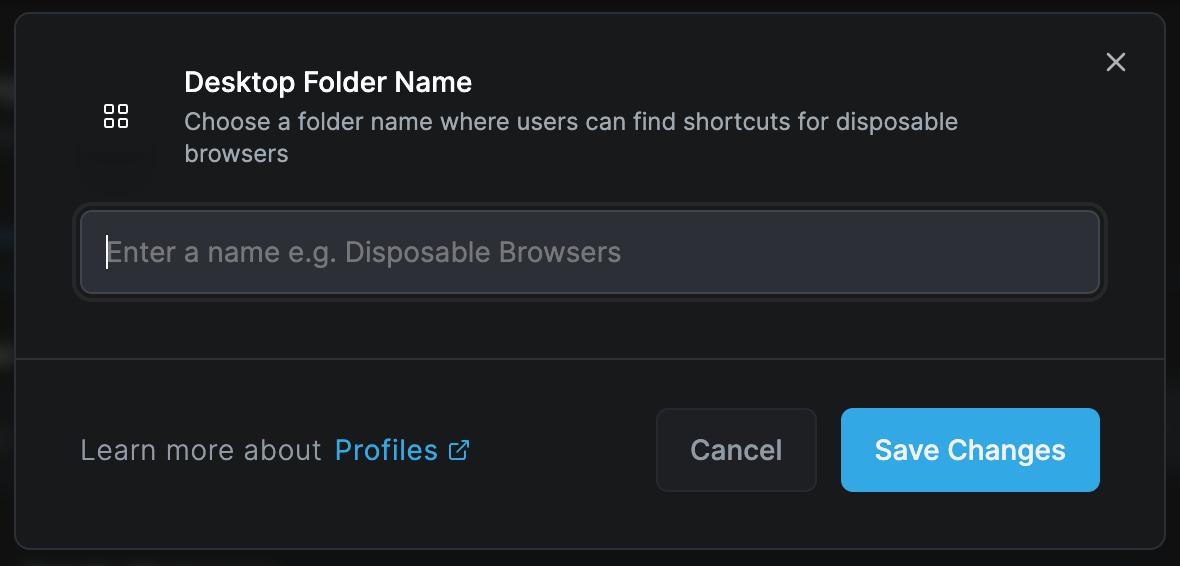
Choose a folder name where users can find shortcuts for disposable browsers. This creates easy access points for users to launch secure, temporary browsing sessions.
Setup Options:
- Desktop shortcut creation
- Start menu integration
- Quick launch toolbar
- Custom folder locations
- Icon customization
Key Features
Session Isolation
Each disposable browser session operates in complete isolation:
Complete Separation
- No data sharing between sessions
- Independent process space
- Isolated network stack
- Separate memory allocation
- Unique session identifiers
Fresh Start
- No cookies from previous sessions
- Empty cache
- No stored passwords
- Clean browsing history
- Default browser settings
Automatic Data Destruction
When a disposable browser session ends, all associated data is immediately and permanently destroyed:
Data Wiped:
- Browsing history
- Download history
- Cookies and site data
- Cache and temporary files
- Form data and autofill
- Passwords and credentials
- Local storage
- Session storage
- IndexedDB data
- WebSQL data
Security Benefits
Protection Against:
- Persistent tracking cookies
- Browser fingerprinting
- Cross-site tracking
- Session hijacking
- Data leakage
- Malware persistence
- Cache poisoning
- History sniffing
Use Cases
High-Security Browsing
Banking and Financial Services
- Online banking sessions
- Investment platforms
- Cryptocurrency transactions
- Payment processing
- Financial report viewing
Healthcare Access
- Patient portal logins
- Medical record access
- Telehealth consultations
- Insurance claims
- Prescription management
Research and Intelligence
Competitive Intelligence
- Competitor website analysis
- Market research
- Price comparisons
- Product evaluations
- Industry monitoring
Security Research
- Malware analysis
- Threat investigation
- Vulnerability testing
- Suspicious link verification
- Phishing site analysis
Temporary Access
Guest Users
- Visitor internet access
- Conference attendee browsing
- Temporary employee access
- Contractor sessions
- Public terminal usage
Testing and Development
- Clean environment testing
- User experience validation
- Cross-browser compatibility
- A/B testing scenarios
- Bug reproduction
Configuration Options
Session Parameters
Duration Settings:
- Maximum session length
- Idle timeout periods
- Warning notifications
- Automatic closure rules
- Extension options
Resource Limits:
- Memory allocation
- CPU usage caps
- Bandwidth restrictions
- Storage quotas
- Process limits
Access Controls
URL Filtering:
- Whitelist specific sites
- Block categories
- Custom URL patterns
- Time-based access
- Geographic restrictions
Feature Restrictions:
- Disable downloads
- Block printing
- Prevent screenshots
- Disable developer tools
- Remove right-click menu
User Experience
Customization Options:
- Homepage settings
- Default search engine
- Language preferences
- Accessibility features
- Theme selection
Convenience Features:
- Bookmark presets
- Quick access links
- Password manager integration (session only)
- Form fill assistance
- Translation services
Implementation
Deployment Methods
Desktop Integration:
- Create desktop shortcuts
- Configure launch parameters
- Set icon appearance
- Define folder structure
- Establish naming conventions
Enterprise Deployment:
- Group Policy configuration
- SCCM package deployment
- Intune app deployment
- Script-based installation
- Virtual app streaming
Technical Architecture
Isolation Technology:
- Container-based isolation
- Virtual machine encapsulation
- Sandbox environments
- Process isolation
- Network segmentation
Resource Management:
- Dynamic allocation
- Automatic cleanup
- Memory optimization
- Cache management
- Process termination
Security Considerations
Data Protection
Encryption:
- TLS/SSL enforcement
- Encrypted memory
- Secure deletion
- Crypto-shredding
- Key destruction
Compliance:
- GDPR compliance
- HIPAA requirements
- PCI DSS standards
- SOC 2 compliance
- ISO 27001 alignment
Threat Mitigation
Attack Prevention:
- Zero-day protection
- Ransomware immunity
- Phishing protection
- Drive-by download prevention
- Script blocking
Forensic Resistance:
- No disk writes
- Memory-only operation
- Secure wipe protocols
- Anti-forensic measures
- Trace elimination
Best Practices
User Guidelines
- Always verify session start: Look for disposable browser indicators
- Never save passwords: Use password managers for permanent storage
- Download consciously: Files may not persist after session
- Complete transactions: Finish all work before closing
- Report issues: Alert IT to any unusual behavior
Administrator Guidelines
- Regular updates: Keep browser engine current
- Policy reviews: Assess and adjust restrictions
- User training: Educate on proper usage
- Monitor usage: Track adoption and patterns
- Incident response: Have procedures for security events
Advanced Features
Integration Options
Authentication:
- Single sign-on support
- Certificate-based auth
- Biometric authentication
- Hardware token support
- Temporary credentials
Monitoring:
- Session logging
- Activity recording
- Threat detection
- Anomaly alerts
- Compliance reporting
Customization
Profile Templates:
Public Access Template
- Maximum restrictions
- No downloads
- Limited site access
- Short session timeout
- Basic features only
Employee Template
- Moderate restrictions
- Controlled downloads
- Intranet access
- Extended sessions
- Productivity tools
Developer Template
- Minimal restrictions
- Dev tools enabled
- Local file access
- Long sessions
- Debug features
Troubleshooting
Common Issues
Session Won't Start
- Check available resources
- Verify user permissions
- Review policy settings
- Test network connectivity
- Validate license
Performance Problems
- Adjust resource limits
- Optimize container size
- Review network latency
- Check host performance
- Clear host cache
Access Denied
- Verify URL whitelist
- Check time restrictions
- Review user groups
- Validate certificates
- Test authentication
Diagnostics
Logging:
- Session start/end logs
- Error messages
- Performance metrics
- Security events
- User actions
Monitoring Tools:
- Resource usage graphs
- Session count tracking
- Error rate monitoring
- Performance dashboards
- Security alerts
Disposable Browser is perfect for high-risk browsing scenarios where data persistence could pose a security threat. Remember that all data is lost when the session ends, so save any needed information externally before closing.
Maintenance
Regular Tasks
- Update browser components
- Review security policies
- Clean temporary storage
- Monitor resource usage
- Audit access logs
Performance Optimization
- Adjust container sizing
- Optimize memory allocation
- Tune network settings
- Review caching policies
- Update hardware resources
Related Features
- Enterprise Browser - Persistent managed browsing
- Browser Extension - Lightweight protection
- Enterprise Workspace - Application isolation