

Architecture
Overview
Zero Trust Networking is one of Netzilo's Agentic Edge modules — the secure-connectivity layer that replaces the legacy VPN, alongside the Enterprise Browser, the Enterprise Workspace, and Netzilo's AI Detection & Response (AIDR) for AI agents. This page covers that networking module.
The Zero Trust Networking module is a collection of components responsible for handling peer-to-peer connections, tunneling, authentication, and network management (IPs, keys, ACLs, etc).
It uses other technologies like WireGuard®, [Pion ICE (WebRTC)], [Coturn], and software developed by Netzilo to make secure private networks deployment and management simple.
Netzilo relies on four components - Client application (or agent), Management, Signal and Relay services.
The combination of these elements ensures that direct point-to-point connections are established and only authenticated users (or machines) have access to the resources for which they are authorized.
A Peer is a machine or any device that is connected to the network. It can be a Linux server running in the cloud or on-premises, a personal laptop, mobile phone, or even a Raspberry PI.
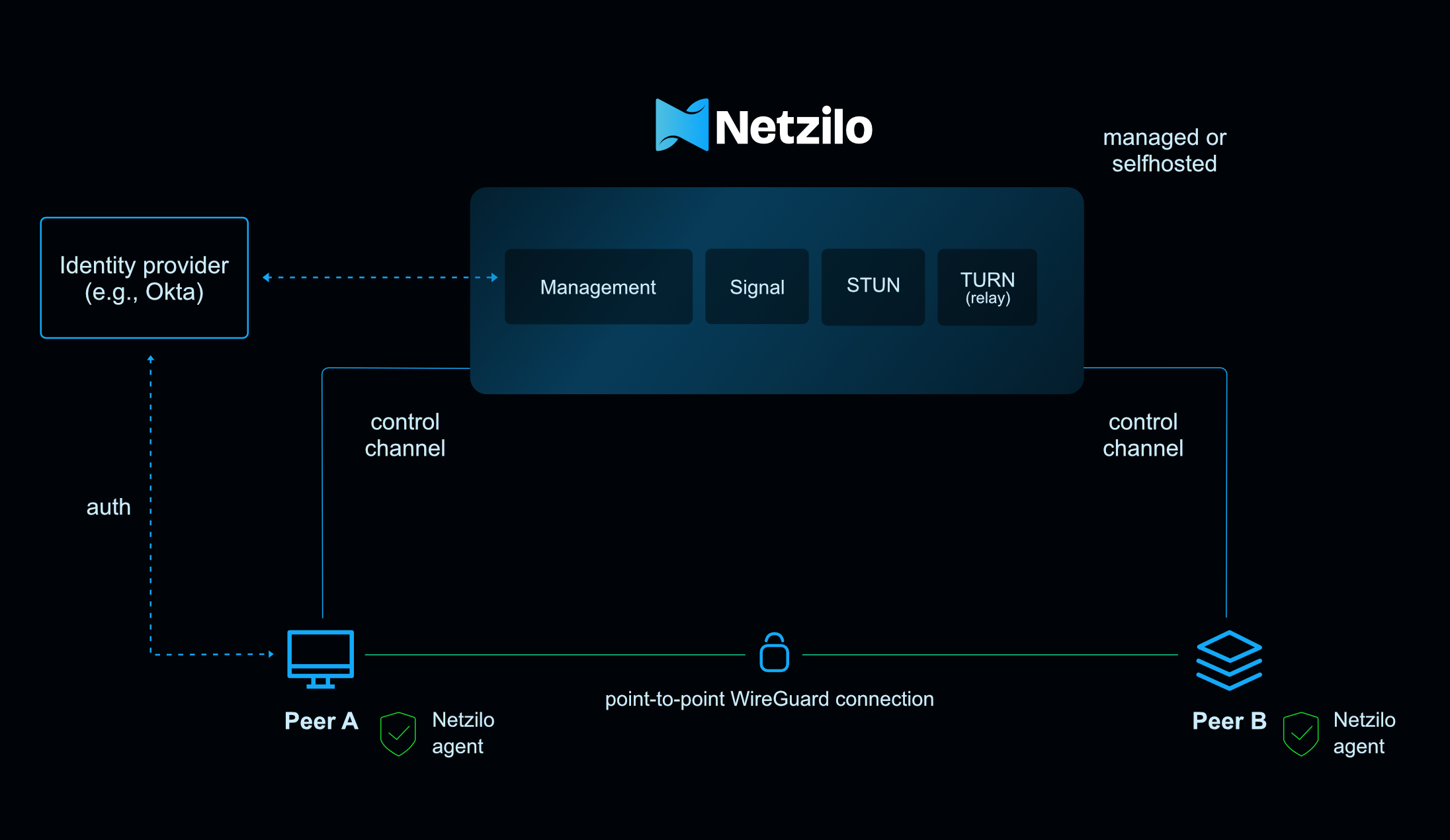
With Netzilo clients installed and authorized on the Management service, machines form a mesh network connecting to each other directly via an encrypted point-to-point WireGuard tunnel.
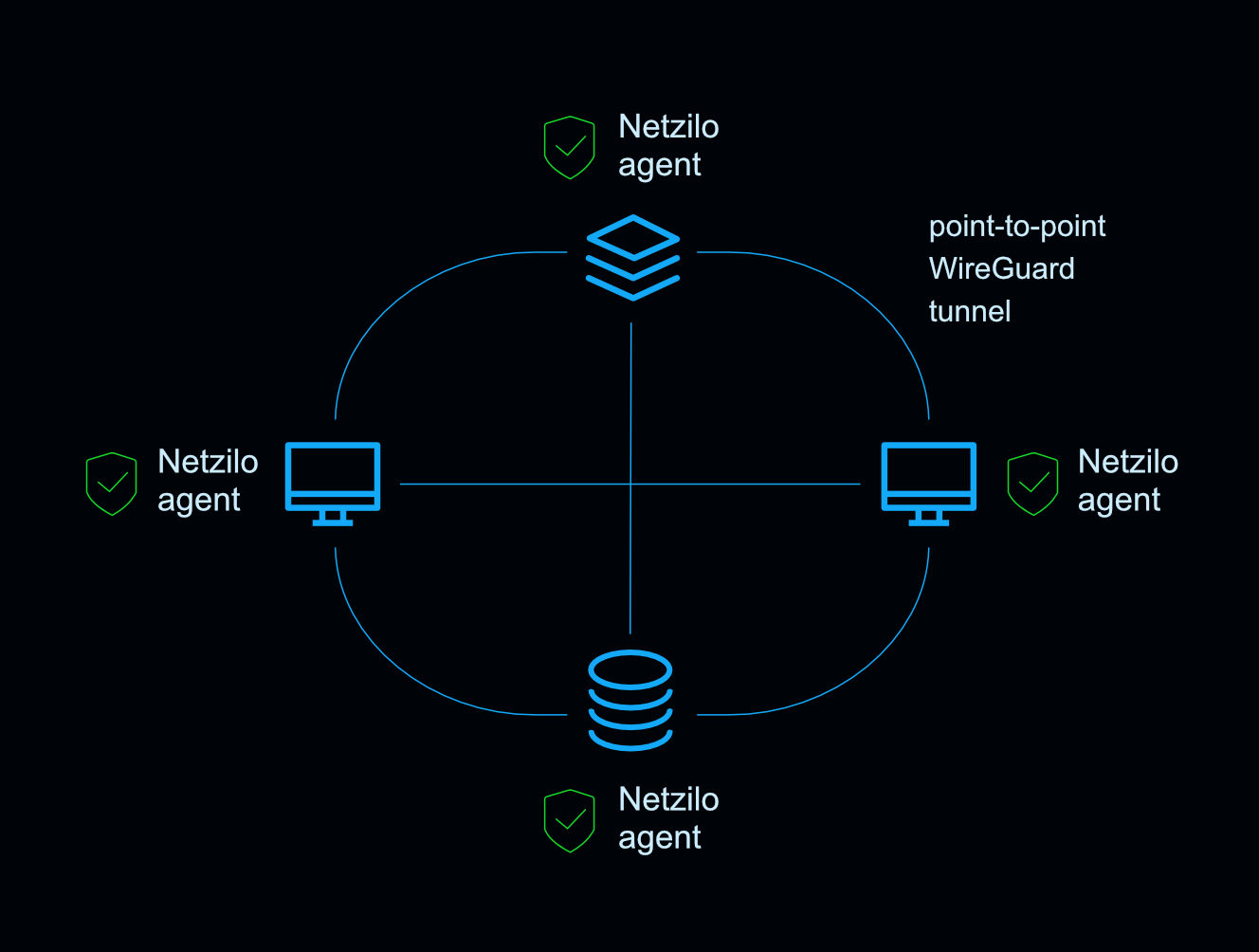
While it is possible to create a full mesh network, it might be not a desirable outcome. In this case, groups and access controls can be utilized to limit the access to certain machines.
Let's now take a closer look at each of Netzilo's components.
Management Service
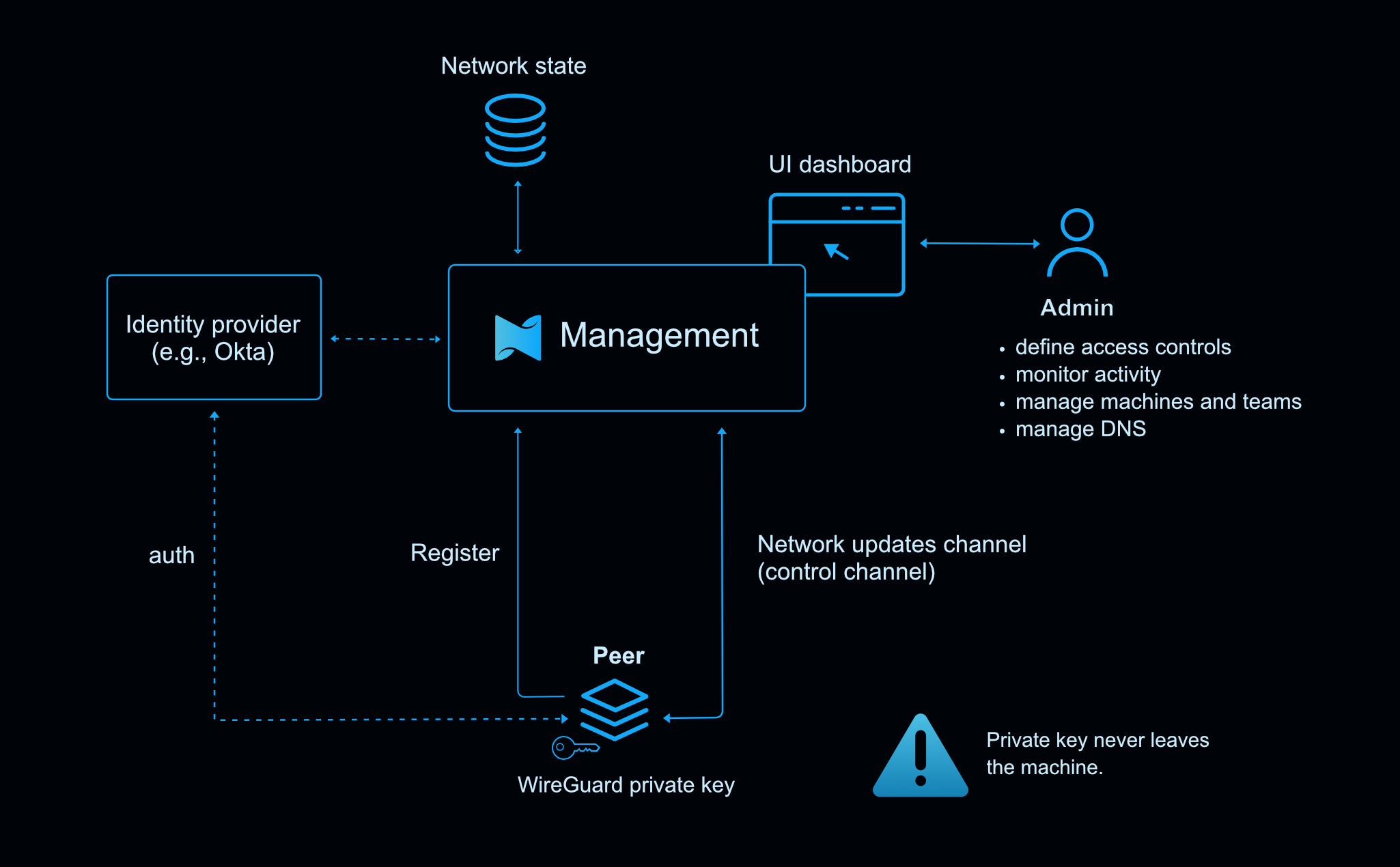
The Management service is the central coordination component for Netzilo with a UI dashboard. It keeps the network state, public WireGuard keys of the peers, authenticates and distributes network changes to peers.
The Management Service's responsibilities include:
- Registering and authenticating new peers. Every new machine has to register itself in the network in order to connect to other machines. After installation, Netzilo client requires login that can be done through Identity Provider (IDP) like Okta or with a setup key.
- Keeping the network map. The Management service stores information about all the registered peers including WireGuard public key that was sent during the registration process.
- Managing private IP addresses. Each peer receives a unique private IP with which it can be identified in the network. We use Carrier Grade NAT address space with an allocated address block 100.64.0.0/10.
- Synchronizing network changes to peers. The Management Service keeps a control channel open to each peer sending network updates. Whenever a new peer joins the network, all other peers that are authorized to connect to it receive an update. After that, they are able to establish a connection to the new peer.
- Creating and managing access control rules.
- Managing private DNS. DNS allows referring to each of the peers with a fully qualified domain name (FQDN).
- Logging network activity.
- Managing users.
The Management service runs in the cloud Netzilo-managed. It can also be self-hosted.
Client Application
The Netzilo Client application (or agent) is a software that is installed on your machines. It is an entry point to you private network that makes it possible for machines to communicate with each other. Once installed and registered, a machine becomes a peer in the network.
The Client's roles are the following:
- Generating private and public WireGuard keys. These keys are used for packet encryption between peers and for WireGuard Cryptokey Routing. To accept the incoming connections, peers have to know each other, therefore, the generated public keys have to be pre-shared on the machines. The client application sends its public key to the Management service which then distributes it to the authorized peers.
- Handling peer registration and authentication. Each peer has to be authenticated and registered in the system. The client application requests a user to log in with an Identity Provider (IDP) or a setup key so that the peer can be associated with the organization's account.
- Receiving network updates from the Management service. Each peer receives initial configuration and a list of peers with corresponding public keys and IP addresses so that it can establish a point-to-point connection.
- Establishing point-to-point WireGuard connection. To establish a connection with a remote peer, the Client first discovers the most suitable connection candidate, or simply address (IP:port) that other peer can use to connect to it. Then sends it to the remote peer via Signal. This message is encrypted with the peer's private key and a public key of the remote peer. The remote peer does the same and once the peers can reach each other, they establish an encrypted WireGuard tunnel.
- Applying access control policies. The client application applies access control rules that are received from the Management service.
It uses system's available firewall manager like
nftablesto apply the rules. - Applying DNS settings. The client application runs an embedded DNS resolver and ensures that the machine can resolve other peers' FQDNs in the
netzilo.networknamespaces. It also applies other DNS settings that are received from the Management service.
The private key, generated by the Client, never leaves the machine, ensuring that only the machine that owns the key can decrypt traffic addressed to it.
Signal Service
The Signal Service or simply Signal is a lightweight piece of software that helps peers to negotiate direct connections. It does not store any data and no traffic passes through it.
The only Signal's responsibility is:
- Serve as a notification mechanism for peers. Before a connection can be established, peers need to find each other and exchange the most suitable connection candidates. This is done through Signal. After a connection has been established, Signal steps out.
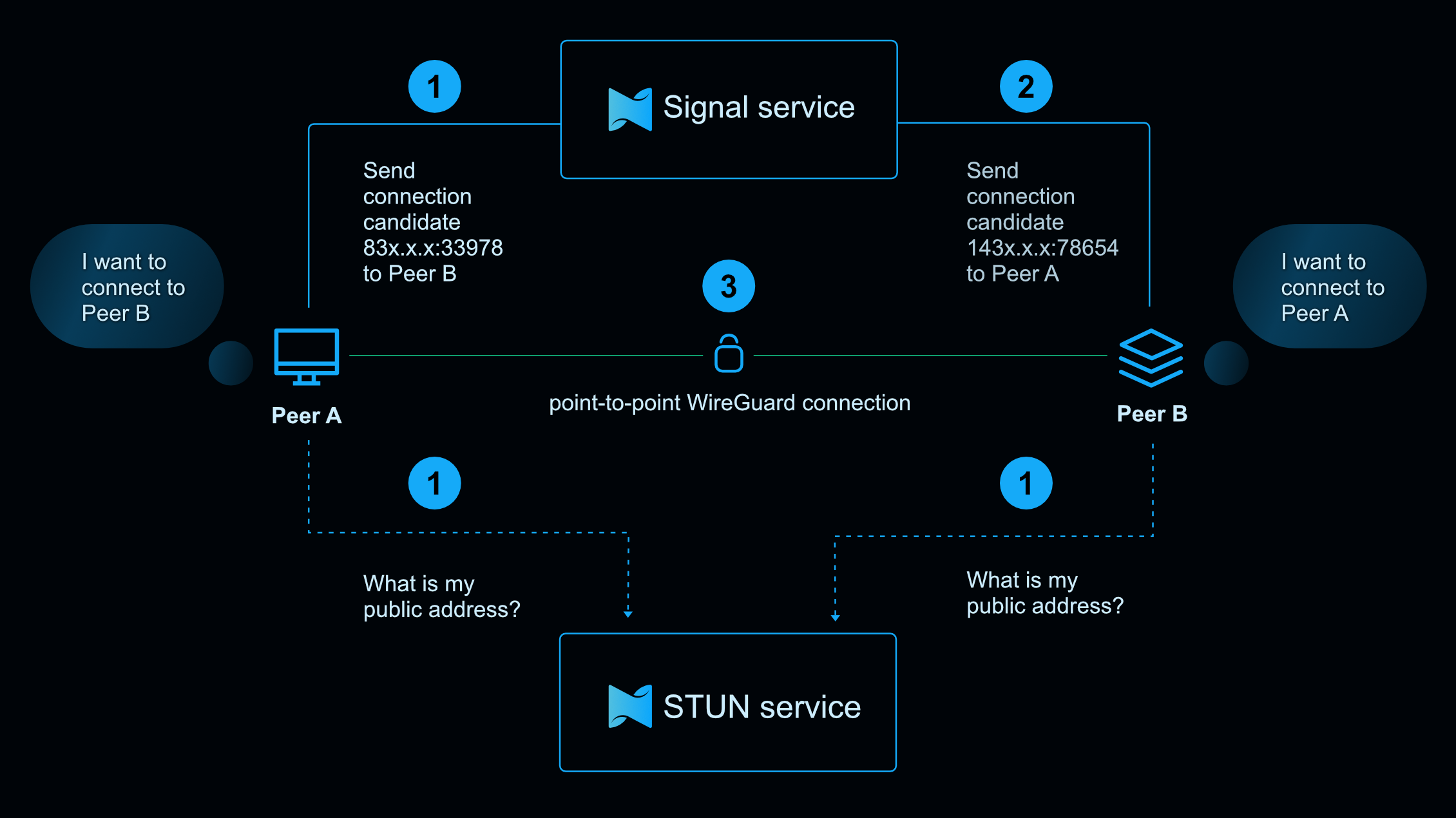
Messages that are sent over Signal are point-to-point encrypted, so Signal can't see the contents.
Netzilo Signal is very similar to the signaling servers used in WebRTC. It runs in the cloud Netzilo-managed and can be self-hosted.
Relay Service
The Relay service is a TURN server in WebRTC terminology. The purpose of this service is to be a "plan B" and relay traffic between peers in case a point-to-point connection isn't possible.
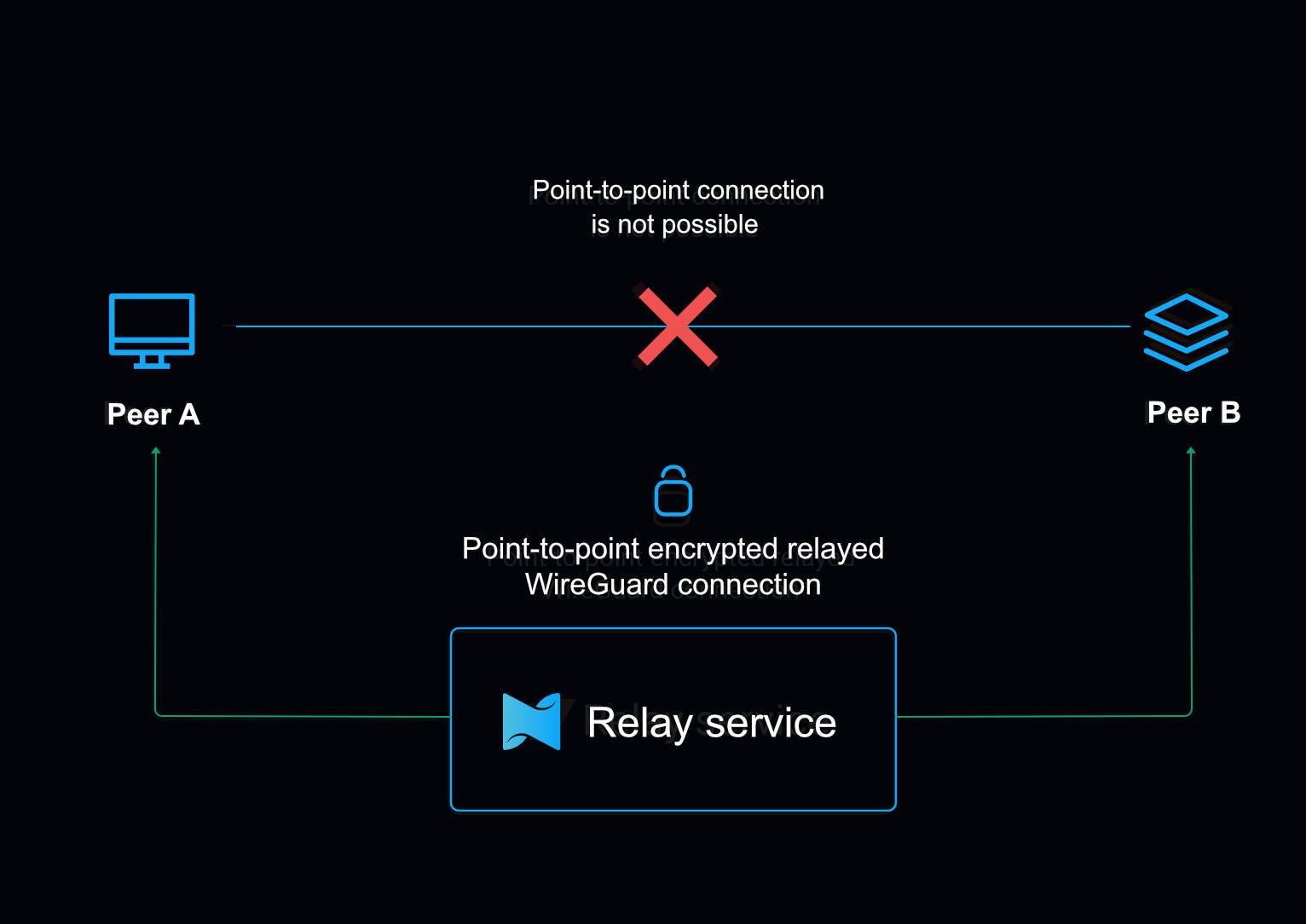
Similar to Signal, traffic that flows through the Relay can't be decrypted due to the WireGuard point-to-point encryption.
It runs in the cloud or can be self-hosted.