

AI Gateway
The Netzilo AI Gateway sits between your agents and the LLM providers and MCP servers your organization allows. Agents and tools such as Claude Code, Cursor, Codex, an OpenAI or Anthropic SDK, or a CI script call the gateway instead of the provider, with the user's Netzilo token as the API key. The gateway identifies every caller as a Netzilo user, applies that user's gateway filters, and forwards the request with the provider key it holds. Provider keys never leave the gateway host.
The gateway is the second place Netzilo governs AI traffic. The first is the Netzilo client on a device, see AI Detection & Response. Use both on developer workstations, and the gateway alone for servers, CI jobs and devices you do not manage.
You run the gateway yourself, on Netzilo Cloud and on a self-hosted Netzilo Server. It is an ordinary peer of your account. You configure it only in the dashboard: Edge > Providers, Edge > MCP, Edge > Guardrails, Edge > Limits and Edge > Filters. Users find it in the Workplace under Agentic Access.
The binary is netzilo-aigw for Linux (amd64), macOS (Intel and Apple silicon) and
Windows (amd64), and the container image is ghcr.io/netzilo/net-aigateway. There is no
Linux arm64 build today.
How it works
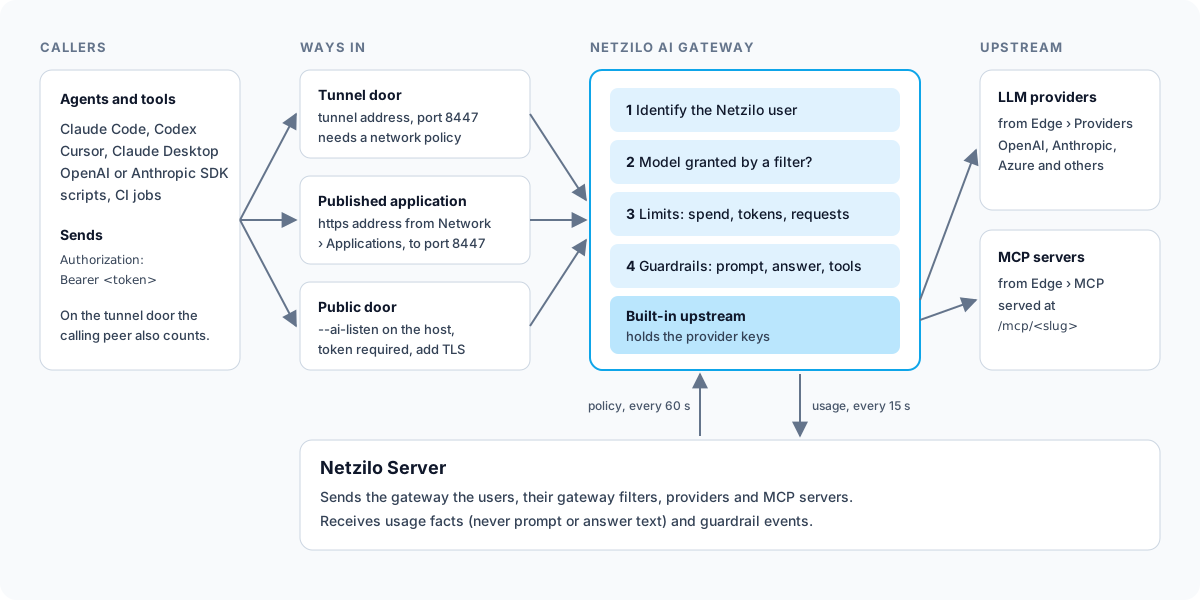
For every request the gateway does the following, in this order:
- Identify the user. The caller sends
Authorization: Bearer <token>. On the tunnel door the calling peer also identifies the user. A caller the gateway cannot identify on the public door is refused with HTTP 401. - Check the model. One of the user's gateway filters must grant the model. A bare model
name goes to the granted provider that serves it;
provider/modelmust be granted for that provider. Without a grant the request is refused with HTTP 403. - Apply limits. Spend, token and request quotas from the user's filters. When several filters apply, the lowest value of each kind wins. An exhausted limit answers HTTP 429 or 402.
- Run guardrails. The guardrails bound by the user's filters run on the prompt, on the answer, on each tool call the model asks for, and on each MCP tool call and its result. A guardrail can block, redact, or send the prompt to another model.
- Record usage. One record per model request and per MCP tool call: who, which model, tokens, cost, latency and status. Never the prompt, the answer, the arguments or the results.
The gateway keeps each user's filters for 60 seconds and re-checks everyone when a policy changes. Inside a request, an internal error lets the request through; the identity check at the door is never relaxed.
API surfaces
Point each client at the path it expects. <gateway> is the address users reach, for
example https://aigw.apps.example.com.
| Path | Used by | Model grant and guardrails | Limits | Usage recorded |
|---|---|---|---|---|
<gateway>/v1/chat/completions | OpenAI SDKs, Cursor, LangChain, curl | yes | yes | yes |
<gateway>/v1/responses | OpenAI Responses API, Codex | yes | yes | yes |
<gateway>/anthropic/v1/messages | Claude Code, Claude Desktop, Anthropic SDK | yes | yes | yes |
<gateway>/v1/embeddings, <gateway>/v1/completions | embedding and legacy completion calls | no, recorded only | yes | yes |
<gateway>/mcp/<slug> | MCP clients | yes, on tool calls and results | yes | yes |
<gateway>/v1/models | any client | lists the models the user may use | - | no |
Streamed answers are released about 1 KB behind the model, so that a redaction applies before the text is shown. Users see a short delay on long answers. A block ends the stream.
Before you start
- A setup key for the gateway's own peer, see
Setup Keys. Its auto-group decides which
group the gateway peer joins, for example
AI-gateways. - A service token. Create a service user under Team > Agents with the role Admin, then create an access token for it, see Agents. The service token binds callers to your account and loads filters, providers and MCP servers. Without it the gateway refuses every chat request.
- At least one provider under Edge > Providers, see Providers.
- A gateway filter under Edge > Filters with Filter Type set to Gateway: the users' groups, at least one model on the Models tab, and the gateway's address on the Gateways tab, see Filters.
- Outbound access from the host: TCP 443 to the Netzilo Server, and HTTPS to the providers and MCP servers you define.
Step 1: Install the gateway
The Add Peer dialog under Endpoint > Peers shows the same commands on the Gateway tab of the Linux, macOS and Windows tabs.
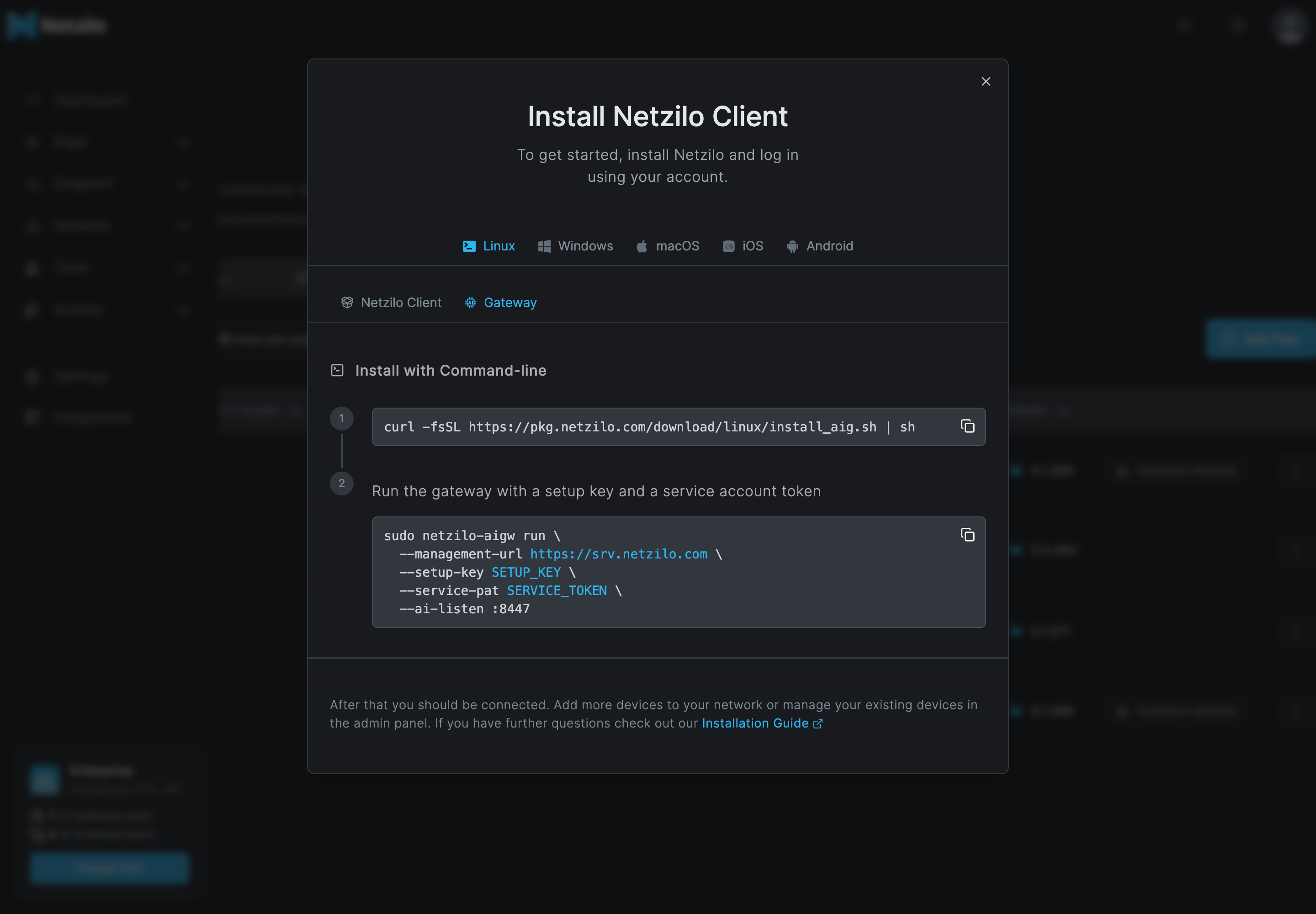
Linux and macOS
curl -fsSL https://pkg.netzilo.com/download/linux/install_aig.sh | sh
On macOS use the same script from https://pkg.netzilo.com/download/macos/install_aig.sh.
The script installs netzilo-aigw into /usr/local/bin and stops if the binary does not
run on the machine.
On Linux with systemd, the script also writes the service unit
/etc/systemd/system/netzilo-aigw.service and the settings file
/etc/netzilo-aigw/aigw.env. The unit is written but not enabled. Edit the settings
file, then start the service:
sudo editor /etc/netzilo-aigw/aigw.env
sudo systemctl enable --now netzilo-aigw
sudo systemctl status netzilo-aigw --no-pager
The settings file holds every flag on one AIG_ARGS line, and the secrets in their own
variables:
AIG_ARGS=--management-url https://srv.netzilo.com --workplace-url https://go.netzilo.com --listen :8443 --insecure-plain-http --ai-listen :8447 --ai-insecure-plain-http
NZ_GATEWAY_SETUP_KEY=<SETUP-KEY>
NZ_GATEWAY_SERVICE_PAT=<SERVICE-TOKEN>
One flag per line is not supported. A later install never overwrites this file.
To try the gateway in the foreground first, use the service's data directory so that the service later keeps the same peer:
sudo netzilo-aigw run \
  --data-dir /var/lib/netzilo-aigw \
  --management-url https://srv.netzilo.com \
  --workplace-url https://go.netzilo.com \
  --setup-key <SETUP-KEY> --service-pat <SERVICE-TOKEN> \
  --listen :8443 --insecure-plain-http \
  --ai-listen :8447 --ai-insecure-plain-http
Never run the foreground process and the service at the same time with the same data directory.
Windows
Run in PowerShell:
irm https://pkg.netzilo.com/download/windows/install_aig.ps1 | iex
The script installs netzilo-aigw.exe into %ProgramFiles%\Netzilo AI Gateway (as
administrator) or %LOCALAPPDATA%\Programs\Netzilo AI Gateway, and adds the folder to the
PATH. It creates no Windows service. To keep the gateway running, use a service wrapper
or a scheduled task of your own.
Container
docker run -d --name netzilo-aigw --restart unless-stopped \
  -p 8447:8447 -v netzilo-aigw:/var/lib/netzilo-gateway \
  -e NZ_GATEWAY_SETUP_KEY=<SETUP-KEY> -e NZ_GATEWAY_SERVICE_PAT=<SERVICE-TOKEN> \
  ghcr.io/netzilo/net-aigateway:latest run \
  --management-url https://srv.netzilo.com --workplace-url https://go.netzilo.com \
  --name aigw1 --listen 127.0.0.1:8443 --ai-listen :8447 --ai-insecure-plain-http
The image is linux/amd64, runs as a non-root user and needs no TUN device and no extra
capabilities. Keep the volume: it holds the peer key.
Self-hosted Netzilo Server
Replace both addresses with your own domain: --management-url https://<your domain> and
--workplace-url https://<your domain>. See
Install on your own server.
Flag reference
Secrets can come from the environment instead of flags: NZ_GATEWAY_SETUP_KEY,
NZ_GATEWAY_PAT and NZ_GATEWAY_SERVICE_PAT.
| Flag | Default | What it does |
|---|---|---|
--management-url | required | https://srv.netzilo.com on Netzilo Cloud, https://<your domain> self-hosted. Scheme and host only |
--workplace-url | the management URL | The Workplace users sign in at. Set https://go.netzilo.com on Netzilo Cloud |
--setup-key or --pat | Credential for the gateway's own peer. Give one, never both | |
--service-pat | Service token that binds callers to your account and loads policy | |
--name | host name | The gateway peer's name in Endpoint > Peers and in usage reports |
--data-dir | /var/lib/netzilo-gateway (Linux) | Peer key, applied state and the usage outbox |
--ai-tunnel-port | 8447 | Tunnel door on the peer's tunnel address. 0 turns it off |
--ai-listen | off | Public door, for example :8447 |
--tls-cert, --tls-key | Certificate and key for HTTPS on the listeners. Give both | |
--tls-cert-dir, --tls-domain | Take the certificate for a domain from a Caddy storage directory | |
--ai-trusted-proxies | CIDRs of a TLS-terminating proxy in front of --ai-listen | |
--ai-insecure-plain-http | off | Silence the warning about a plain-HTTP public door |
--ai-allow-unattributed | off | On the public door, pass requests from unknown callers through ungoverned instead of 401 |
--ai-policy-refresh | 60s | How long a user's filters are trusted before the gateway asks again |
--listen | :8443 | The browser-access proxy used by clientless access. It is always on: bind it to 127.0.0.1:8443 when you only need the AI Gateway |
--admin-listen | 127.0.0.1:9090 | Health endpoints /healthz and /readyz |
--log-level | info | Log verbosity |
Step 2: Make the gateway reachable
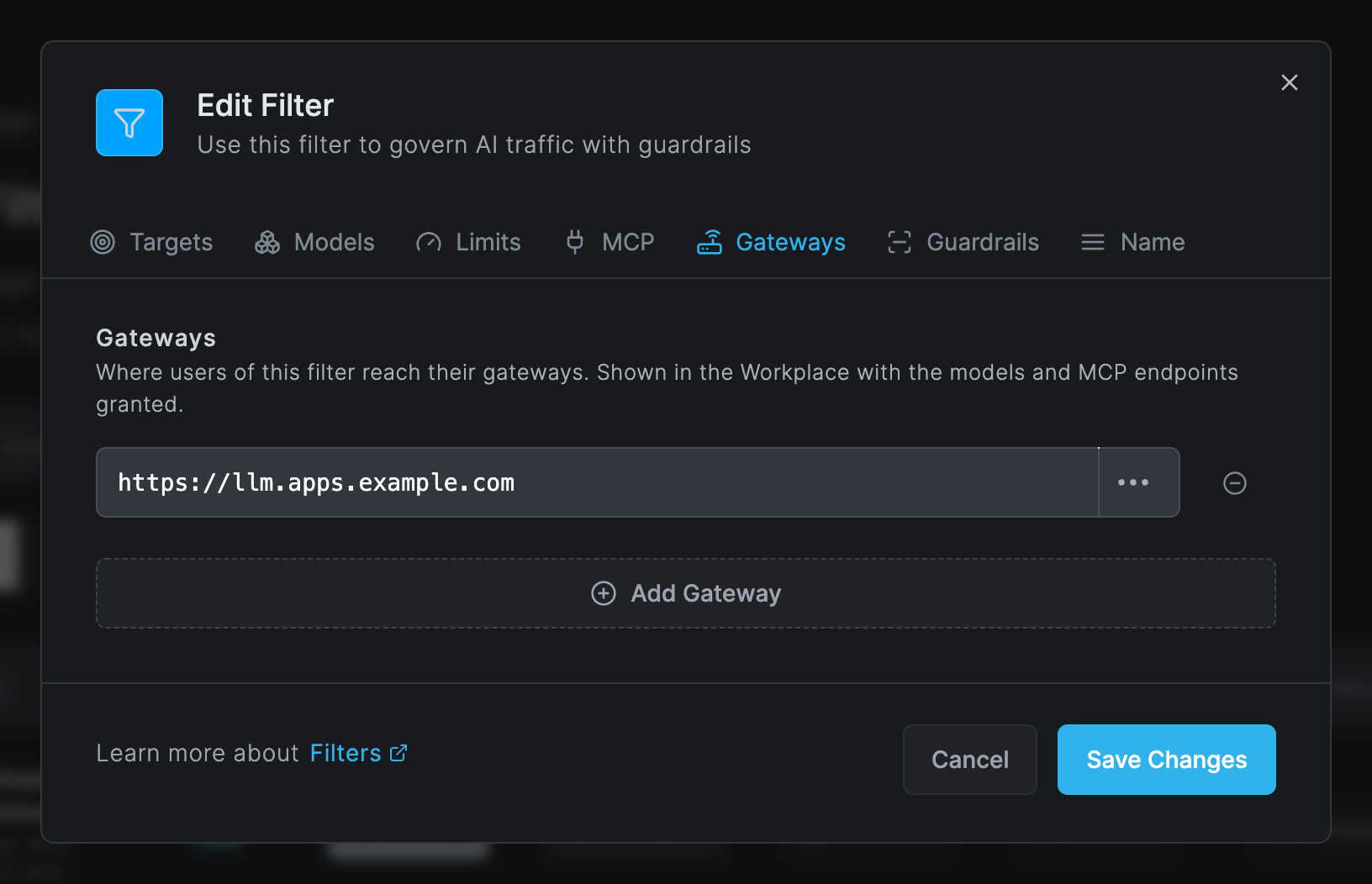
Choose one or more ways in. Then put the address users should use on the Gateways tab of the gateway filter, so that the Workplace shows it.
Inside the network (tunnel door)
Devices with the Netzilo client reach the gateway at
http://<gateway-name>.netzilo.network:8447, or at the gateway peer's 100.x address. No
certificate is needed: the traffic is inside the encrypted tunnel. The caller is
identified by its peer, so a request without a token is still attributed to the device's
user.
The users' devices need a network policy to the gateway peer on TCP port 8447. The Default policy (All to All) covers it. In a hardened account, add a policy under Network > Policies from the users' groups to the gateway's group on TCP 8447, see Policies. Keep the gateway reachable only from groups that should use it: a request from a peer the gateway cannot map to a user passes ungoverned.
From anywhere (published application)
This is the recommended public exposure. No public door and no certificate are needed on the gateway host.
-
Go to Network > Applications and click Add Application, see Applications.
-
Fill in the dialog:
Field What to enter Address aigwunder one of your application domains, for exampleaigw.apps.example.comTarget http://<gateway-name>.netzilo.network:8447. The port is required: without it the proxy dials port 80 and answers 502Groups The groups of the users who call the gateway Forward the user's credential On Send the address as Host header Off -
Users call
https://aigw.apps.example.com/v1/chat/completionswithAuthorization: Bearer <token>. The reverse proxy admits the token and forwards the request to the gateway through the user's own tunnel.
The published address also serves the sign-in used by MCP connectors and by Claude Desktop, so both work without a public door.
Public door
Start the gateway with --ai-listen :8447 on a host with a public address and open port
8447 in the firewall. Every caller must send a bearer token; the public door never
identifies callers by address. Give the door a certificate with --tls-cert and
--tls-key, or put a TLS proxy in front of it and list the proxy in
--ai-trusted-proxies. Without TLS the user's token travels in clear text.
Step 3: Connect agents and tools
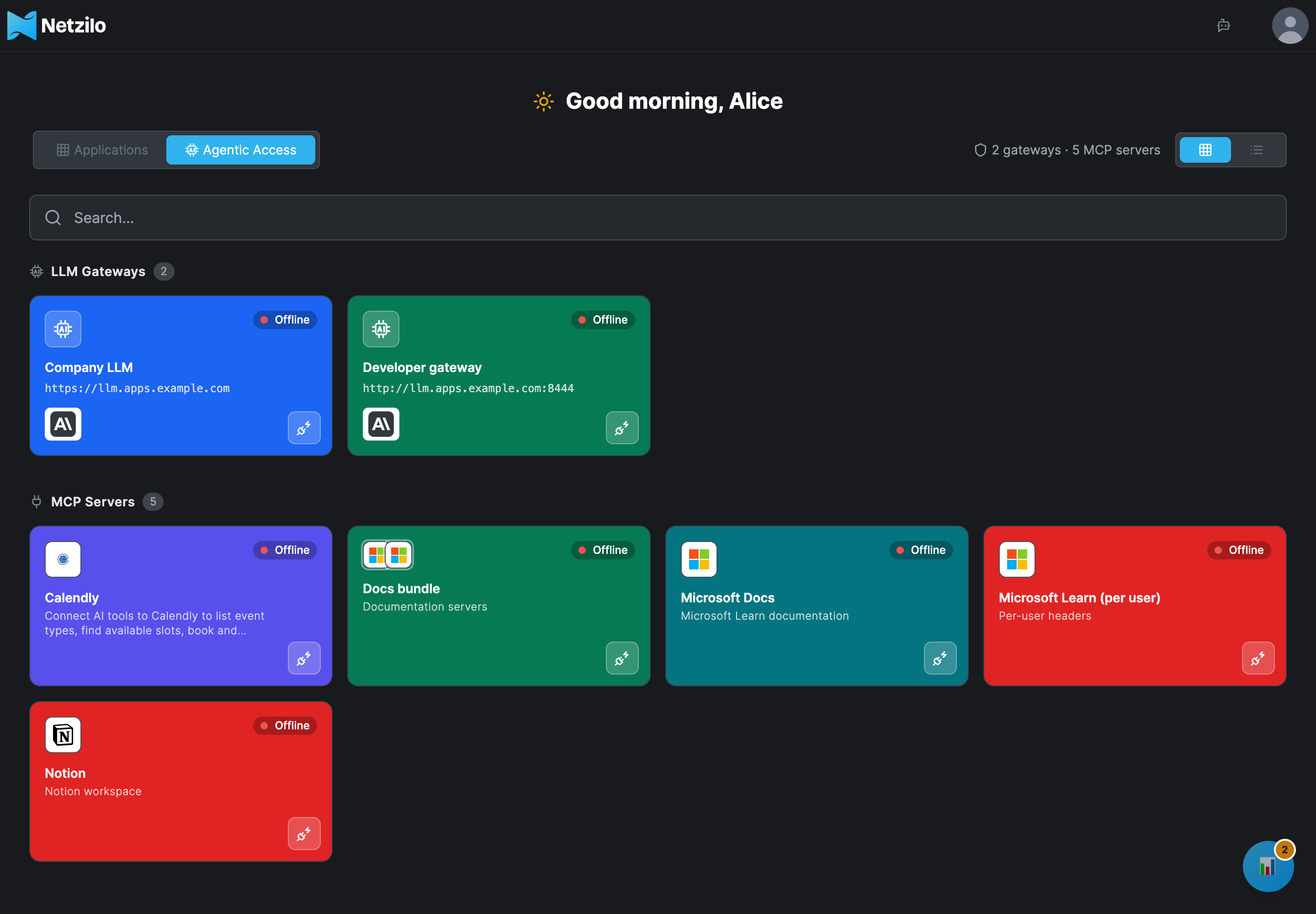
Users find their gateways, models, MCP servers and connection snippets in the Workplace under Agentic Access, and create their token there with Create Access Token. See Agentic Access.
Every client sends the token as a bearer token:
| Header | Accepted values |
|---|---|
Authorization: Bearer <token> | A user's personal access token (nzl_…), the Workplace's AI Gateway token, or a token the client got by signing in at the gateway |
Use the token as a bearer token. With the Anthropic SDK pass it as auth_token, not
api_key. A token of another Netzilo account is refused.
| Client | Base address |
|---|---|
| OpenAI-compatible clients (Python, Node.js, Cursor, LangChain) | <gateway>/v1 |
Claude Code (ANTHROPIC_BASE_URL), Anthropic SDK | <gateway>/anthropic |
| curl | <gateway>/v1/chat/completions |
| MCP clients | <gateway>/mcp/<slug> |
Check that a user's token works:
curl https://aigw.apps.example.com/v1/models -H "Authorization: Bearer <token>"
The answer lists the models the user's filters grant.
Claude Desktop: Sign in with your organization
Claude Desktop can sign in at the gateway with the user's Netzilo account, without a token to paste.
- In Claude Desktop, set the gateway endpoint to exactly
<gateway>/anthropic, for examplehttps://aigw.apps.example.com/anthropic. - Choose Sign in with your organization.
- Claude shows a code of the form
XXXX-XXXXand opens the approval page in the browser. - Sign in to the Workplace if asked. Check that the code on the page matches the code in Claude, then click Allow. The page says that access is allowed; nothing redirects.
- Claude collects its token within a few seconds.
The token Claude receives is the user's own access token named Claude (MCP), valid for
one day and renewed automatically for up to 30 days. Users see it under
Profile Settings and can revoke it there; Claude then has to
sign in again.
Only <gateway>/anthropic serves this sign-in. With <gateway>/v1 or <gateway>/openai
Claude reports gateway SSO discovery failed: 401. With the bare <gateway> address the
sign-in works but requests fail with HTTP 405.
What users see when a request is refused
Refusals, in the order a caller can meet them:
| HTTP status | Message | Cause and fix |
|---|---|---|
| 401 | a Netzilo credential is required | No token, a malformed or expired token, or a token of another account, on the public door or a published address |
| 503 | management is not reachable, try again | The gateway could not ask the Netzilo Server who the token belongs to. Retry |
| 404 | not served by the AI gateway | A path the gateway never forwards |
| 405 | Method Not Allowed on POST /v1/messages | The Anthropic API is served under /anthropic: set the client's base address to <gateway>/anthropic |
| 502 | the AI gateway upstream is not reachable | The gateway's built-in upstream is down. Read the gateway log |
| 403 | no model is granted to this user or model <m> is not granted to this user | No gateway filter grants that model to the user. Grant it under Edge > Filters |
| 403 | the guardrail's reason, default blocked by Netzilo policy | A guardrail blocked the prompt, the answer, a tool call or an MCP call. The event in Activity names the rule |
| 429 or 402 | budget_exceeded, rate_limited, token_limited or request_limited | A limit from the user's filters is used up for its window, see Limits |
| MCP tool answer | Connect <server> in your Workplace before using its tools | The MCP server needs the user's own sign-in. The user connects it under Agentic Access |
Policy refusals have the type netzilo_policy. A fallback provider is never used to get
around a refusal.
What the gateway sends to the Netzilo Server
- Usage facts, every 15 seconds: per model request the user, gateway, provider, model asked for and model served, tokens, cost in US dollars, latency and status; per MCP tool call the server, tool, status, latency and the sizes of arguments and results. No prompt, answer, argument or result text. Records survive an outage or a restart on disk and are never counted twice.
- Guardrail events, like a device does: when a rule matches, the event carries the rule name and the content that matched.
Usage appears at once in the AI Usage report and in Dashboard > Agentic Activity after its hourly refresh. Guardrail verdicts appear in Activity > Events under the category AI Edge, see Events.
Operate the gateway
The gateway peer. It appears under Endpoint > Peers with its --name, version and
connection state, in the groups of its setup key. If the peer is deleted, the process exits
so that the service manager restarts it, and it registers as a new peer: add its groups
again.
Health. curl http://127.0.0.1:9090/healthz answers ok. /readyz answers ready, or
503 with the reason, such as management unreachable.
Logs. On Linux: sudo journalctl -u netzilo-aigw -f. Lines worth knowing:
| Log line | Meaning |
|---|---|
gateway: bound to an account with N users | The service token works |
gateway ai: listening on tunnel <ip>:8447 … | The tunnel door is open |
gateway ai: policy …: N user(s) cached, N filter(s) held, N rule(s) loaded, N failed | Filters and guardrails loaded. failed counts guardrails whose YAML did not parse |
gateway ai: refused <model> for <user>: <reason> | A model or limit refusal |
gateway ai: no --service-pat: … | The service token is missing: chat requests are refused |
gateway: no data dir: … | The data directory is not writable: every restart registers a new peer |
Upgrade. Run the install script again, or pull a newer image tag. The script stops and
starts a running service around the copy. The data directory keeps the peer key, so the
gateway returns as the same peer. netzilo-aigw --version prints the installed version.
Rotate the service token. Create a new token for the service user, put it in
/etc/netzilo-aigw/aigw.env, restart the service, then revoke the old token. Users' spend
counters survive the restart.
Troubleshooting
The service exits at once with a service PAT is required or give either a setup key or a PAT
Set NZ_GATEWAY_SERVICE_PAT, and exactly one of the setup key or the PAT for the gateway
peer, in /etc/netzilo-aigw/aigw.env.
The Workplace shows the gateway offline although curl works
The browser's check is refused for its origin: --workplace-url is missing or wrong. On
Netzilo Cloud set --workplace-url https://go.netzilo.com and restart. The card recovers at
its next check, within 30 seconds.
A valid token gets 401 a Netzilo credential is required
The token belongs to another account, has expired, or was pasted with a space. Create a new
token and try GET /v1/models again.
Every request gets 403 no model is granted to this user
The user is in no group that a gateway filter targets, the filter grants no model, the filter is disabled, or its type is Endpoint. Fix the filter under Edge > Filters.
A published address answers 502 The application did not answer.
The target lacks :8447, the gateway is down, or the users' device groups have no policy
to the gateway peer. Fix the target or the policy.
A published address answers 404 There is no application at this address.
The application is disabled or not published yet. The proxy refreshes its list within 30 seconds.
Claude Desktop: gateway SSO discovery failed: 401 or Gateway returned HTTP 405
The endpoint in Claude is not exactly <gateway>/anthropic. Correct it and sign in again.
Claude Desktop: token_endpoint: must be same-origin or server does not advertise device_authorization_endpoint
The gateway, or the reverse proxy in front of a published address, is older than the organization sign-in. Upgrade it.
The approval page says "That code was not found or has expired."
The code was mistyped, or more than 10 minutes passed since Claude showed it. Retype it, or start the sign-in again in Claude.
Claude keeps waiting after Allow
Claude checks every 5 seconds and must collect its token within 5 minutes of Allow. After a Netzilo Server restart, or with several management replicas without session affinity, the pending sign-in is lost: sign in again.
Usage never appears in the dashboard
Look for gateway ai: usage: … kept, upload failed in the log: the gateway cannot reach the
Netzilo Server or its service token is refused. The dashboard panel refreshes hourly; the
AI Usage report reads the same data at once.
Every restart creates a new peer
The log shows gateway: no data dir. Make --data-dir writable for the service user.
Limits to know
- A limit applies per user per gateway. Two gateways in one account count separately, and there is no pool shared by a group. Changing a user's grants or limits restarts their counters.
- Embeddings and legacy completions are identified, limited and recorded, but guardrails do not run on them.
- A revoked token works for up to one minute at the gateway, which caches identities for that long.
- Sign-ins at the gateway live in one management process for 10 minutes. A self-hosted server with several management replicas needs session affinity.
- Windows has no service for the gateway, and there is no Linux arm64 build.
- The browser-access proxy on port 8443 is always on. Bind it to
127.0.0.1:8443when you do not use clientless access.
Related Documentation
- AI Detection & Response - Devices and the gateway, one rule language
- Providers - The models the gateway routes to
- MCP - MCP servers and bundles the gateway serves
- Limits - Spend, token and request quotas
- Filters - Gateway filters grant models, limits and MCP servers
- Guardrails - The rules the gateway applies
- Agentic Access - What users see and paste
- Applications - Publish the gateway at an HTTPS address
- AI Usage - Requests, tokens and cost per user and model