

Clientless-access gateway
The clientless-access gateway lets people reach internal web resources from a browser that
has only the Netzilo browser extension: no Netzilo client and no admin rights on the
device. On a self-hosted server it is the gateway container, an HTTPS proxy on port
8443. This page covers the server side: checking it, opening its port, adding it to an
older server, running it on another host, and its options.
How users get access, the profile's Proxy tab and what users see are on Clientless Access. On Netzilo Cloud the gateway is provided and there is nothing to install.
The gateway needs HTTPS. A server installed over plain HTTP, or by IP address without a certificate, gets no gateway. It also needs a management server and dashboard from a release with clientless access, see Before you start.
How it works
- A user signs in with Login in the extension's popup.
- The extension asks the management server how this browser should route, and installs a proxy configuration that sends only internal names and addresses to the gateway.
- The extension answers the gateway's login request with the user's sign-in token. The user sees no prompt.
- The gateway checks the token with management and starts a session for that user on
that browser: a virtual peer named
vp-<n>-PROXYin the user's account, with that user's groups and policies. Requests go through that session's tunnel, so the user reaches exactly what their policies allow. - After 60 minutes without traffic the session stops. The next request starts it again, which takes 10 to 20 seconds.
The gateway runs in shared mode: it has no peer of its own, and it talks to management
inside the compose stack. It serves the server's own certificate: Caddy's Let's Encrypt
certificate, read from the netzilo_caddy_data volume, or the files in certs/ when you
use your own certificate. Renewals are picked up within 30 seconds, without a restart.
The gateway is not the same as published applications,
which serve browsers with nothing installed through the reverse-proxy container on port
443.
Before you start
-
A release with clientless access. From any machine:
curl -sS -o /dev/null -w '%{http_code}\n' https://go.example.com/api/users/current/routing401means management supports clientless access.404means it is older: update management, then the dashboard, see Upgrade and add components. -
A certificate that browsers trust. A public certificate such as Let's Encrypt, or one from a company CA your browsers trust. A self-signed certificate does not work for browsers.
-
The Netzilo browser extension 5.0.455 or later on the users' browsers. Safari is not supported.
Step 1: Check the gateway
A server installed with a current installer, or a current AWS or Azure image, already runs
the gateway. Check it in the compose folder (/opt/netzilo, or /opt/netzilo/run on a
marketplace image):
cd /opt/netzilo
sudo grep -c '^  gateway:' docker-compose.yml
sudo docker compose logs --tail=50 gateway | grep 'gateway:'
0 means the server has no gateway yet: see
Add the gateway to an older server. Otherwise the log
shows:
gateway: version <v> starting in shared mode (management http://management:80, egress public)
gateway: TLS certificate loaded from ...
gateway: proxy listening on [::]:8443 (https)
From any machine, the gateway asks for a login, which proves it answers:
curl -sS -o /dev/null -w 'gateway %{http_code}\n' --proxy "https://go.example.com:8443" http://example.com/
The answer is 407.
Step 2: Open port 8443
Allow inbound TCP 8443 to the server from your users' networks. Docker publishes the port
itself, so a host firewall such as ufw does not filter it: the cloud security group or
network firewall is what counts.
Current AWS and Azure templates open 8443. Deployments created from older templates do not. Add the rule:
# AWS: the stack's security group
aws ec2 authorize-security-group-ingress --group-id <sg-id> --protocol tcp --port 8443 --cidr 0.0.0.0/0
# Azure: the deployment's network security group (pick a free priority)
az network nsg rule create -g <resource-group> --nsg-name <nsg> -n Allow-Gateway-8443 \
  --priority 1010 --direction Inbound --access Allow --protocol Tcp --destination-port-ranges 8443
Limit the source to your users' networks when you know them.
Step 3: Switch on clientless access
In the dashboard, go to Settings > Permissions and turn on Allow clientless access.
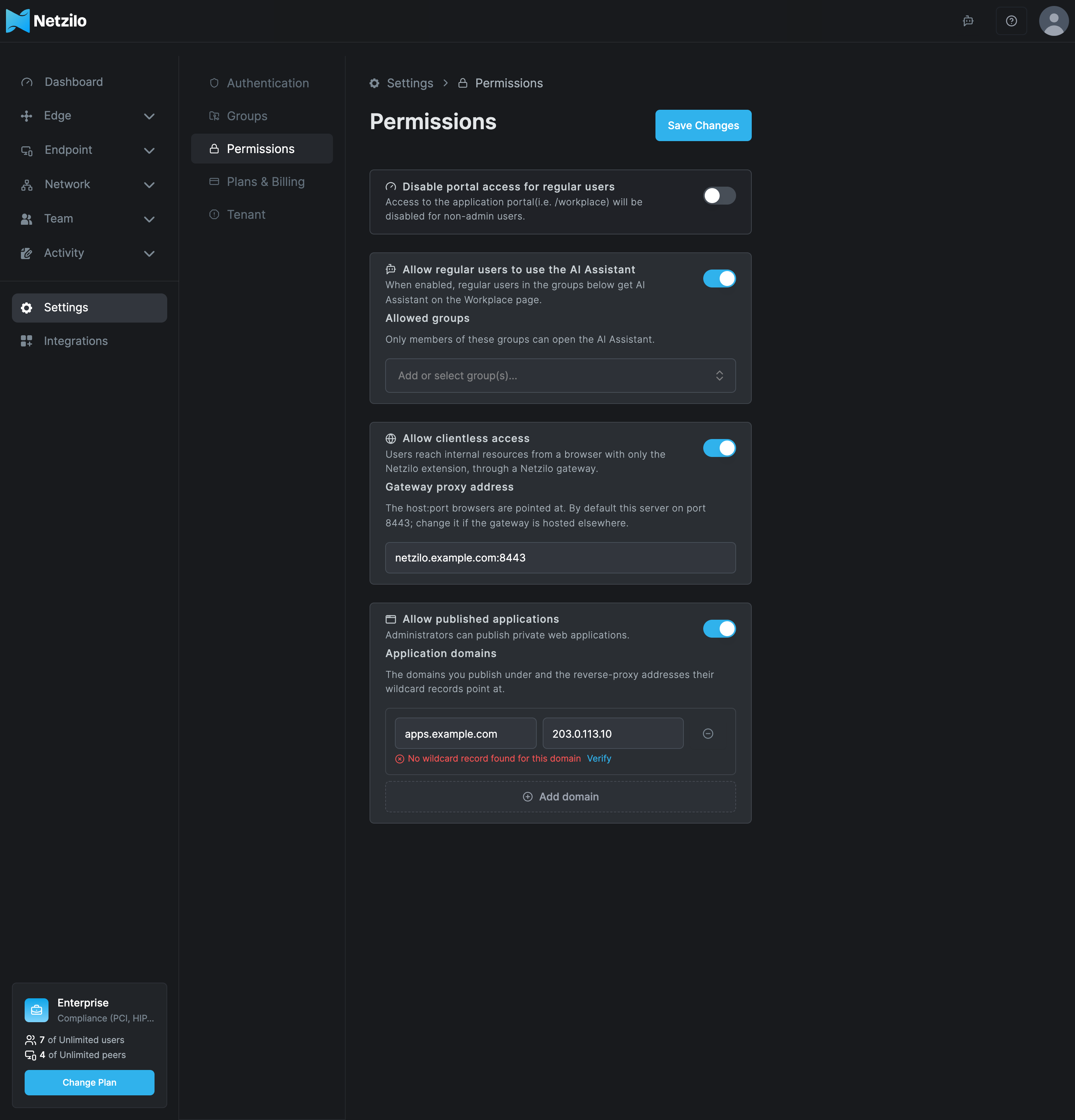
| Field | What to enter |
|---|---|
| Allow clientless access | On. Off means no browser gets automatic routing; browsers remove it within 5 minutes |
| Gateway proxy address | Leave empty when the gateway runs on the server itself: browsers then use the server's domain on port 8443. Set host:port only when the gateway runs on another host or port. It must match the gateway's certificate |
Then give users routing through a profile with the browser extension, as described in Clientless Access.
Add the gateway to an older server
Servers installed before the gateway existed run without it. Never re-run the installer to add it: that erases the server.
Servers installed with the one-line installer. If the published installer has the component commands (check as described in Upgrade and add components), one command adds the gateway, with a backup first:
curl -fsSL https://pkg.netzilo.com/download/install-netzilo.sh | sudo bash -s -- install gateway
It refuses a plain-HTTP server. Then run the checks in Gates, open port 8443 and switch clientless access on.
AWS and Azure images, or an installer without the component commands. Add the gateway in place with the procedure below. First take a backup (see Backup and restore) and check that the server has a certificate:
sudo grep -E '^(NETBIRD_DOMAIN|NETBIRD_HTTP_PROTOCOL|TLS_MODE)=' /opt/netzilo/netzilo-state.env
On a Let's Encrypt server the procedure recreates the caddy container once, so the
dashboard and API are unreachable for a few seconds. Nothing else restarts.
What it does: finds the compose folder and the domain; on a Let's Encrypt server, copies
Caddy's current certificate out of its container into a new named volume
netzilo_caddy_data, so that no new certificate is requested; on a server with your own
certificate, mounts the same certs/ folder; adds the gateway service and its volumes to
docker-compose.yml, and validates the file. It refuses to run twice and keeps a
timestamped copy of the compose file.
if [ -f /opt/netzilo/run/docker-compose.yml ]; then C=/opt/netzilo/run; else C=/opt/netzilo; fi
cd "$C"
sudo grep -q '^  gateway:' docker-compose.yml && echo "gateway is already present; stop here"
DOMAIN=$(sudo sed -n 's/^NETBIRD_DOMAIN=//p' /opt/netzilo/netzilo-state.env | tr -d '"')
echo "domain: $DOMAIN"
stamp=$(date +%s)
sudo cp -a docker-compose.yml "docker-compose.yml.bak-$stamp"
# Let's Encrypt servers: keep Caddy's current certificate before its container changes.
sudo docker cp caddy:/data "caddy-data-seed-$stamp"
sudo DOMAIN="$DOMAIN" python3 - <<'EOF'
import os, re
dom = os.environ["DOMAIN"]
if not dom: raise SystemExit("no NETBIRD_DOMAIN in /opt/netzilo/netzilo-state.env")
p = "docker-compose.yml"; text = open(p).read()
if re.search(r"^  gateway:", text, re.M): raise SystemExit("gateway already present")
def block(name):
    m = re.search(r"^  %s:\n(?:(?!^  \S).*\n)*" % name, text, re.M)
    if not m: raise SystemExit("no %s service in docker-compose.yml" % name)
    return m
caddy, mgmt = block("caddy"), block("management")
provided = re.search(r"^      - (\S+):/data/caddy/certificates/?\s*$", caddy.group(0), re.M)
ssl = re.search(r"^      - (\S+):/etc/ssl/certs:ro\s*$", caddy.group(0), re.M)
extra = re.search(r"^    extra_hosts:\n(?:^      .*\n)+", mgmt.group(0), re.M)
vols = ["  netzilo_gateway:\n"]
if provided:
    cert_mount = "      - %s:/certs:ro\n" % provided.group(1)
    tls = '"--tls-cert", "/certs/fullchain.pem", "--tls-key", "/certs/privkey.pem",'
else:
    if not re.search(r"^      - netzilo_caddy_data:/data\s*$", caddy.group(0), re.M):
        cv = re.search(r"^    volumes:\n", caddy.group(0), re.M)
        if not cv: raise SystemExit("caddy has no volumes: list")
        at = caddy.start() + cv.end()
        text = text[:at] + "      - netzilo_caddy_data:/data\n" + text[at:]
        vols.append("  netzilo_caddy_data:\n")
        open(".gateway-caddy-changed", "w").write("1\n")
    cert_mount = "      - netzilo_caddy_data:/caddy:ro\n"
    tls = '"--tls-cert-dir", "/caddy/caddy/certificates", "--tls-domain", "%s",' % dom
svc = (
    "  # Clientless access gateway (browser extension -> HTTPS proxy on :8443), added\n"
    "  # after install. Shared mode: each browser session is a guest peer of its user.\n"
    "  gateway:\n"
    "    image: ghcr.io/netzilo/net-gateway:latest\n"
    "    container_name: gateway\n"
    "    restart: unless-stopped\n"
    "    user: '0:0'\n"
    "    cap_drop:\n"
    "      - ALL\n"
    "    security_opt:\n"
    "      - 'no-new-privileges:true'\n"
    "    networks:\n"
    "      - netzilo\n"
    + (extra.group(0) if extra else "")
    + "    depends_on:\n"
    "      - management\n"
    "    ports:\n"
    "      - '8443:8443'\n"
    "    volumes:\n"
    + ("      - %s:/etc/ssl/certs:ro\n" % ssl.group(1) if ssl else "")
    + "      - netzilo_gateway:/var/lib/netzilo-gateway\n"
    + cert_mount
    + "    command: [\n"
    '      "run",\n'
    '      "--management-url", "http://management:80",\n'
    '      "--listen", ":8443",\n'
    "      " + tls + "\n"
    '      "--admin-listen", ":9090",\n'
    '      "--idle-timeout", "60m",\n'
    '      "--data-dir", "/var/lib/netzilo-gateway",\n'
    '      "--log-file", "console",\n'
    '      "--log-level", "info"\n'
    "    ]\n"
)
top = re.search(r"^volumes:\n", text, re.M)
if not top: raise SystemExit("no top-level volumes: section in docker-compose.yml")
text = text[:top.start()] + svc + "volumes:\n" + "".join(vols) + text[top.end():]
open(p, "w").write(text)
EOF
sudo docker compose config -q && echo "compose file valid"
Then start it, in the same shell (it reuses $C and $stamp):
cd "$C"
sudo docker compose pull gateway
if [ -f .gateway-caddy-changed ]; then
  sudo docker compose up --no-start --no-deps gateway              # creates netzilo_caddy_data, touches nothing running
  VOL=$(sudo docker volume ls -q --filter label=com.docker.compose.volume=netzilo_caddy_data)
  IMG=$(sudo docker inspect caddy --format '{{.Config.Image}}')
  sudo docker run --rm --entrypoint sh -v "$VOL":/to -v "$PWD/caddy-data-seed-$stamp":/from:ro "$IMG" -c 'cp -a /from/. /to/'
  sudo docker compose up -d --no-deps caddy gateway               # caddy: a few seconds of downtime
  sudo rm -f .gateway-caddy-changed
else
  sudo docker compose up -d --no-deps gateway
fi
sudo docker compose logs --since 2m gateway | grep 'gateway:'
caddy-data-seed-<stamp> holds a private key: delete it once the gateway serves the
certificate (sudo rm -rf "$C"/caddy-data-seed-*).
Gates
| Check | Expected |
|---|---|
sudo docker compose ps | Every service Up, including gateway |
sudo docker compose logs gateway | TLS certificate loaded from ... and proxy listening on [::]:8443 (https), and no no TLS certificate yet after the first minute |
curl -sS -o /dev/null -w '%{http_code}\n' https://go.example.com/ | 200: the dashboard is back after Caddy's restart |
openssl s_client -connect go.example.com:8443 -servername go.example.com | The server's certificate, with the same issuer as on port 443 |
| Test the path without a browser with a real user's token | 200 for an internal address |
Roll back
A gateway added with install gateway rolls back from the backup folder the command
printed, see Upgrade and add components. For the in-place
procedure, switch clientless access off first, then:
cd "$C"
sudo docker compose stop gateway && sudo docker compose rm -f gateway
sudo cp -a "docker-compose.yml.bak-<stamp>" docker-compose.yml
sudo docker compose up -d --no-deps caddy
The last line is needed only if Caddy's volume was added. The netzilo_caddy_data volume
can stay; it only holds Caddy's certificates.
Run the gateway on another host
The gateway does not have to run next to management. Run it on another Linux host with Docker (linux/amd64) when it must sit in a DMZ, in another region or close to the resources, or when you use Netzilo Cloud and want your own gateway.
The host needs:
- A DNS name for the gateway, for example
gw.example.com, and a certificate for it that browsers trust. - Inbound
8443/tcpfrom the browsers. - Outbound access like a Netzilo client:
443/tcpto the management server,3478/udpand the relay ports to the relay, and UDP to peers for direct connections.
Bind the gateway to your account with the access token of an Admin Agent (create it under Team > Agents, see Agents). Keep the token in a file only root can read, not on the command line:
sudo install -d -m 700 /etc/netzilo-gateway
sudo sh -c 'umask 077; printf "NZ_GATEWAY_SERVICE_PAT=%s\n" "nzl_..." > /etc/netzilo-gateway/env'
sudo docker volume create netzilo_gateway
sudo docker run -d --name netzilo-gateway --restart unless-stopped \
  --user 0:0 --cap-drop ALL --security-opt no-new-privileges \
  -p 8443:8443 -p 127.0.0.1:9090:9090 \
  --env-file /etc/netzilo-gateway/env \
  -v /etc/letsencrypt:/etc/letsencrypt:ro \
  -v netzilo_gateway:/var/lib/netzilo-gateway \
  ghcr.io/netzilo/net-gateway:latest \
  run --management-url https://go.example.com \
      --listen :8443 \
      --tls-cert /etc/letsencrypt/live/gw.example.com/fullchain.pem \
      --tls-key /etc/letsencrypt/live/gw.example.com/privkey.pem \
      --admin-listen :9090 --idle-timeout 60m \
      --data-dir /var/lib/netzilo-gateway --log-file console --log-level info
sudo docker logs --tail=30 netzilo-gateway | grep 'gateway:'
The log shows gateway: bound to an account with <n> users. With certbot, mount the whole
/etc/letsencrypt folder, because the files in live/ link into archive/. Use
https://srv.netzilo.com as the management URL with Netzilo Cloud, or your server's domain
when self-hosted.
Then set Settings > Permissions > Gateway proxy address to gw.example.com:8443. One
account uses one gateway address; to spread users over several gateways, use custom PAC
profiles per group.
Browser addresses behind your server's Caddy. A gateway on another host reaches a
self-hosted management server through Caddy, which does not trust forwarded addresses from
unknown hosts. Sessions then show the gateway's IP and location instead of the browser's,
and location posture checks judge the gateway. Trust the gateway's public IP in the global
options of the server's Caddyfile, in the existing servers block, then run
sudo docker compose restart caddy (a few seconds of dashboard downtime):
{
  servers :80,:443 {
    protocols h1 h2c
    trusted_proxies static 203.0.113.20/32
  }
}
Trust only the gateway's own address: any host listed there may state a browser's address.
Options
The gateway's settings are command-line options in the command: of the gateway service
in docker-compose.yml. After a change, recreate it with
sudo docker compose up -d --no-deps gateway. Recreating the gateway drops browser
sessions; browsers start new ones on their next request.
| Option | Default | Controls |
|---|---|---|
--idle-timeout | 60m | How long a session may go without traffic before it stops |
--max-devices-per-user | 5 | Browser sessions per user at a time |
--max-sessions | 2000 | Sessions in total |
--revalidate | 10m | How often each session's credential is checked again. Blocking a user or revoking their token takes effect within this time |
--egress | public | Whether traffic the user's tunnel does not cover may go to public addresses from the gateway host. off allows only the tunnel |
--egress-allow | none | Private address ranges the gateway host may reach for such traffic |
--service-pat | none | Binds the gateway to one account (also NZ_GATEWAY_SERVICE_PAT) |
--log-level | info | debug logs every connection and its outcome. Set it back afterwards |
The gateway never lets a browser reach the gateway host itself or a link-local address, and after 20 failed logins from one address within 5 minutes it blocks that address for 5 minutes.
Logs and health
cd /opt/netzilo
sudo docker compose logs --tail=200 gateway
sudo docker compose logs -f --since 10m gateway | grep 'gateway:'
| Log line | Meaning |
|---|---|
gateway: session vp-<n>-PROXY (<email>) ready: ... | A browser session is up |
gateway: session vp-<n>-PROXY (<email>) stopped: idle | The session ended; the next request starts it again |
gateway: credential refused for "<user>" from <ip>: ... | A wrong, expired or foreign token |
gateway: <email> already has 5 browser sessions; a new device from <ip> refused | The per-user limit |
gateway: no TLS certificate yet (...) | Caddy has no certificate for the domain yet, or the certificate mount is wrong |
gateway: management: management not reachable yet, retrying ... | Management is down or starting. After 5 minutes the gateway exits and Docker restarts it |
Posture check '<name>' FAILED at <check> | A policy's posture check fails for that browser |
Logs never contain a credential. Browser sessions appear in Endpoint > Peers as
vp-<n>-PROXY and are removed automatically some time after they go offline.
Troubleshooting
Test the path without a browser
From any machine that can reach the gateway, with a real user's access token (the user name is free text):
export TOKEN=nzl_...
curl -sS -o /dev/null -w 'internal -> HTTP %{http_code} in %{time_total}s\n' \
  --proxy "https://go.example.com:8443" --proxy-user "test:$TOKEN" http://intranet.example.internal/
curl -sS -o /dev/null -w 'wrong token -> HTTP %{http_code}\n' \
  --proxy "https://go.example.com:8443" --proxy-user "test:nzl_wrong" http://intranet.example.internal/
unset TOKEN
Expect 200 (the first call after an idle hour takes 10 to 20 seconds), then 407.
The gateway container keeps restarting. Read sudo docker compose logs --tail=50 gateway. management not reachable yet for 5 minutes means management is down: fix it
first. management URL ...: want http(s)://host[:port] means the --management-url option
is malformed.
The log says no TLS certificate yet. With Let's Encrypt, Caddy has not obtained the
certificate for exactly the gateway's domain yet, or the domain differs from the
Caddyfile's. With your own certificate, the mount or the file names (fullchain.pem,
privkey.pem) are wrong.
Browsers show ERR_PROXY_CONNECTION_FAILED or ERR_TUNNEL_CONNECTION_FAILED. Port 8443
is blocked, the Gateway proxy address is wrong, or the browser does not trust the
certificate or it is for another name. Test from the user's network with
openssl s_client -connect go.example.com:8443.
407 again and again with a correct token. The token belongs to another server, has
expired, or the user is not in the account the gateway is bound to.
429 too many devices for this user. The user has 5 sessions. Idle sessions end after
60 minutes, or raise --max-devices-per-user.
503 with Retry-After. Management is unreachable, the session limit is reached, or
the session's tunnel was not ready within 30 seconds. The browser retries.
Sessions show the gateway's IP in Peers. A gateway on another host lacks
trusted_proxies in the server's Caddyfile, see
Run the gateway on another host.
For problems in the browser, such as the popup showing unavailable, see Clientless Access.
Limits
- Safari is not supported. Firefox needs the extension allowed in private windows.
- Browser sessions never pass process checks or Netzilo endpoint checks.
- Only web traffic through the browser. Other protocols need the Netzilo client.
- One gateway address per account through Settings > Permissions.
Related Documentation
- Clientless Access - give users access from the browser extension
- Permissions - the account switches for clientless access and published applications
- Published applications - web applications for browsers with nothing installed
- Server reference - containers, ports and certificates