

Browser Extension
The Netzilo browser extension governs AI use inside the browser. It runs the same governance engine as the Netzilo client and the Netzilo AI Gateway: the same guardrails, the same behavior graph and the same AI events. A guardrail written for devices applies in the browser unchanged.
Use it when people use web AI apps such as ChatGPT or claude.ai, on managed devices and on personal ones. On Linux it is the only way to govern AI in the browser.
You give the extension its policy under Edge > Filters, with an endpoint filter whose Operating Systems include Browser. Its verdicts appear under Activity > Events.
This page covers the extension as an AI enforcement point. The per-domain data-loss controls of the Enterprise Browser Extension profile (download and upload restrictions, content restrictions, URL blocking) are described in Browser Extension profile.
How it works
- The user signs in to the extension once, at the Workplace.
- The extension reads the endpoint filters whose Operating Systems include Browser and whose groups contain the user, with their guardrails.
- When a page sends a prompt or receives an answer, the extension evaluates it against those guardrails before it leaves the browser or is shown on the page.
- Each verdict becomes an AI event in Activity > Events, and the tab's activity is uploaded to the user's behavior graph.
Guardrails are data from the Netzilo Server. A new or changed guardrail reaches the extension without a new extension release.
What it governs
The extension sees the requests a page makes: fetch, XHR, WebSocket and EventSource.
| Traffic | Examples | Governed as |
|---|---|---|
| Web AI apps | ChatGPT (signed in and logged out), claude.ai, Gemini, Perplexity | prompts and answers, including streamed answers |
| API calls from a page | a web app or an in-page script calling the OpenAI, Anthropic or Google AI APIs, or other LLM hosts the engine knows, including a local Ollama on localhost:11434 | prompts and answers |
| MCP over WebMCP | a page that offers tools through the browser's WebMCP interface | tool calls and results |
| The tab's HTTP requests | every request the tab makes | a network log of host, path, method and content type, never bodies |
| Conversation history | ChatGPT, claude.ai and Gemini reloading a conversation | governed again when shown, so a redaction also applies after a reload |
It governs nothing outside the browser and never inspects the Netzilo client's traffic.
Browsers
| Browser | Package | Notes |
|---|---|---|
| Chrome | Chrome Web Store, ID kdcpnkonhjcknlkjmjapclhpoamlckji | network log available |
| Edge | Edge Add-ons, ID efflopncanncclcfnddajplbnmhoebml | network log available |
| Firefox 128 or later | netzilo-secure-browser | network log available |
| Safari | the Netzilo Secure Browser app from the App Store (ID 6740890085); the Safari extension inside it is named Netzilo Browser | no network log |
| Netzilo Enterprise Browser | bundled | see Enterprise Browser |
Safari offers no network log, so guardrails that declare requires: http are skipped
there. Rules on prompts, answers and tools work in Safari as everywhere else. See
Detection Rules.
Before you start
- Guardrails under Edge > Guardrails, see Guardrails.
- The users in a group, for example
Employees. The browser is not a peer: the extension matches filters by the user's groups.
Step 1: Bind guardrails to the browser
- Go to Edge > Filters and click Add Filter, or open an existing endpoint filter.
- Set Filter Type to Endpoint.
- Under Operating Systems, select Browser. You can also keep desktop systems in the same filter, for example Windows and Browser; the filter then serves both.
- Under groups, add the users' groups. The group All matches everyone.
- Add the guardrails, name the filter and save.
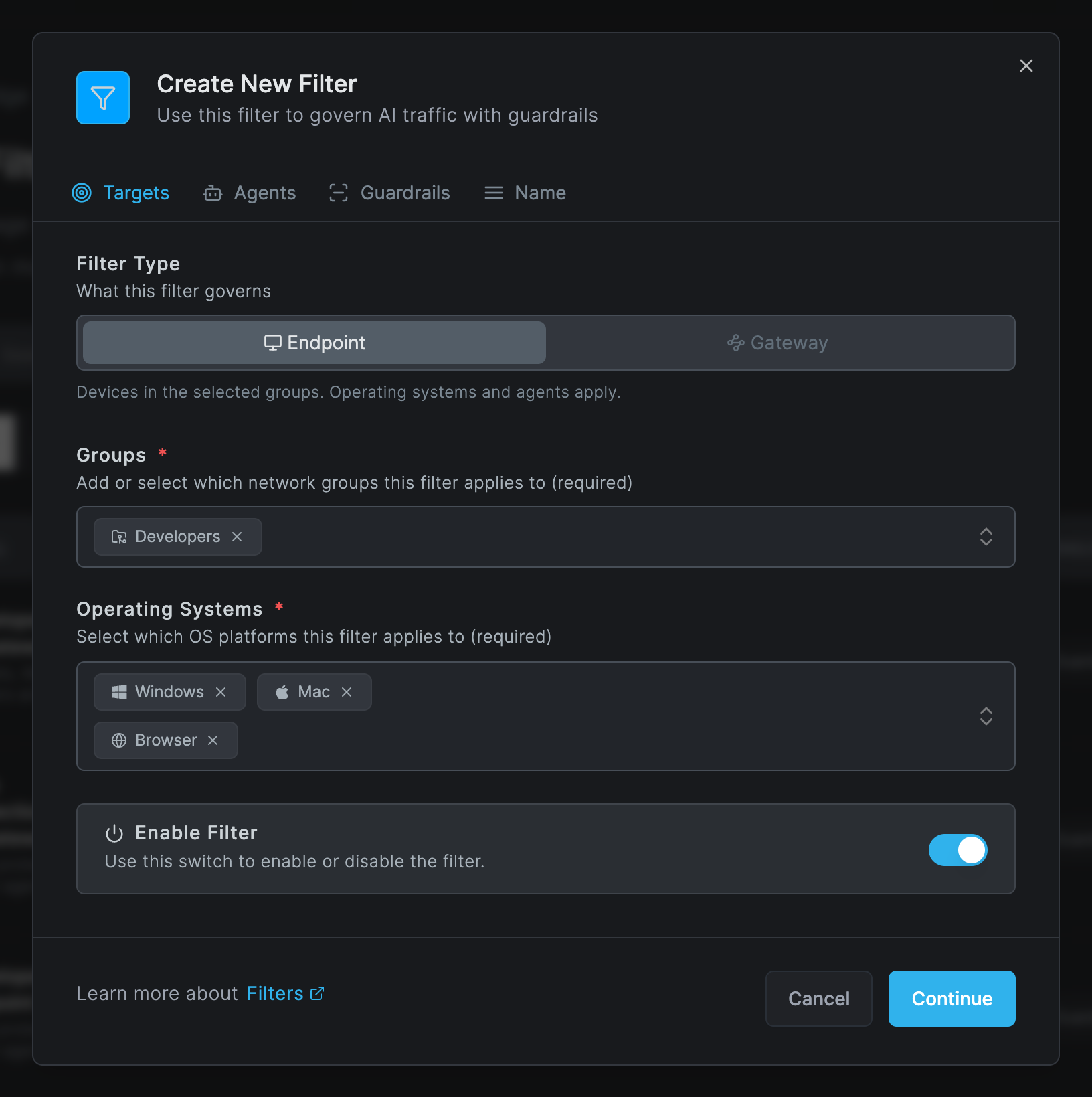
The Agents list is not used by the extension: process paths mean nothing in a browser. Leave it empty on a browser-only filter. On a mixed filter it still steers desktop processes on Windows and macOS.
A desktop operating system never matches the extension, and a filter with only Browser never reaches a desktop client. When several filters match a user, their guardrails are merged into one rule set.
Step 2: Install the extension
- Force-install with browser policy. Chrome: add
kdcpnkonhjcknlkjmjapclhpoamlckji;https://clients2.google.com/service/update2/crxtoExtensionInstallForcelist. Edge: addefflopncanncclcfnddajplbnmhoebml;https://edge.microsoft.com/extensionwebstorebase/v1/crx. - Let the Netzilo client install it. When an Enterprise Browser Extension profile applies to a device, the client writes the force-install policy for Chrome and Edge itself, and removes it when the client service is uninstalled. See Browser Extension profile.
- Safari: users install the Netzilo Secure Browser app, then enable Netzilo Browser under Safari Settings > Extensions and allow it on all websites.
Step 3: Users sign in
The user opens the extension's popup and clicks Login. This opens the Workplace, where the user picks the tenant and signs in. The popup then shows Protection: Active.
After you change a filter or a guardrail, the user can press Refresh in the popup to load it at once. The popup's Debug tab shows the rules version and the number of filters, so you can confirm the change arrived.
When the Netzilo client also runs on the device
Only one side governs a browser, so nothing is evaluated twice. The Netzilo client takes over the browser on Windows and macOS when both of these are true:
- the browser's executable is in the Agents list of an endpoint filter for the device, and
- the AI sites (chatgpt.com, claude.ai, gemini.google.com) are inspected by the client.
The extension then stands down after the Netzilo Server confirms that the user has a connected device. The popup says "the desktop client governs this browser", and events come from the client instead of the extension. On Linux the client does not steer browser traffic, so the extension always governs the browser.
Fail-open and fail-closed
While the engine cannot judge a request (it is starting, the Netzilo Server is
unreachable, or the request cannot be read), the extension lets traffic through by
default. To stop such requests instead, set the managed browser policy fail_mode to
closed for the extension, with the same browser management you use for force-install.
Fail-closed applies only to AI endpoints; every other site always loads. There is no
dashboard setting for it.
What users see
| Verdict | In the page |
|---|---|
| Redact | The matched text is replaced by the rule's replacement, for example [CARD-REDACTED], in the prompt as it is sent and in the answer as it is shown |
| Block on a prompt | ChatGPT shows an error with the rule's reason. claude.ai and Gemini answer with Netzilo Guardrail: Blocked by rule: <rule name> |
| Detect | Nothing in the page; an AI detected event is recorded |
| Streamed answers | Text is released about 1 KB behind the model, so that a redaction applies before it is shown. Long answers appear with a short delay; short answers appear at once at the end |
| Reload of a signed-in ChatGPT conversation | The messages are hidden briefly until the governed history has loaded, then shown with redactions applied |
The extension never answers with a block page; refusals appear inside the chat.
Where the results show
Every verdict is an AI event under Activity > Events, in the category AI Edge. The
row reads <site> in the browser for <user>, followed by what happened, the rule and the
filter.
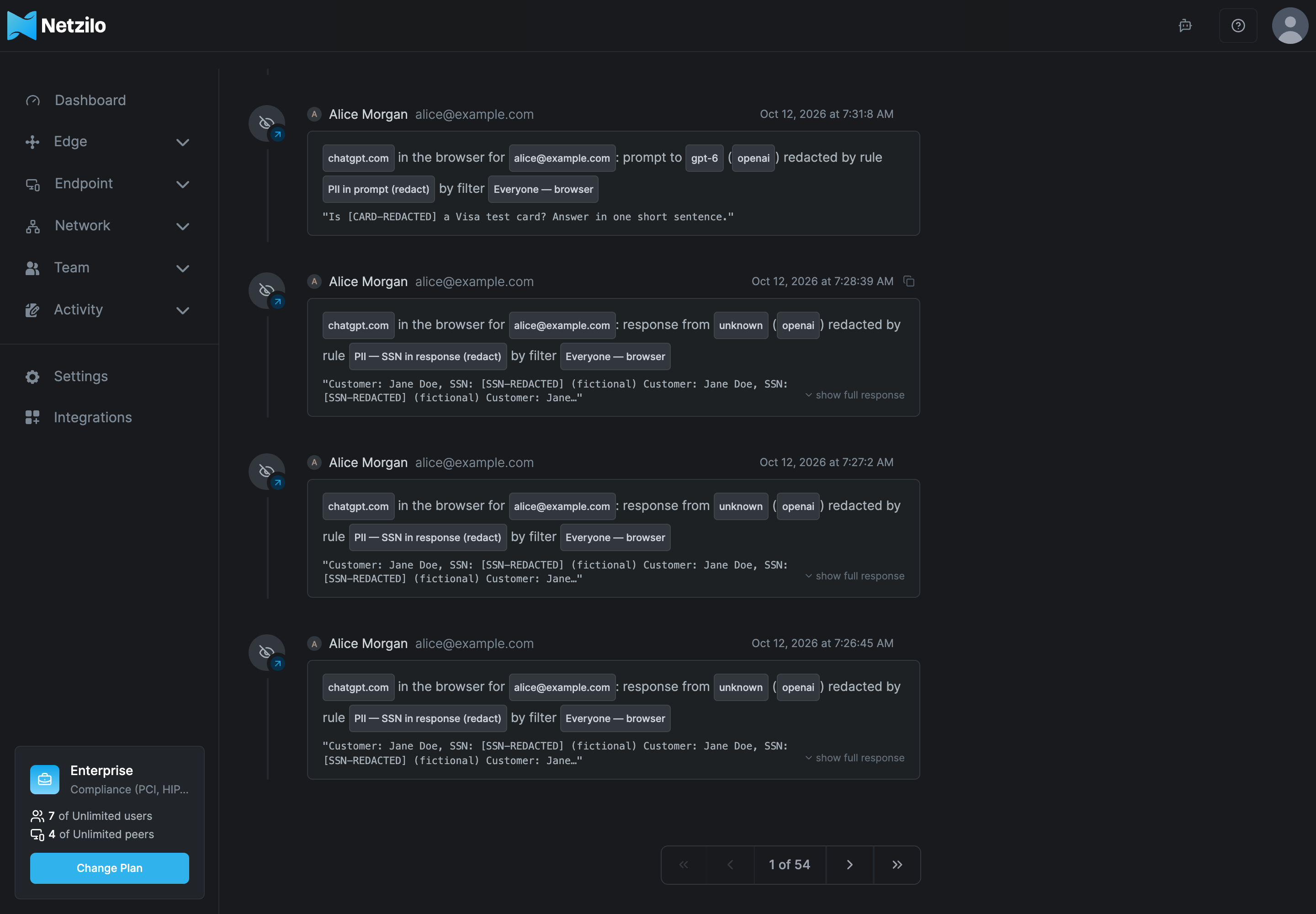
- Each browser tab on a site is a session of its own, under a browser session. The first
time a tab session shows behavior, Activity records a Session snapshot entry, "Session
snapshot is available for
<site>in the browser", which opens the session's behavior graph. See Behavior Graph & Kill Chains. - Regular users see only their own browser sessions; administrators see all of them.
- The AI Agent Activity report counts browser events. The AI Usage report does not: it covers AI Gateway traffic only.
- Uploaded observations are kept for 7 days. Events are kept like every other activity event.
Troubleshooting
Ask the user for the popup's Debug tab first. It shows the state, Protection, whether the extension stood down, the rules version, the number of filters, the rules loaded, failed and skipped by name, and the browser's capabilities.
Prompts pass and no events appear
The user is not signed in, or no enabled endpoint filter with Browser includes one of the user's groups (the popup shows 0 filters). Sign in from the popup, add Browser and the user's group to the filter, then press Refresh.
The popup shows Protection: Inactive
There is no sign-in, the user's filters are empty, or the extension stood down. The popup names the reason.
The extension stood down, but nobody governs the AI sites
The browser's executable is in the filter's Agents list, but the client does not inspect the AI sites. Remove the browser from Agents so that the extension governs it.
A rule is listed as failed in the popup
The guardrail does not compile, for example an invalid regular expression. Fix it under Edge > Guardrails, save, and press Refresh.
A rule is listed as skipped in Safari
The rule needs the network log (requires: http), which Safari does not offer. It works in
Chrome, Edge and Firefox.
Events show the source mitm instead of extension
The Netzilo client governs this browser. This is expected on Windows and macOS when the browser is in the filter's Agents list.
Works in Chrome, nothing in Safari
The Netzilo Browser extension is not enabled, or not allowed on all websites, under Safari Settings > Extensions.
Unmapped counters rise in the Debug tab
The engine could not read traffic on an AI site, usually because the site changed. Report the site and the counters to Netzilo support. Rules on HTTP requests still apply.
Limits to know
- A logged-out ChatGPT conversation reopened by a reload is not redacted, because the site renders it on its server. New prompts and answers in it are governed.
- Safari has no network log: rules on HTTP requests are skipped there.
- Fail-closed covers AI endpoints only, and it is a browser policy, not a dashboard setting. The default is fail-open.
- The browser is not a peer: it has no posture checks and no network policies, and filters reach it through the user's groups only.
- One side governs a browser at a time. When the client inspects the browser but not the AI sites, nobody governs those sites until the filter's Agents list is corrected.
Related Documentation
- AI Detection & Response - The enforcement points and how they fit together
- Filters - Endpoint filters with the operating system Browser
- Guardrails - Write and test the rules the extension applies
- Behavior Graph & Kill Chains - Tab sessions and session snapshots
- Browser Extension profile - Per-domain data-loss controls and force-install
- Enterprise Browser - Netzilo's own browser, with the extension built in