

General-Purpose Agents
Many AI agents run as ordinary software on a desktop or server: desktop assistants such as Claude and ChatGPT, IDE assistants such as Cursor, agent runtimes and in-house automations. You did not build them and they have no hook system. The Netzilo client governs them from outside: it routes the traffic of the applications you name through its TLS-inspecting proxy and evaluates every prompt, answer and tool call against your guardrails. Nothing about the agent changes.
You choose which applications to govern in an Endpoint filter under Edge > Filters, on its Agents tab.
How it works
- An endpoint filter lists the groups and operating systems it applies to, the Agents (process paths) to intercept, and the guardrails to apply.
- The Netzilo client on each matching device receives the filter with its guardrails.
- On Windows and macOS the client steers the network traffic of the listed processes, and of the processes they start, into its proxy. The proxy decrypts the traffic locally with the Netzilo CA, which the client trusts in the operating system's store.
- The proxy recognizes LLM and MCP traffic (OpenAI, Anthropic, Gemini, Perplexity, Cursor, Cohere, Bedrock, NVIDIA, Ollama, MCP over HTTP and more, first by host name, then by the shape of the request), evaluates it, and allows, redacts or blocks it.
- Verdicts appear under Activity > Events, and the activity is recorded in the device's behavior graph.
Processes that are not in Agents are not intercepted. A filter with an empty Agents list intercepts nothing transparently; coding-agent hooks, the SDK and the browser extension still work.
Linux: the Netzilo client does not steer traffic per application. Point the
application at the client's proxy with HTTPS_PROXY=http://127.0.0.1:41339 or
ALL_PROXY=socks5h://127.0.0.1:41339, or use
coding-agent hooks or the
SDK.
Step 1: Install the Netzilo client
On a desktop, install the client and sign in:
curl -fsSL https://pkg.netzilo.com/download/linux/install_netzilo_linux.sh | sh
netzilo up
netzilo up opens your browser to sign in. See Install Netzilo for
the installers and platform details. On macOS, the user approves the Netzilo system
extension once; it is what steers application traffic.
Servers and containers enroll without a browser, with a setup key:
curl -fsSL https://pkg.netzilo.com/download/linux/install_netzilo_linux.sh | sh
netzilo up --setup-key <SETUP_KEY>
The machine joins the setup key's groups and receives the endpoint filters of those groups, so an agent runtime deployed across many machines is governed the same way everywhere.
Step 2: Create an endpoint filter
- Go to Edge > Filters and click Add Filter.
- On Targets, set Filter Type to Endpoint, pick the groups, and pick the Operating Systems.
- On Agents, add the path of each application to intercept. Wildcards (
*,**) and environment variables (%PROGRAMFILES%,$HOME) are expanded on the device. - On Guardrails, add the guardrails to apply.
- Name the filter and save.
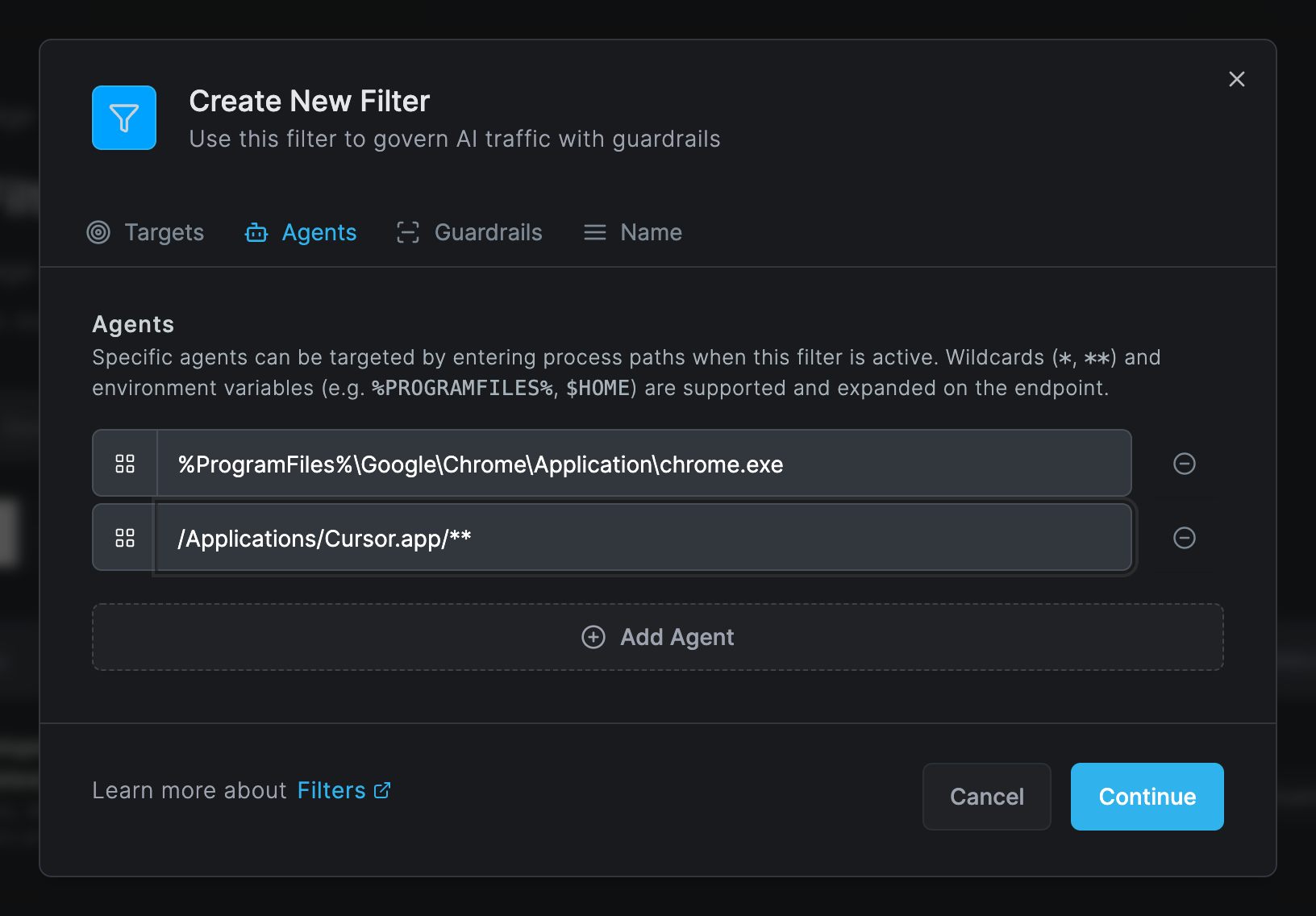
Examples of Agents entries:
| Application | Path |
|---|---|
| Claude desktop app on macOS | /Applications/Claude.app/** |
| Cursor on macOS | /Applications/Cursor.app/** |
| Cursor's own files in the home folder | ~/.cursor/** |
| Claude Code installed in the home folder | $HOME/.local/bin/claude |
| Chrome on Windows | %PROGRAMFILES%\Google\Chrome\Application\chrome.exe |
Listing a browser in Agents makes the client govern AI sites in that browser, and the browser extension then stands down there.
See Filters for every field.
Step 3: Verify
- On the device, the client log shows
Filters applied: Nand noFailed rules:line. Runnetzilo refreshto pick up a change at once. - Use an application you listed in Agents. Its model calls and MCP calls appear as a session under Activity > AI Sessions, and Activity > Events shows a Session trajectory available entry seconds after its first call. Guardrail verdicts appear as AI blocked, AI redacted or AI detected.
- Cursor, Gemini CLI and MCP servers that run as local processes (stdio) are not recorded in sessions yet; their verdicts are still events.
Applications with their own certificate store
The client trusts its CA in the operating system's store, which covers most applications, including Go programs. Runtimes that ship their own store need one extra step:
| Runtime | What to do |
|---|---|
| Python, curl | Set SSL_CERT_FILE or REQUESTS_CA_BUNDLE to /etc/netzilo/netzilo-ca.pem (Windows: %PROGRAMDATA%\Netzilo\netzilo-ca.pem) |
| Java | Import the CA into the Java trust store with keytool -importcert |
| Firefox | Turn on the ImportEnterpriseRoots policy, or import the CA into the profile |
| Node.js | Nothing: the client sets NODE_EXTRA_CA_CERTS system-wide |
Applications that pin certificates or require mutual TLS break under inspection. Remove them from Agents, which also removes their visibility, or ask Netzilo support to add their domain to the centrally maintained list of domains that are passed through uninspected. There is no per-account setting for this list.
What the proxy does not change
- Large and binary bodies: requests and responses over 10 MB, or opaque binary content, pass without body inspection. URL, status and header rules still apply.
- Bedrock with AWS signatures: a request to Bedrock signed with AWS SigV4 cannot be rewritten, so redactions are skipped; blocks still apply. Use the SDK in embedded mode, Bedrock's OpenAI-compatible endpoint, or the AI Gateway to redact.
- Cursor's streaming responses can be blocked but not redacted; a redaction on a Cursor request is applied as a block.
- Streamed answers from other providers are released about 1 KB behind the model, so that a redaction applies before the text is shown.
Browser-based agents
Web AI apps such as ChatGPT, claude.ai, Gemini and Perplexity are governed by the Netzilo browser extension, with endpoint filters whose operating systems include Browser. It works on managed and personal devices, and it is the only browser enforcement point on Linux. See Browser Extension.
Servers, CI and unmanaged devices
Where you cannot install the client, or for agents that run in CI, route the agents' model and MCP traffic through the AI Gateway instead. The gateway identifies the user from their Netzilo token and applies their gateway filters.
Troubleshooting
No AI events for a device
The device is not in a group of an enabled endpoint filter, or the filter's operating
systems do not include the device's. Fix the filter, run netzilo refresh, and check the
log for Filters applied: N.
A desktop app is not intercepted
Its path is not in the filter's Agents, or, on macOS, the Netzilo system extension was not approved. On Linux, set the proxy variables for the app.
The app shows certificate errors
The app uses its own certificate store, or it pins certificates. See Applications with their own certificate store.
The client log shows Failed rules: [<id>]
Those guardrails did not load on the device. Open each one under Edge > Guardrails, fix its YAML, and save.
Related Documentation
- Filters - Endpoint filters and the Agents list
- Guardrails - The rules the client applies
- Coding Agents - Hooks for Claude Code, Codex CLI, Gemini CLI and OpenClaw
- Browser Extension - AI enforcement in the browser
- AI Gateway - For servers, CI and unmanaged devices