

AI Sessions
An AI session is one run of an AI agent or AI app: a Claude Code session, a chat in Claude Desktop, an SDK agent's run, or an MCP client's work against MCP servers. Netzilo records every model call and every MCP tool call of a session, after your guardrails, and keeps them together so you can follow what the agent did.
You find the sessions in the dashboard under Activity > AI Sessions. The page lists every recorded session in two tabs, LLM and MCP. Click a session to open it.
Only administrators can open this page; they see the sessions of every user. Sessions hold personal data and the text of prompts, answers and tool calls, as your guardrails left them.
Watch · 1:40
Investigate what an agent did
Go from a team to a person to a session, replay it on a timeline and see the behavior graph.
How it works
A session is recorded where the traffic passes a Netzilo enforcement point:
| Point | What it records |
|---|---|
| Netzilo client (endpoint) | The model calls and MCP calls of agents and apps on the device, through the client's HTTPS inspection. Claude Code hooks and agents built with the Netzilo agent SDK land on the same session as the process's model calls. |
| Netzilo AI Gateway | The model calls and MCP calls that go through the gateway: its providers, MCP servers and MCP bundles. |
- The Netzilo client or the AI Gateway records each model call and MCP call after your guardrails: who made it, the agent, the model or the MCP server and tool, tokens, status and the messages.
- Both send their records to the Netzilo Server about every 15 seconds. A session is one record, whichever point saw it. When a device sends its agent's traffic through the AI Gateway, the gateway records the calls and the device does not record them again, so nothing is counted twice.
- Seconds after a new session's first call, Activity > Events shows a Session trajectory available entry. Its eye icon opens the session.
- Sessions are kept until the AI data retention removes them. On a self-hosted server, see AI data retention.
A device enrolled with a setup key has no user. Its sessions belong to the device and show the device's name in place of a user.
A device that records sessions reports only the guardrail verdicts it makes (AI blocked, AI redacted, AI detected) as events, like the AI Gateway. Allowed calls are in the sessions, not in Activity > Events.
The AI Sessions page
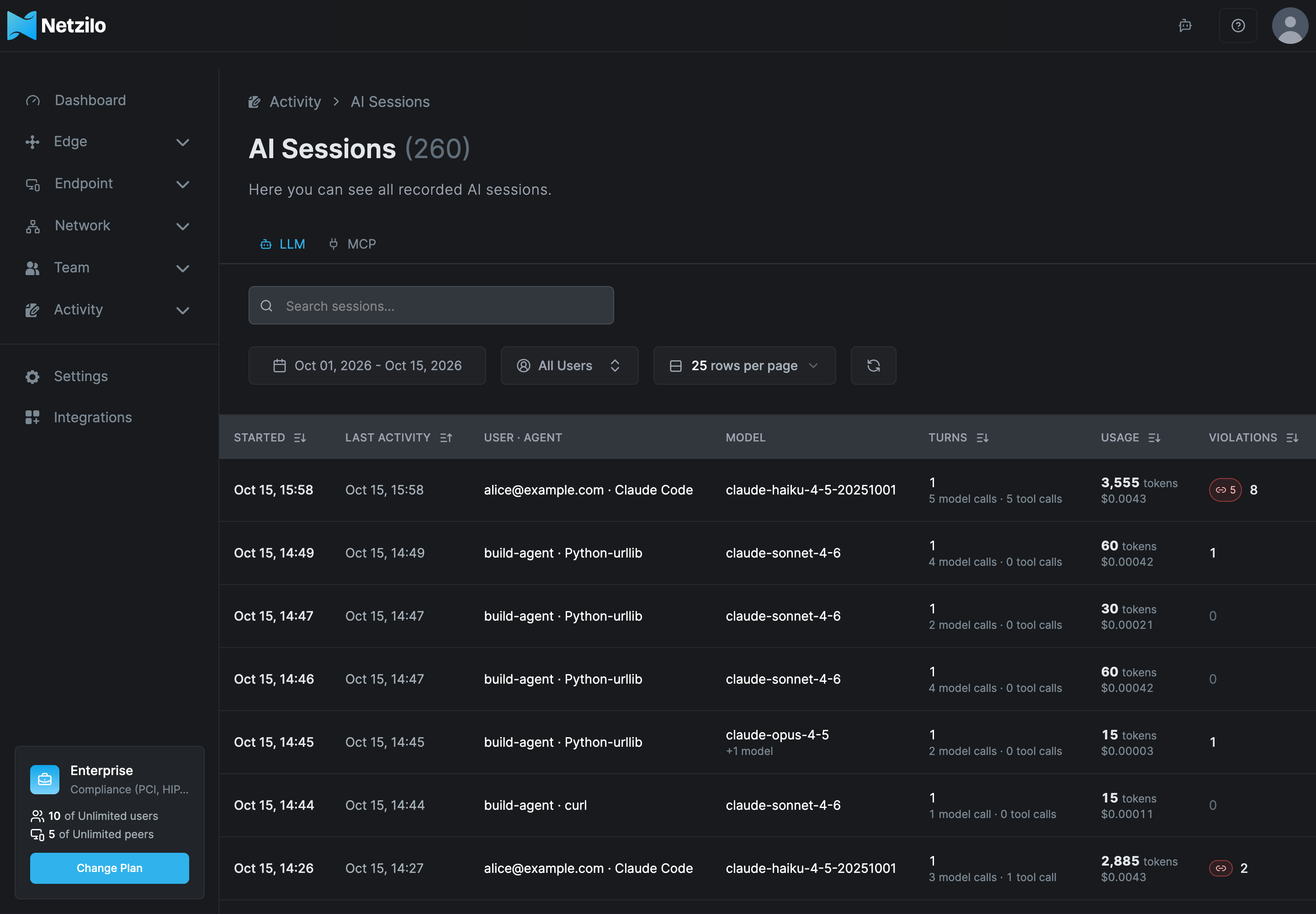
The page header shows how many sessions match the current tab and filters.
| Tab | Lists |
|---|---|
| LLM | Sessions with model calls. |
| MCP | Sessions with MCP tool calls. |
A session with both model calls and MCP calls is on both tabs. Each tab keeps its own search, filters, page and sort.
Columns
On the LLM tab:
| Column | Shows |
|---|---|
| Started | When the session's first call was made. |
| Last activity | When its latest call was made. |
| User · Agent | The user, or the device for a device-owned session, and the agent or app. |
| Model | The models the session called. |
| Turns | The number of turns, with the number of model calls and tool calls under it. |
| Usage | Tokens and cost. Cost is computed for AI Gateway traffic; calls recorded on a device count $0.00. |
| Violations | Blocked, redacted and detected verdicts together. A kill-chain badge opens the session on its behavior graph. |
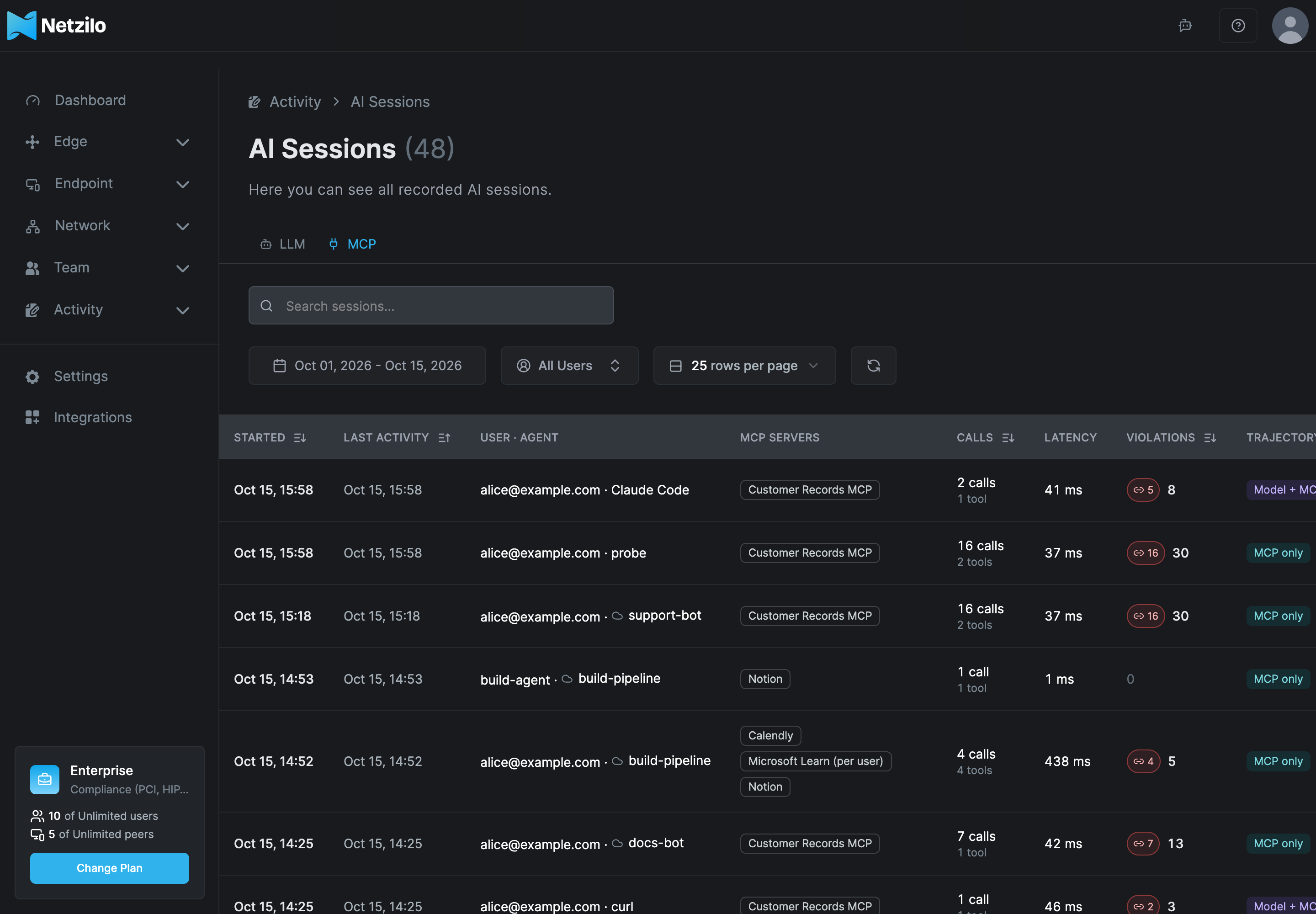
On the MCP tab:
| Column | Shows |
|---|---|
| Started, Last activity, User · Agent | As on the LLM tab. An MCP client that runs without an agent shows its own name, or Unknown client when it never named itself. |
| MCP servers | The MCP servers the session called. |
| Calls | The number of MCP calls, with the number of distinct tools under it. |
| Latency | The average time of an MCP call. |
| Violations | As on the LLM tab: the session's blocked, redacted and detected verdicts. |
| Trajectory | Model + MCP when the session also made model calls, MCP only when it made none. |
Filter and sort
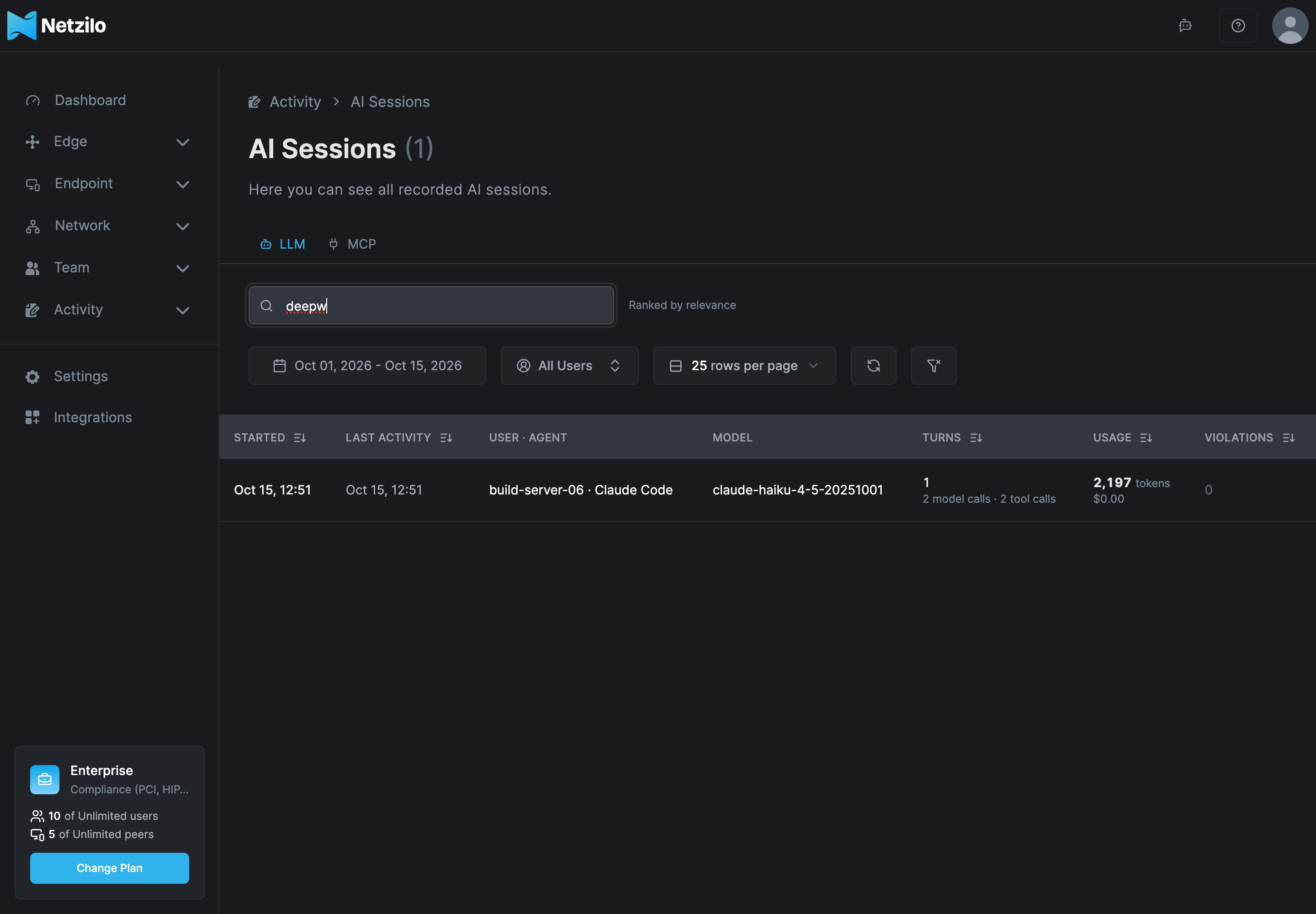
| Control | What it does |
|---|---|
| Search box | Keyword search. Press Enter to search; Ctrl+K (⌘K on macOS) puts the cursor in the box. While a search is active and no column is sorted, the best matches come first and the page shows Ranked by relevance. |
| Date range | The sessions active in the period: started before its end and active after its start. The default is the last 14 days; your browser remembers the range for each tab. |
| All Users | Show the sessions of one user. |
| Rows per page | How many sessions a page shows. |
| Refresh | Reloads the list. |
| Reset | Appears when a filter or search is set. Clears them and restores the default order. |
Click a column header to sort by it: Started, Last activity, Turns, Usage and Violations on the LLM tab, and Started, Last activity, Calls and Violations on the MCP tab. The default order is the most recently active session first. Sorting and paging happen on the server, so they cover every matching session, not only the page on display. If the list shrinks while you are on a later page, the page moves to the last one.
How search matches
A session is found by its user's name and email address, its agent, the app and MCP client it used, the AI Gateway that recorded it, its models, and its MCP servers and tools.
- Names are split into words at every character that is not a letter or a digit:
alice@corp.exampleis alice, corp and example;search_docsis search and docs;gpt-4o-miniis gpt, 4o and mini. - Each word of your search must match the start of one of the session's words, in any
order and in any case.
qorvfinds qorvex, butorvexdoes not. - Every word must match.
deepwiki alicefinds Alice's sessions that used DeepWiki. - A search made only of punctuation finds nothing.
Open a session
Click a row to open the session in the Agentic Activity window. A session opened from the LLM tab starts on its Trajectory; one opened from the MCP tab starts on its MCP Calls. The window has these tabs:
| Tab | Shows |
|---|---|
| Trajectory | A timeline of the session and every message by turn: prompts, answers, tool calls and results, with guardrail verdicts and kill-chain steps marked. On a device, the processes the agent started, the files it read or wrote and the network connections it made are shown under the tool call that caused them. |
| Behavior Graph | The user, agent, models, tools, processes and files of the session, with the steps between them. |
| MCP Calls | Shown when the session made MCP calls. The session's MCP tool calls: the tool, its arguments, its result and the verdicts on it. Select a call to see its details; its Source tab names the server, the tool, who ran it, the MCP client, the MCP session and Seen at, the gateway or device that recorded it. |
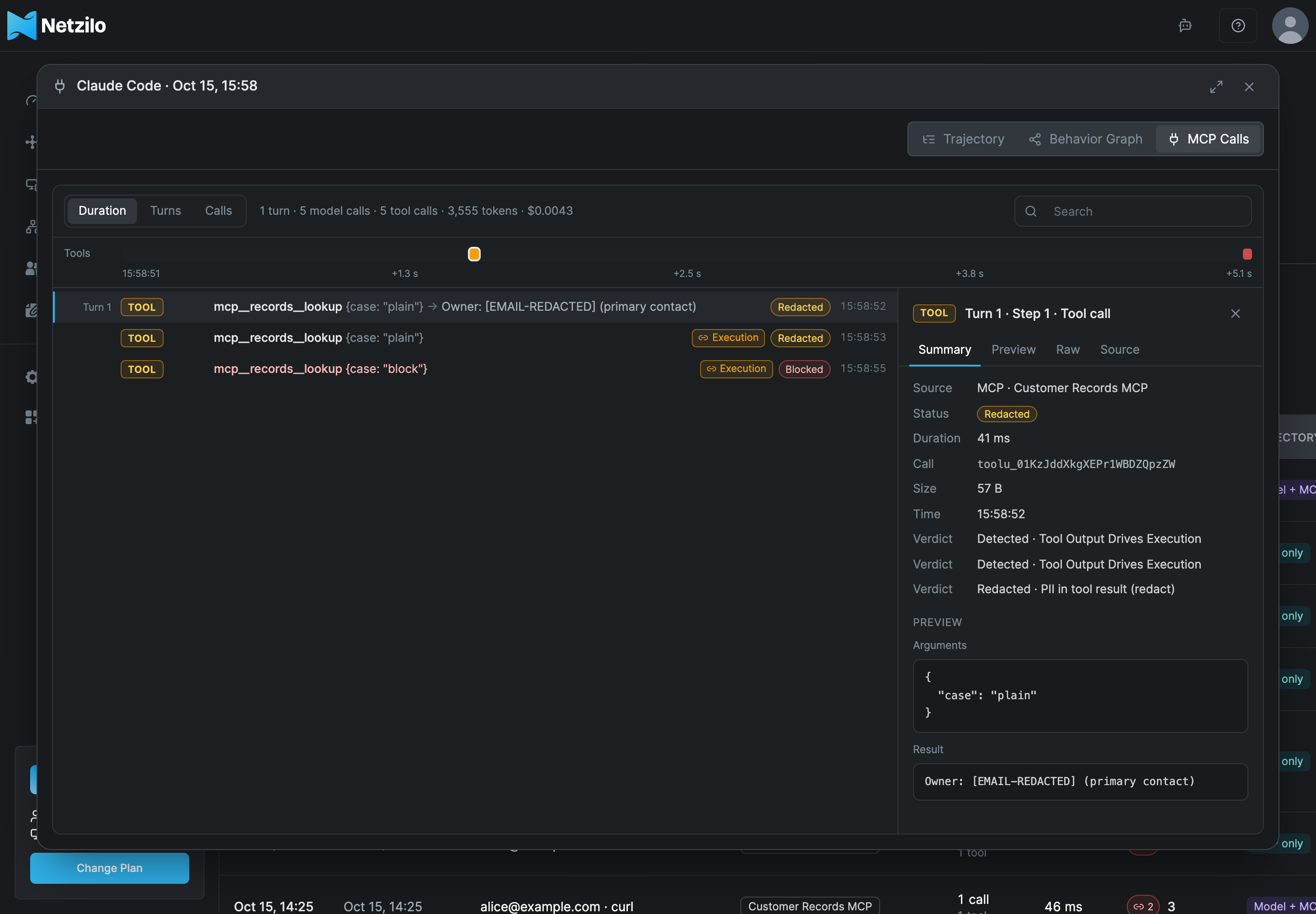
The window is described in Agentic Activity.
MCP tool results and your guardrails
Guardrails judge MCP traffic in both directions, on devices and on the AI Gateway:
- Arguments the agent sends to a tool.
- Results the tool returns. Every text in a result is judged on its own: each text item, the text of an embedded resource, a resource of a text type sent encoded, a link to a resource, and every text value in structured content. Images, audio and binary data are not judged.
A redaction is written back in the place it came from, so the result keeps its shape and the agent can still read it. A refused call does not reach the agent. The session records the call after your guardrails, so the session shows what the agent received, not the raw result.
Use the API
The page reads GET /api/ai/sessions. With an administrator's token it returns every
user's sessions; with a regular user's token, only that user's.
curl -s -H "Authorization: Token $NZ_TOKEN" \
  "https://srv.netzilo.com/api/ai/sessions?mcp=1&q=deepwiki&since=2026-10-01T00:00:00Z&limit=50"
On a self-hosted server, use your own domain instead of srv.netzilo.com.
| Parameter | Meaning |
|---|---|
llm=1, mcp=1 | Only sessions with model calls, or with MCP calls. |
q | Keywords, matched as described in How search matches. Ranked by relevance when no sort is given. |
since, until | The period, in RFC 3339 or Unix seconds. |
user, group, agent, model | One user's ID, one group's ID, one agent, one model. |
client, server, tool | One MCP client by name (client= with no value: Unknown client), one MCP server, one tool (of that server when server is set). |
sort, order | started_at, last_activity (default), total_tokens, cost, llm_calls, mcp_calls, turns, blocked or violations; desc (default) or asc. |
limit, offset | The page. limit defaults to 100 and is at most 500. |
The answer is {"sessions": [...], "total": n}, where total counts every matching
session. Open one session with GET /api/ai/sessions/session?id=<id> and its
trajectory with GET /api/ai/sessions/trajectory?id=<id>.
Troubleshooting
A device's sessions do not appear. Sessions are recorded on a device only when its Netzilo client inspects the agent's HTTPS traffic (the agent is in an endpoint filter's Agents) and the client and the Netzilo Server are both recent enough to record sessions. Cursor, Gemini CLI and MCP servers that run as local processes (stdio) are not recorded yet. A call the device sent to your AI Gateway is in the gateway's session.
A session shows tokens but a cost of $0.00. Cost is computed for AI Gateway traffic. Calls recorded on a device count $0.00.
A search finds nothing although the name is on screen. Search matches the start of words. Search for the beginning of a word, or for another word of the name.
Events show no AI allowed entries any more. Devices and gateways that record sessions report only verdicts. The allowed calls are in the sessions.
Related Documentation
- Agentic Activity - the company-wide view and the session window
- Events - verdicts and the Session trajectory available event
- AI Usage - requests, tokens and cost over a period
- General-Purpose Agents - which apps a device inspects
- Edge Guardrails - the rules applied to sessions
- AI Gateway - sessions recorded on the gateway