

Events
Every administrative change, access decision, data-protection action and AI verdict in your account is recorded as an activity event. Events are the evidence layer: use them to prove what happened, to tune policies and guardrails, and to feed your SIEM.
You find them in the dashboard under Activity > Events. The page header shows the total number of events that match the current filters.
Only administrators can open Activity. Events can contain personal data, such as user names, e-mail addresses and, for AI events, the content that triggered a rule.
How it works
- Something happens: an administrator changes a policy, a device is granted access to a target, the browser extension blocks an upload, or a guardrail redacts a prompt.
- The management server, the Netzilo client, the Netzilo browser extension or the Netzilo AI Gateway records an event. Devices send their events in batches about every thirty seconds, so a new event can take a short while to appear.
- The event is stored with a display name (for example AI blocked), a stable code (for
example
ai.blocked) and a category. Events are kept until they are deleted; there is no automatic retention limit. - When Event Streaming is enabled, every event is also copied to your Amazon S3 or Min.io bucket. See Event Streaming.
The full list of events, with their codes, is on the Event reference page.
The Events page
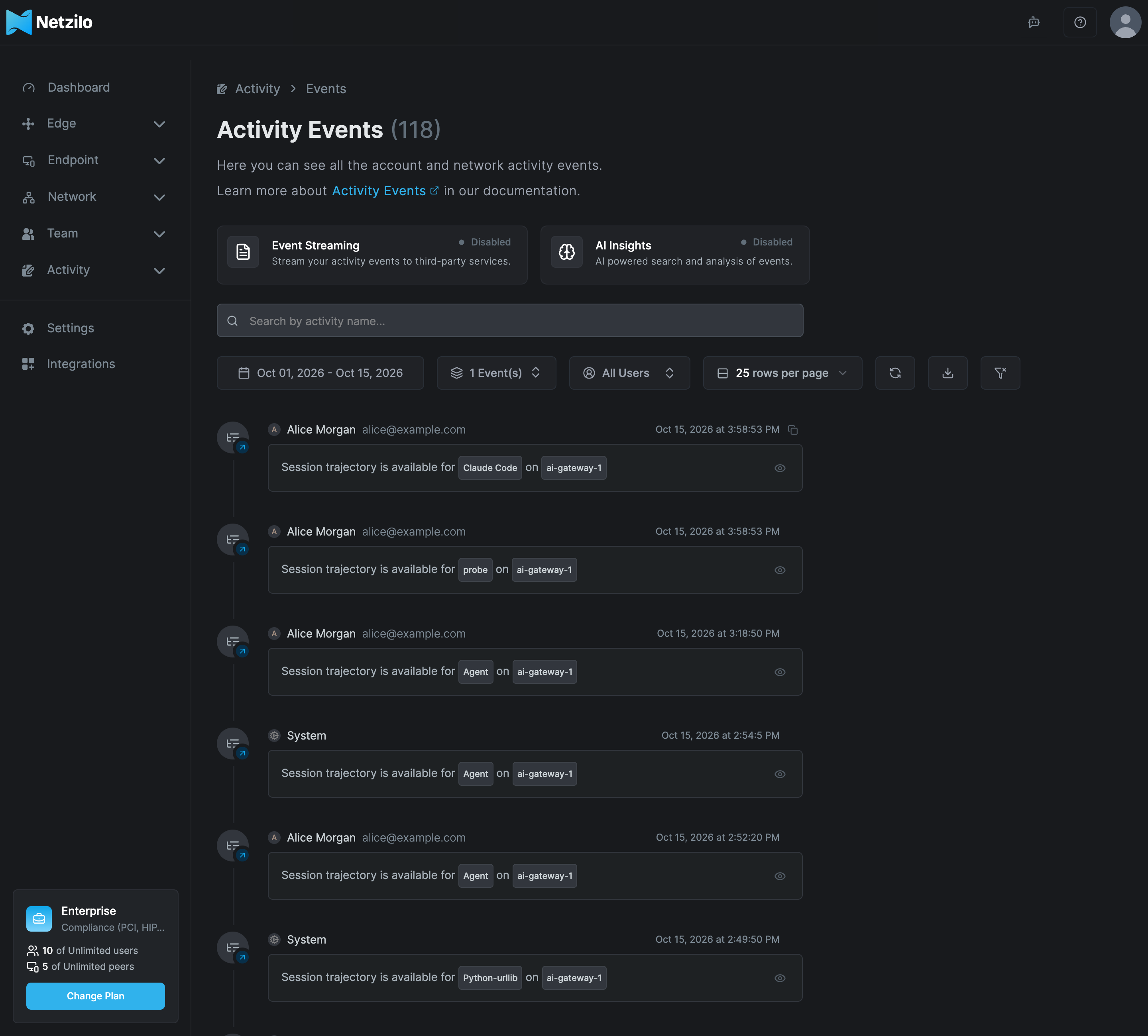
Two status cards sit at the top of the page. Click a card to open its settings under Integrations.
| Card | Shows Enabled when |
|---|---|
| Event Streaming | An Amazon S3 or Min.io target is configured under Integrations > Event Streaming. |
| AI Insights | A model is approved for Log Analysis under Integrations > Artificial Intelligence. |
Filter events
Use the controls above the list to narrow it down:
| Control | What it does |
|---|---|
| Search box | Keyword search by activity name. While a search is active, results are sorted by relevance and the list shows Ranked by relevance. |
| Date range | The period to show. The default is the last 14 days. |
| All Event Types | A multi-select of event types, grouped by category. The button then shows the number of selected types, for example 6 Event(s). Its search field matches event codes, for example ai. or peer.access. |
| All Users | Show the events of one user, or the events recorded by the system. |
| Rows per page | 10, 25, 50 or 100 events per page. |
| Refresh | Reloads the list. |
| Download | Downloads the events on the current page as a CSV file. |
| Reset | Appears when a filter is set. Clears all filters and the search. |
The CSV file holds only the page on display, with the columns Timestamp, User, Email, Event, Source, Target and More Information. To export more, raise the rows per page or use the API (see Use the API).
Event categories
The All Event Types list groups events into these categories:
| Category | What it covers |
|---|---|
| Administration | Changes to the account: peers, users, groups, policies, routes, DNS, setup keys, posture checks, profiles, guardrails, filters, providers, limits, MCP servers, published applications, integrations, reports and settings. |
| Access Control | Access decisions and sign-ins: peer and target access granted or blocked, URLs accessed, user log-in and log-out, MCP server connections, published application access, recorded sessions. |
| Data Exfiltration | Data the browser or workspace protections stopped: redacted data, blocked copy/paste, printing, screenshots, source-code uploads and download content. |
| Policy Violation | Blocked downloads, uploads and URLs, failed posture checks, isolation requirements and protection pauses. |
| Suspicious | Prompt injection blocked, code injection detected, self-defense activated and failed logins. |
| Investigation | Answers from AI Smart Search (AI Insight). |
| AI Edge | AI traffic verdicts: AI blocked, AI redacted, AI redirected, AI detected, plus Session trajectory available and Session snapshot. |
Read an event
Each row shows the category icon with a small badge (added, removed or changed), the user who caused the event (or System for automatic actions), the time, and a description. Hover the user's icon to see the location when it is known. Hover the time and click the copy icon to copy the raw event as JSON.
Some rows have extra actions:
| Row | Action |
|---|---|
| Session recorded | The play icon plays the recorded desktop session. Recording needs Event Streaming. |
| Session trajectory available | The eye icon (View session) opens the AI session in the Agentic Activity window. |
| Session snapshot | The eye icon (View behavior graph) opens the behaviour graph of that browser tab session. |
| An AI event with a kill chain | The eye icon (View kill chain) opens the steps that led to the verdict. |
| AI Insight | Shows the AI Smart Search answer with the events and recordings it cites. |
AI Edge events
Every AI Edge row follows the same pattern:
<agent> on <peer> for <user>: <what> <outcome>
- Agent is the program that made the call, such as a coding agent, an AI app or the AI Gateway. For the browser extension, the agent is the site and the row reads "chatgpt.com in the browser for alice@example.com: …".
- What is the part of the traffic that was checked: a prompt to a model, a response from a model, a tool call or tool result on an MCP server, a request or connection to a host, a process, or a periodic rule.
- Outcome is allowed, blocked, redacted, redirected or matched (for AI detected, a match in report mode). Blocked, redacted and redirected rows name the rule and the filter, and can show the reason and the matched excerpt.
AI Edge events are verdicts only. Allowed calls are in AI Sessions, not in Events. AI allowed and Semantic event rows are no longer recorded; older ones remain until they age out.
The raw JSON adds the details you need for an investigation:
| Field | Values |
|---|---|
surface | llm_request, llm_response, tool_call, tool_result, prompt, sampling, http_request, connect, process_exec, periodic |
engine | rules, semantic, script, periodic, policy, limit |
source | mitm (Netzilo client), hook (coding-agent hooks), extension (Netzilo browser extension), gateway (Netzilo AI Gateway), probe (device probe) |
The JSON also names the rule, the filter, the provider, the model, the MCP server and tool, the
host, the session and the actors. content holds up to 8 KB of the triggering content, after
redaction, with content_truncated set when it was cut.
Two common gateway cases:
- A request refused by a limit is AI blocked with engine
limit, sourcegatewayand surfacellm_request. - A request for a model or provider the user is not granted is AI blocked with engine
policy.
A Session trajectory available row appears once per new AI session recorded on a
device or the AI Gateway, seconds after its first call. It reads "Session trajectory is
available for <agent> on <peer>", and its eye icon opens the session. See
AI Sessions.
For a browser tab, a Session snapshot row appears the first time the tab shows
behaviour. It reads "Session snapshot is available for <site> in the browser" and opens
the tab's behaviour graph. See Behavior Graph & Kill Chains.
Ask in plain language: AI Smart Search
AI Smart Search needs a model approved for Log Analysis. See Artificial Intelligence.
When AI Insights is enabled, the search box offers a ✦ button (AI Smart Search). Type a question and click ✦, for example:
- Who uploaded a file to Dropbox last week?
- Which users were blocked by a guardrail yesterday?
- Was the upload of the customer deck successful?
The answer is saved as an AI Insight event in the Investigation category. It lists the events it found, each with a relevance (High, Medium or Low), and the session recordings it cites. You can open it again later from the event list. Click the stop button to cancel a search that is still running.
Use the API
Pull events through the API when you need more than one page, for example for an audit:
curl -H "Authorization: Token $NZ_TOKEN" \
  "https://srv.netzilo.com/api/events/paginated?limit=1000&offset=0&date_from=2026-10-01T00:00:00Z&code=ai.blocked&code=ai.redacted"
The response holds events and pagination (total, limit, offset, has_more,
total_pages). Filter by user=<email>, by one or more code values, by date_from and
date_to, and by keyword with q. Leave out order when you use q, so results stay ranked
by relevance. On a self-hosted server, use your own domain instead of srv.netzilo.com. A
read-only agent token is enough. See
Agents for tokens and Events API
for the full reference.
Stream events to your SIEM
Netzilo can copy every event to an Amazon S3 or Min.io bucket as it is recorded. Point your SIEM at the bucket. See Event Streaming.
Troubleshooting
No events for a device.
The device is not connected, or nothing it did matched a policy, profile or filter. Run
netzilo status on the device and check that the device is in the groups your policies and
filters use.
user.login events are missing on a self-hosted server.
Log-in events come from the identity provider. They need the built-in identity provider and the
service account it was given at install. Check the identity provider's health.
The CSV file is incomplete. The download holds only the current page. Raise the rows per page or use the API.
AI Insights shows Disabled and there is no ✦ button. No model is approved for Log Analysis. Approve one under Integrations > Artificial Intelligence.
Rows read UNKNOWN_ACTIVITY. They were written by older Netzilo clients with event types that no longer exist. They are history, not a fault.
Related Documentation
- Event reference - Every event type, its code and category
- AI Sessions - Every recorded AI session
- Reports - User, authentication, AI agent and AI usage reports
- Event Streaming - Copy events to Amazon S3 or Min.io
- Behavior Graph & Kill Chains - What behavior graphs and kill chains show
- Guardrails - The rules behind AI blocked, redacted and detected events
- Filters - Which guardrails apply to whom
- Artificial Intelligence - Approve a model for AI Smart Search