

AI Assistant
The dashboard's AI Assistant answers questions about your Netzilo deployment, diagnoses devices and proposes changes for you to approve. On a self-hosted server it runs on your own server, with an AI provider that the account owner chooses. This page covers the server side: what runs where, what it needs, how to add it to an older server, how to change its settings and how to fix it.
A fresh server shows no AI Assistant button. That is expected: no AI provider and no model come with the server. The Assistant appears once an owner connects a provider and approves a model for it, see Step 1.
How it works
The Assistant has three parts:
| Part | Where it runs | What it does |
|---|---|---|
| Management | The management container | Owns the chat: checks who may use the Assistant, stores sessions, messages and the audit log, and carries out approved changes |
| Worker | The support-worker container | The agent. It runs one answer at a time and keeps nothing between answers. It has no inbound port: only management calls it, over the internal network, with a shared token |
| AI provider | Outside the server, or inside your network | The model. Chosen by the owner under Integrations > Artificial Intelligence, never configured on the worker |
The worker holds no credential of its own. Every API call it makes uses the token of the person in the chat, so the Assistant can do exactly what that person can do. Every change it proposes runs only after that person approves it in the chat.
The AI provider here is the Assistant's own provider. It is not the same list as the providers of the AI Gateway under Edge > Providers.
Before you start
-
The server has the worker. Servers installed in September 2026 or later include it. Check in the compose folder (
/opt/netzilo, or/opt/netzilo/runon a marketplace image):cd /opt/netzilo sudo grep -c 'support-worker' docker-compose.yml sudo docker compose ps support-worker0, or no such service, means an older server: see Add the worker to an older server. Otherwise the service must behealthy. -
Outbound HTTPS from the server:
Destination Needed for If blocked The AI provider's endpoint Every answer The Assistant cannot answer github.comandcodeload.github.comRefreshing the runbooks the agent follows The worker uses the copy built into its image
Step 1: Connect an AI provider
An account owner goes to Integrations > Artificial Intelligence and clicks Add Provider. Any vendor API or compatible endpoint works: OpenAI, Anthropic, or an OpenAI- or Anthropic-compatible gateway or model server in your own network. In the provider's model list, tick the models allowed for Assistant. Nothing is approved until you tick it.
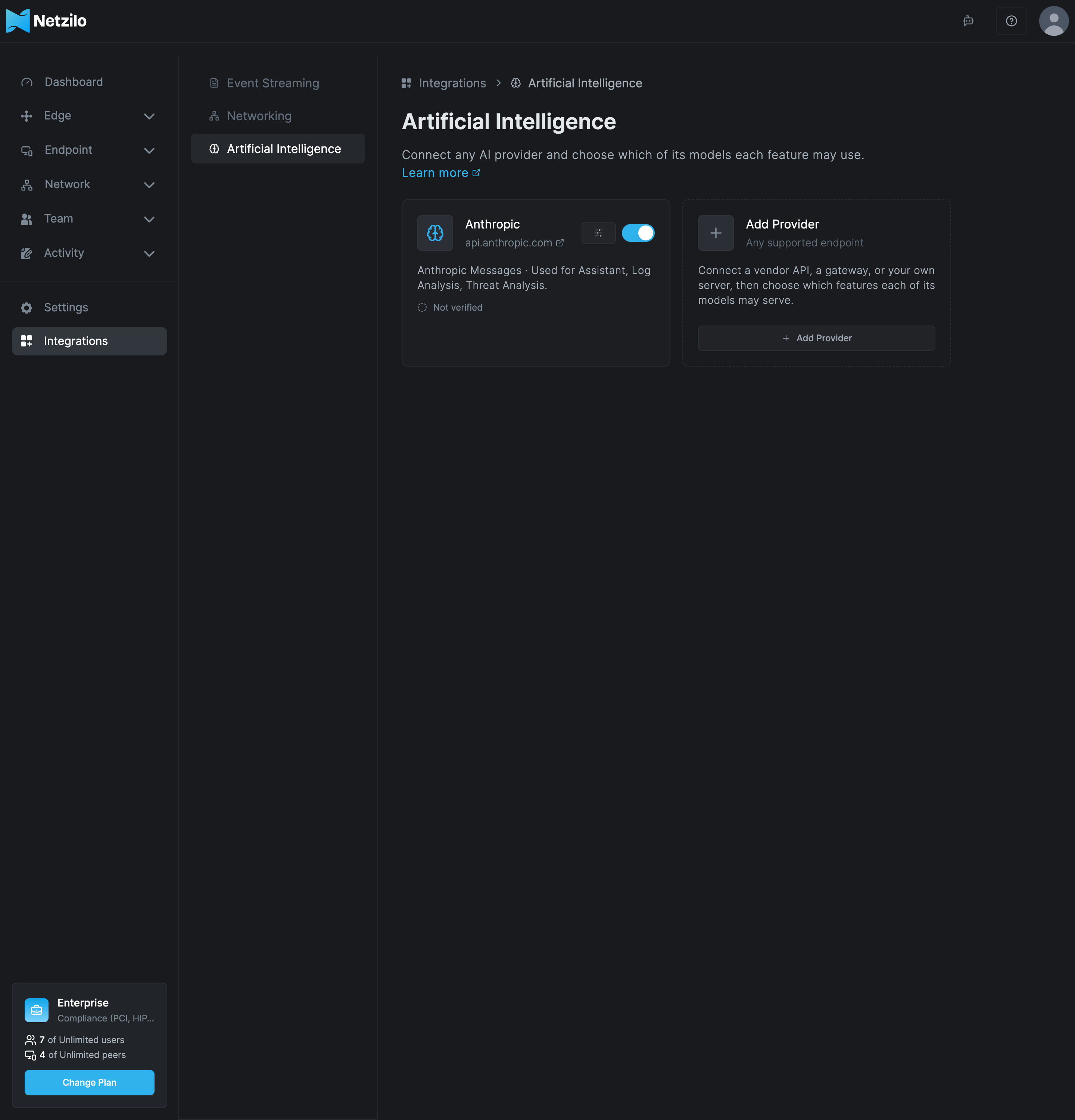
The endpoint must be reachable from the server, not only from your browser. See Artificial Intelligence for the provider dialog.
Administrators now see the Assistant button in the dashboard.
Step 2: Let regular users use it
Regular users get the Assistant on their Workplace page, for their own devices only. Go to Settings > Permissions, turn on Allow regular users to use the AI Assistant, and choose the Allowed groups. Only members of these groups can open it. See Permissions.
Change the worker's settings
The worker's settings are environment variables of the support-worker service in
docker-compose.yml. Edit its environment: list, then recreate only that service:
cd /opt/netzilo
sudo docker compose up -d --no-deps support-worker
sudo docker compose ps support-worker
It reports healthy within about 30 seconds. Recreating it interrupts only an answer in
progress.
| Variable | Default | Controls |
|---|---|---|
SUPPORT_MAX_AGENT_STEPS | 12 on compose installs | Model calls per answer. Raise to 16 if answers end with step limit reached; answering with what I have |
SUPPORT_TURN_TIMEOUT_SEC | 900 | The worker's time limit for one answer |
SUPPORT_THINKING_BUDGET_TOKENS | 4096 | Reasoning tokens per call on Anthropic models. 0 turns reasoning off |
SUPPORT_OPENAI_REASONING_EFFORT | medium | Reasoning effort for OpenAI reasoning models: low, medium or high |
SUPPORT_SKILLS_REF | main | The version of the runbooks to follow. Pin a tag or commit if they must not change without review |
SUPPORT_SKILLS_REFRESH_MINUTES | 30 | How often runbooks are refreshed. 0 turns refreshing off and uses the copy in the image |
HTTPS_PROXY | none | A corporate proxy for the provider and GitHub |
SUPPORT_WORKER_TOKEN must stay equal to WorkerToken in the SupportConfig block of
management.json. The worker refuses to start without it, and it refuses to start when a
LANGCHAIN_ or LANGSMITH_ tracing variable is set, because tracing would send
conversations to a third party.
Behind a corporate proxy. Set HTTPS_PROXY. If you also set HTTP_PROXY, add
management to NO_PROXY, because the worker reaches management over plain HTTP on the
internal network. If the proxy inspects TLS, mount its CA certificate into the container
and point SSL_CERT_FILE at it.
Air-gapped servers. Set SUPPORT_SKILLS_REFRESH_MINUTES=0. The runbooks are then the
ones in the image; a newer worker image brings newer ones. Connect an AI provider endpoint
inside your network.
Upgrade the worker like any other component, see Upgrade and add components.
Add the worker to an older server
A server installed before September 2026 has no worker and no SupportConfig block. Never
re-run the installer to add it: that erases the server.
Servers installed with the one-line installer. If the published installer has the component commands (check as described in Upgrade and add components), one command adds the worker with its token and settings, after a backup:
curl -fsSL https://pkg.netzilo.com/download/install-netzilo.sh | sudo bash -s -- install support-worker
AWS and Azure images, or an installer without the component commands. Add the worker in
place. Take a backup first (see Backup and restore).
The procedure keeps timestamped copies of both files it edits, generates a 40-character
token, adds the support-worker service to docker-compose.yml and the SupportConfig
block to management.json, starts the worker and restarts management. Management is down
for the few seconds of its restart. It refuses to run twice. On marketplace images the
worker image is downloaded from ghcr.io, which the default security rules allow.
if [ -f /opt/netzilo/run/docker-compose.yml ]; then C=/opt/netzilo/run; else C=/opt/netzilo; fi
cd "$C"
sudo grep -q '^  support-worker:' docker-compose.yml && echo "support-worker is already present; stop here"
stamp=$(date +%s)
sudo cp -a docker-compose.yml "docker-compose.yml.bak-$stamp"
sudo cp -a management.json "management.json.bak-$stamp"
TOKEN="$(openssl rand -base64 32 | tr -d '=+/' | head -c 40)"
sudo TOKEN="$TOKEN" python3 - <<'EOF'
import os, re
tok = os.environ["TOKEN"]
p = "docker-compose.yml"; text = open(p).read()
if re.search(r"^  support-worker:", text, re.M): raise SystemExit("support-worker already present")
mgmt = re.search(r"^  management:\n(?:(?!^  \S).*\n)*", text, re.M)
if not mgmt: raise SystemExit("no management service in docker-compose.yml")
extra = re.search(r"^    extra_hosts:\n(?:^      .*\n)+", mgmt.group(0), re.M)
block = (
    "  support-worker:\n"
    "    image: ghcr.io/netzilo/net-support-worker:latest\n"
    "    container_name: support-worker\n"
    "    restart: unless-stopped\n"
    "    networks:\n"
    "      - netzilo\n"
    + (extra.group(0) if extra else "")
    + "    environment:\n"
    f"      - SUPPORT_WORKER_TOKEN={tok}\n"
    "      - SUPPORT_MAX_AGENT_STEPS=16\n"
    "      - SUPPORT_TOOL_TIMEOUT_SEC=30\n"
)
top = re.search(r"^(volumes|networks):", text, re.M)
if not top: raise SystemExit("no top-level volumes:/networks: section in docker-compose.yml")
open(p, "w").write(text[:top.start()] + block + text[top.start():])
EOF
sudo TOKEN="$TOKEN" python3 - <<'EOF'
import json, os
p = "management.json"; cfg = json.load(open(p))
if cfg.get("SupportConfig", {}).get("WorkerURL"): raise SystemExit("SupportConfig already set")
cfg["SupportConfig"] = {
    "WorkerURL": "http://support-worker:8080",
    "WorkerToken": os.environ["TOKEN"],
    "ManagementURL": "http://management:80",
    "TurnTimeoutSec": 900,
}
with open(p, "w") as f:
    json.dump(cfg, f, indent=2); f.write("\n")
EOF
unset TOKEN
sudo docker compose config -q
sudo docker compose pull -q support-worker
sudo docker compose up -d support-worker
sudo docker compose restart management
management.json is edited in place on purpose: the file is mounted into the management
container by path, and replacing it would leave the container reading the old copy.
Check that every service is Up and support-worker becomes healthy within about a
minute (sudo docker compose ps). Then connect a provider as in
Step 1 and ask the Assistant a first question. Delete the
.bak- files once it works: they hold the same secrets as the live files.
To roll back the in-place procedure:
cd "$C"
sudo docker compose rm -sf support-worker
sudo cp -a "$(ls -t docker-compose.yml.bak-* | head -1)" docker-compose.yml
sudo cp -a "$(ls -t management.json.bak-* | head -1)" management.json
sudo docker compose restart management
Rotate the shared token
Both sides change together. An answer in progress at that moment fails. The commands work in either compose folder.
if [ -f /opt/netzilo/run/docker-compose.yml ]; then C=/opt/netzilo/run; else C=/opt/netzilo; fi
cd "$C"
sudo cp -a management.json "management.json.bak-$(date +%s)"
sudo cp -a docker-compose.yml "docker-compose.yml.bak-$(date +%s)"
NEW="$(openssl rand -base64 32 | tr -d '=+/' | head -c 40)"
sudo NEW="$NEW" python3 - <<'EOF'
import json, os, re
new = os.environ["NEW"]
cfg = json.load(open("management.json"))
cfg["SupportConfig"]["WorkerToken"] = new
json.dump(cfg, open("management.json", "w"), indent=2)
text = open("docker-compose.yml").read()
text, n = re.subn(r"(SUPPORT_WORKER_TOKEN=)\S+", lambda m: m.group(1) + new, text)
assert n == 1, "expected exactly one SUPPORT_WORKER_TOKEN line"
open("docker-compose.yml", "w").write(text)
EOF
unset NEW
sudo docker compose up -d --no-deps support-worker
sudo docker compose restart management
Audit and data
Every Assistant session creates a Support session created event in Activity > Events. Administrators can open the read-only log of any session from that event, even after its owner deleted it. Sessions, messages and the audit trail are stored in management's database, so the normal backup covers them. The worker stores nothing and does not log conversation text.
Troubleshooting
No Assistant button for anyone. No model is approved for Assistant. An owner approves one under Integrations > Artificial Intelligence.
Admins see the button, a regular user does not. Allow regular users to use the AI Assistant is off, or the user is in none of the Allowed groups.
support agent is not configured on this deployment. management.json has no
SupportConfig block: the server predates the worker. See
Add the worker to an older server.
support agent is unavailable, try again shortly. Management cannot reach the worker:
it is down or still starting. Check sudo docker compose ps support-worker and its log.
support worker returned HTTP 401. The two copies of the token differ. Make
SUPPORT_WORKER_TOKEN equal to WorkerToken, or rotate the token.
The worker keeps restarting with refusing to start: SUPPORT_WORKER_TOKEN is empty. The
token is missing from the worker's environment.
The AI provider rejected the configured API key. The key is wrong, expired or revoked.
The owner fixes the provider under Integrations > Artificial Intelligence.
The configured model was not found at the AI provider. The provider does not serve that
model. Approve another one.
The AI provider could not be reached (network error or timeout). The server has no
outbound access to the provider, the proxy is not set, or a TLS-inspecting proxy's CA is
not trusted.
Answers end with step limit reached; answering with what I have. Raise
SUPPORT_MAX_AGENT_STEPS to 16.
To see the worker's log:
cd /opt/netzilo
sudo docker compose logs --tail=200 support-worker
Related Documentation
- Artificial Intelligence - connect AI providers and approve models
- Permissions - let regular users use the Assistant
- Upgrade and add components - add or update the worker
- Server reference - containers and outbound access