

Permissions
The Permissions tab holds the account-wide switches that decide what regular users may use and which access methods are available at all: the Workplace portal, the AI Assistant, clientless access from a browser, and published applications.
You find it under Settings > Permissions. Each setting has a switch; some open more fields when you turn them on. Nothing changes until you click Save Changes.
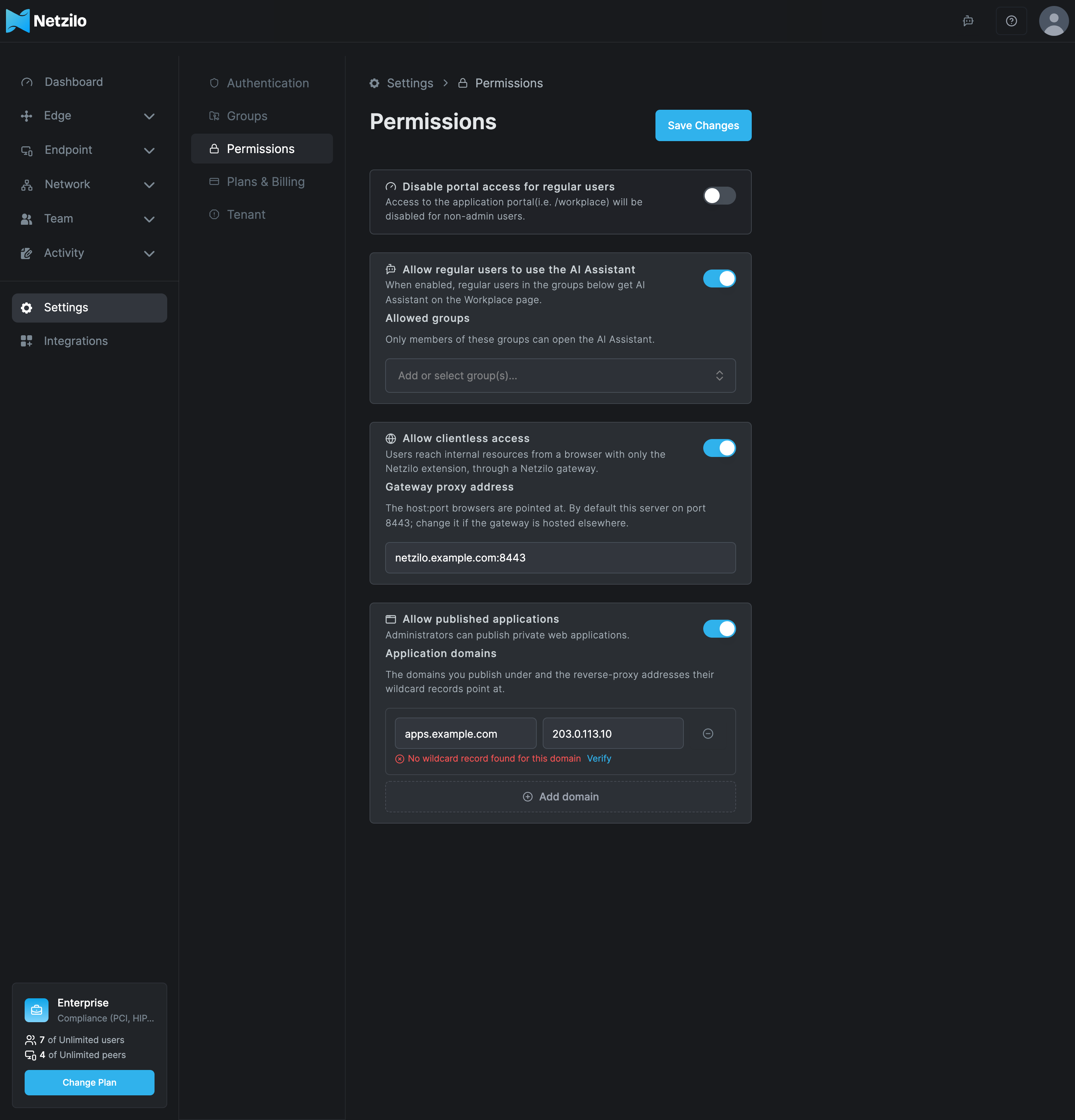
Disable portal access for regular users
Turn this on when your users only need the Netzilo client and should not use the Workplace portal in the browser.
| Field | What to enter |
|---|---|
| Disable portal access for regular users | On: users with the User role who sign in to the dashboard are sent to the client download page instead of the Workplace. Administrators are not affected. |
Users keep their network access through the Netzilo client. Only the browser portal is closed to them.
Allow regular users to use the AI Assistant
Administrators always have the AI Assistant. This setting gives it to regular users too: they see it on the Workplace page and can ask it about their own devices. The assistant then works with that user's permissions, not with an administrator's.
| Field | What to enter |
|---|---|
| Allow regular users to use the AI Assistant | On: users in the groups below get the AI Assistant on the Workplace page. |
| Allowed groups | The groups whose members may open the AI Assistant. Select existing groups, or type a new name to create the group when you save. |
You need both: the switch on, and the user in one of the Allowed groups. With the switch on and no group selected, no regular user gets the assistant.
The AI Assistant needs a model approved for Assistant under Integrations > Artificial Intelligence. Without one, nobody sees the assistant, administrators included.
Allow clientless access
Clientless access lets users reach internal web resources from a browser that has only the Netzilo browser extension, through a Netzilo gateway. No Netzilo client is installed on the device.
| Field | What to enter |
|---|---|
| Allow clientless access | On: browsers with the extension are routed to the gateway automatically, according to each user's routes, DNS and policies. |
| Gateway proxy address | The host:port browsers connect to. Leave the default, this server on port 8443, unless the gateway runs on another host or port. The name must match the gateway's certificate. |
The switch controls automatic routing only. A profile that uses a Custom PAC is served whether the switch is on or off. When you turn the switch off, browsers drop the automatic routing at their next refresh, within 5 minutes.
The full setup, including the profile's Proxy tab, is in Clientless Access.
Allow published applications
Published applications give a private web application an address of its own, such as
crm.apps.example.com, that signed-in users open from any browser.
| Field | What to enter |
|---|---|
| Allow published applications | On: administrators can publish applications. Off: nothing is published, and every published address answers There is no application at this address. The applications keep their settings and come back when you turn it on again. |
| Application domains | One row per domain you publish under. Left: the domain, such as apps.example.com. Right: the addresses its wildcard record points at, such as 203.0.113.10, separated by commas. Use Add domain for another row. |
Under each row the dashboard checks the wildcard record. Click Verify to check again:
| Result | Meaning |
|---|---|
| The wildcard record points to the gateway | A random name under the domain resolves to the addresses you entered. |
| The wildcard record points elsewhere | The record exists but resolves to other addresses, which the message lists. |
| No wildcard record found for this domain | The wildcard record does not exist yet, or has not propagated. |
The check is only a check: you can save a domain before its record exists. Do not use the
server's own domain. On Netzilo Cloud, add netzilo.app with the address that
anything.netzilo.app resolves to.
How to publish an application is in Published Applications.
Changes in the activity log
Every change on this tab is recorded in Activity > Events, for example Account AI assistant enabled for users, Account AI assistant groups updated, Account clientless access enabled and Account clientless proxy address updated.
Troubleshooting
A regular user does not see the AI Assistant. Check that the switch is on, that the user is in one of the Allowed groups, and that a model is approved for Assistant under Integrations > Artificial Intelligence.
Users see only the client download page. Disable portal access for regular users is on. Turn it off to give them the Workplace back.
Browsers do not use the gateway after you turned clientless access on. The extension picks up the change at its next refresh, within 5 minutes. Check that the user's profile has the browser extension with the Proxy tab set to automatic.
Verify shows "No wildcard record found for this domain". Create the wildcard DNS
record, such as *.apps.example.com, pointing at the address in the row, and click
Verify again after it propagates.
Related Documentation
- Clientless Access - Browser access with only the Netzilo extension
- Published Applications - Publish private web applications
- Workplace - The portal regular users see
- Artificial Intelligence - Approve a model for the AI Assistant
- Groups - Create and review groups