

AI Detection & Response (AIDR)
An LLM chat request is easy to secure: one prompt in, one answer out. An AI agent is a different problem. It chooses its own tools, reads content it was never meant to trust, holds credentials, calls MCP servers and APIs, touches the file system, and chains all of that into actions, often dozens of steps deep, with no human watching each one. Inspecting any single request in that chain tells you little; the risk lives in the sequence.
AI Detection & Response (AIDR) follows the agent for its whole run. It records what the agent does, judges each action in the context of what came before, and enforces your policy on prompts, answers, tool calls and the actions they trigger.
You set the policy in the dashboard under Edge, and you see the results under Activity, on the Dashboard and in Reports.
How it works
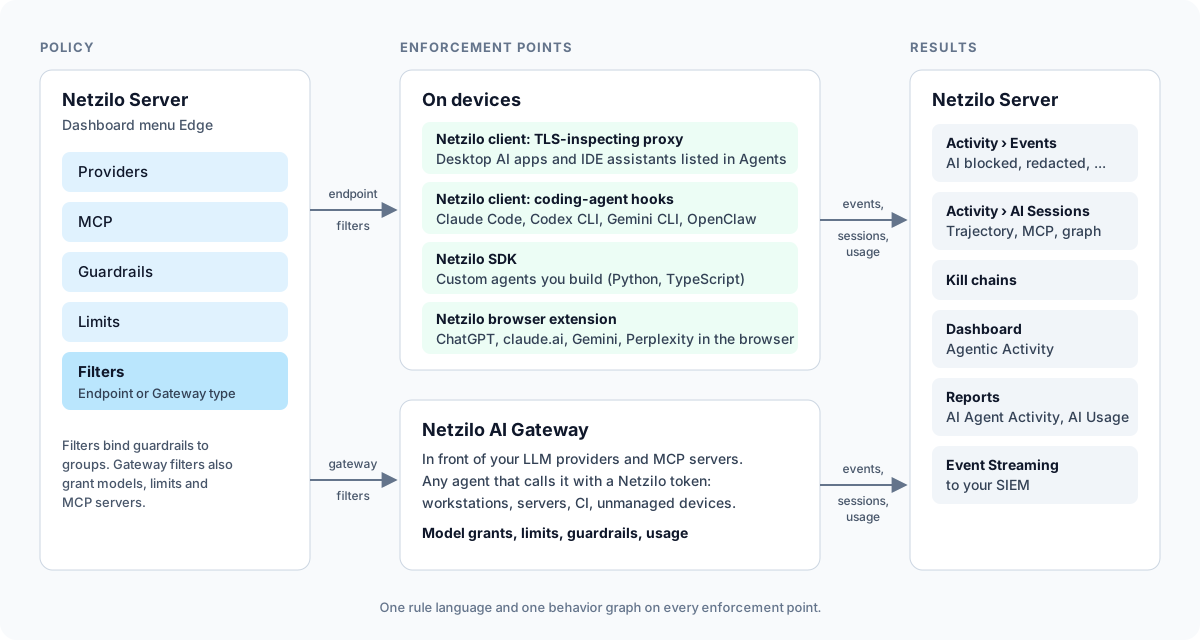
- You write guardrails. A guardrail is a detection rule in YAML. It can match one event, such as a card number in a prompt, or run a script over the agent's history, such as "loaded instructions from an unknown site, then read a credential file".
- Filters bind guardrails to the places they run. An Endpoint filter applies to devices (and browsers) in its groups. A Gateway filter applies to users in its groups when they call the Netzilo AI Gateway.
- An enforcement point evaluates every action against the guardrails that reach it, and allows, reports, redacts, blocks, or sends a prompt to another model.
- Everything is recorded as observations, attributed to the session that acted, and folded into a behavior graph. The Netzilo client and the AI Gateway also record each model call and MCP call, after the guardrails, into an AI session. Verdicts become AI events in Activity.
Two enforcement points
| Netzilo client on a device | Netzilo AI Gateway | |
|---|---|---|
| What it governs | What runs on the device: desktop AI apps, coding agents, agents built with the SDK, and AI in the browser | What any agent sends to your LLM providers and MCP servers through the gateway |
| Policy | Endpoint filters: groups and operating systems, the Agents to intercept, guardrails | Gateway filters: groups of users, model grants, limits, MCP servers, gateway addresses, guardrails |
| Identity | The device and its user | The Netzilo user, from the token the agent sends or the calling peer |
| Sees | Prompts, answers, tool calls, MCP calls, HTTP, and on the device also processes, files and connections | Prompts, answers, tool calls and MCP calls; no processes or files |
| Records | AI sessions of the device's agents and apps | AI sessions of every user who calls the gateway |
| Best for | Managed workstations and servers | Servers, CI jobs and devices you do not manage; budgets and model access for everyone |
The two compose. The device sees everything a governed process does; the gateway sees every user's model and MCP traffic wherever the agent runs, holds the provider keys and the budgets, and is the only place that serves MCP servers. On developer workstations, use both.
Ways into the device engine
| Surface | How it works | Page |
|---|---|---|
| TLS-inspecting proxy in the Netzilo client | Steers the traffic of the processes listed in an endpoint filter's Agents into the client's inspection, on Windows and macOS | General-Purpose Agents |
| Coding-agent hooks | Claude Code, Codex CLI, Gemini CLI and OpenClaw ask the client before each tool call and prompt, so a block happens before the action runs | Coding Agents |
| SDK | The client embedded in an agent you build, in Python or TypeScript | Custom Agents |
| Browser extension | ChatGPT, claude.ai, Gemini and Perplexity in Chrome, Edge, Firefox and Safari, governed by endpoint filters that include Browser | Browser Extension |
The proxy, the hooks and the SDK need no change to how you run the agent, except the SDK, which you add to your agent's code. For the gateway, you point the agent's base URL at the gateway and give it the user's token, see AI Gateway.
Policy objects
Under Edge, in this order:
- Providers: the LLM providers and models the gateway routes to.
- MCP: MCP servers and bundles the gateway serves.
- Guardrails: the detection rules.
- Limits: spend, token and request quotas at the gateway.
- Filters: bind all of it to groups, as endpoint or gateway filters.
Users find their gateways, models and MCP servers in the Workplace under Agentic Access.
The behavior graph
Every action an enforcement point sees becomes an observation, attributed to the session that performed it: one run of an agent, one browser tab, one process. Sessions know their parent, so the process an agent started belongs to the agent's run. From the observations Netzilo builds a behavior graph of sessions, programs, models, tools, hosts, skills and file activity.
Representing activity this way makes agentic threats detectable. A single credential read or a single upload is unremarkable on its own; a skill pulled from an untrusted source, followed by a credential read, followed by an upload to an unsanctioned destination is an attack. Scripted guardrails read that history before they decide, and when they fire they attach a kill chain: the ordered steps that led to the verdict.
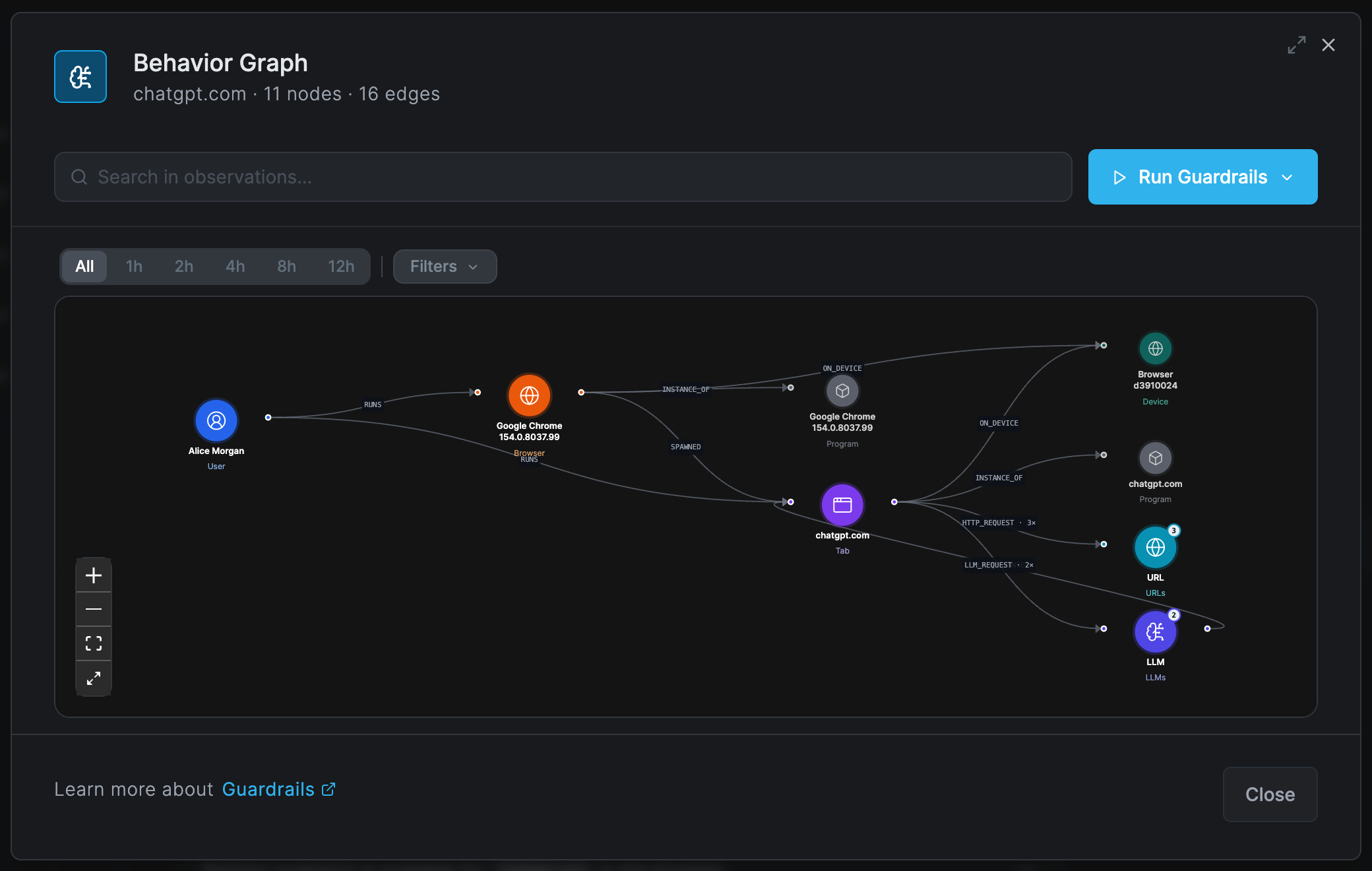
See Behavior Graph & Kill Chains.
Governance as code
Guardrails are YAML: a Sigma detection with Netzilo actions, plus Starlark scripts for behavioral rules. They can be reviewed, version-controlled and tested like any other code.
Netzilo maintains an open library of AIDR rules at github.com/netzilo/aidr-sigma. In the dashboard, Edge > Guardrails > Add Guardrail can also turn a plain-language description of a threat into a rule with the AI Assistant, when a model is approved for Assistant under Artificial Intelligence. See Detection Rules.
Where the results show
- Activity > AI Sessions: every recorded session, LLM and MCP, searchable, each with its trajectory, MCP calls and behavior graph. See AI Sessions.
- Activity > Events, category AI Edge: AI blocked, AI redacted, AI redirected and AI detected, each with the agent, the model or tool, the rule and the filter. Allowed calls are not events; they are in the sessions. Session trajectory available rows open a new AI session; Session snapshot rows open a browser tab's behavior graph; events from scripted rules open their kill chain. See Events.
- Dashboard > Agentic Activity: top teams, guardrails, agents, models, MCP servers and tools. Its window goes down to each team, person, agent, MCP client, server and tool, and to each AI session recorded on a device or the AI Gateway, with the session's trajectory, MCP calls, kill chains and behavior graph. See Dashboard.
- Reports: AI Agent Activity for agents, models and violations, and AI Usage for recorded requests, tokens and cost (gateway and devices).
- Event Streaming to your SIEM, see Event Streaming.
What to expect
- Streamed answers are held back slightly. On every enforcement point, streamed answer text is released about 1 KB behind the model, so that a match can be redacted before it is shown. Long answers appear with a short delay.
- Conversations are recorded after the guardrails. The client inspects on the device and the gateway on your gateway host. Both record each model call and MCP call into an AI session, with its prompts, answers, tool arguments and results as they passed your guardrails (redacted text stays redacted), and send them to the Netzilo Server, where administrators read them under Activity > AI Sessions. When a rule matches, its event also carries the content that matched, so the dashboard can show why.
- Some applications cannot be inspected. Applications that pin certificates or require mutual TLS break under inspection; remove them from the filter's Agents.
Demos
How-to videos
One video per enforcement point, each about two minutes. The whole series is on Video How-To Guides.
Browser · 1:47
Govern ChatGPT and Claude in the browser
Redact a customer ticket and block a private key in ChatGPT and claude.ai, with only the extension installed.
Endpoint · 1:30
Govern every AI tool on a laptop
Claude Code and a homemade script with a personal API key get the same guardrails, on the device itself.
Your agents · 1:28
Govern the agents you build, from the inside
Two lines of the Netzilo SDK put an agent under the guardrails, with its processes and files in its session.
New to how Netzilo connects to agents? See AI Agent Lifecycle for how the SDK, the coding-agent hooks, the client, the browser extension and the AI Gateway map to the stages of an agent's life.
Related Documentation
- AI Gateway - Run the gateway in front of your providers and MCP servers
- Browser Extension - AI enforcement in the browser
- AI Sessions - Every recorded AI session, searchable
- Behavior Graph & Kill Chains - Sessions, behavior graphs and kill chains
- Detection Rules - The rule format and scripting reference
- Filters - Bind guardrails to devices and users