

MCP
The MCP page defines the MCP servers your Netzilo AI Gateways connect to, and the bundles that
serve tools from several servers behind one endpoint. An MCP server here is a definition: how the
gateway reaches the server, over HTTP, server-sent events or as a process it starts, and how it
authenticates. Every gateway serves each server at https://<gateway>/mcp/<slug>.
Agents and MCP clients then talk to the gateway, not to the server. The gateway checks who the caller is, applies that user's grants and runs their guardrails on every tool call and every tool result. Which servers and tools a user may call is granted in a gateway filter, see Filters.
You manage MCP servers and bundles under Edge > MCP, on the tabs MCP Servers and MCP Bundles. Only administrators and owners see this page. Users connect their own sign-ins in the Workplace, see Agentic Access.
How it works
- You define an MCP server: its connection and its authentication.
- A gateway filter grants the server, or a bundle that contains it, to the users of its groups, with all of its tools or only the tools you name.
- Where the server needs a per-user credential, each user connects it once in the Workplace. Where it needs a shared credential, you sign in once in the server's dialog.
- Every AI Gateway pulls the servers, bundles and stored credentials from management and serves
them at
/mcp/<slug>. - A caller connects to
https://<gateway>/mcp/<slug>with their own token. The gateway admits only servers granted to that user, runs the user's guardrails on each tool call and result, and records each call for the AI Usage report.
Before you start
- An AI Gateway. MCP servers are served only through the Netzilo AI Gateway, see AI Gateway.
- Reachability. An
httporsseserver must be reachable from the gateway host. Astdioserver is a command that the gateway host runs, so the command must be installed there. - For OAuth servers, the sign-in runs through your management server. Some providers require a client you register by hand, see Authentication.
The MCP Servers tab
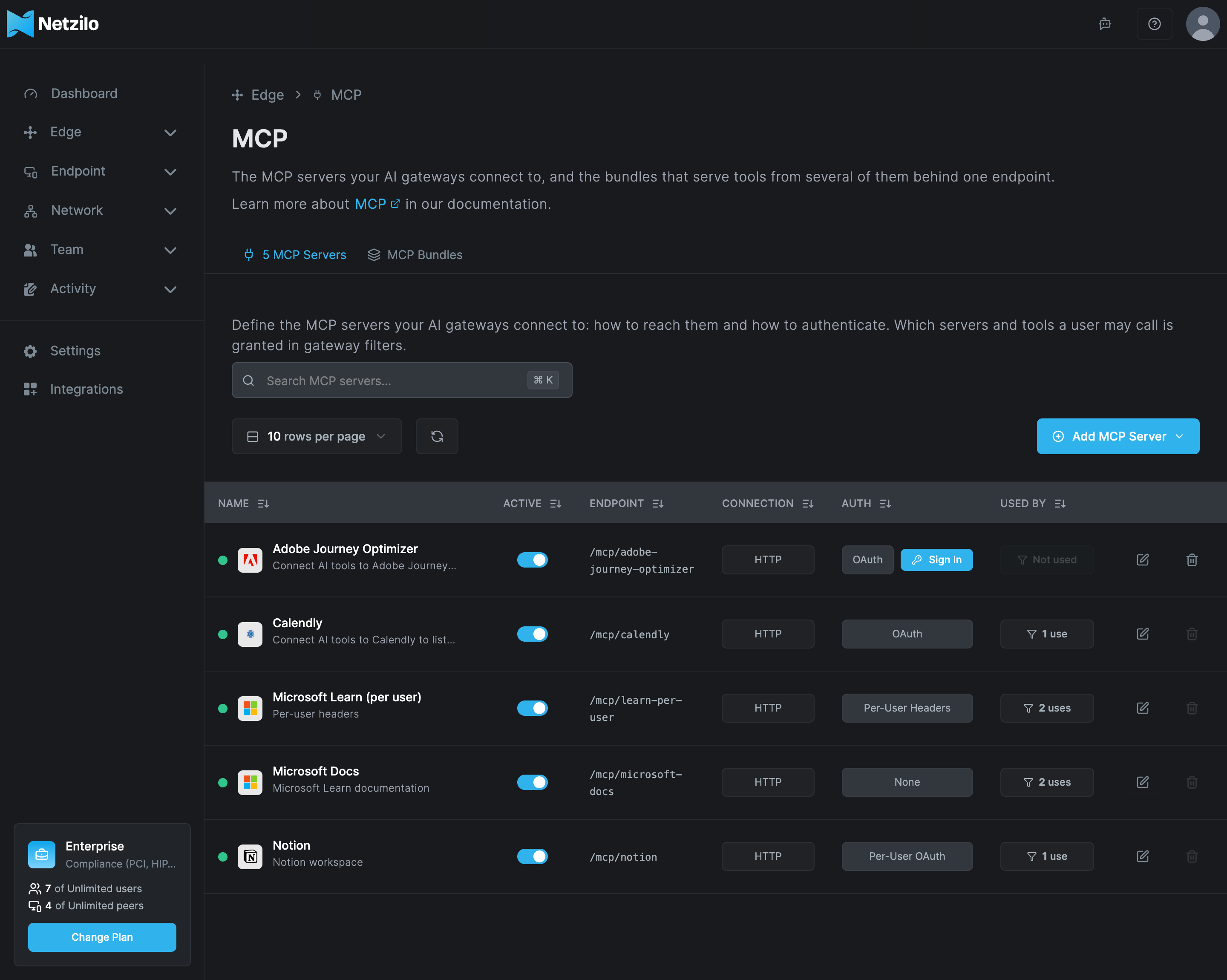
| Column | What it shows |
|---|---|
| Name | The server's name and description. |
| Active | Whether the server is enabled. A disabled server is removed from every gateway. |
| Endpoint | The path every gateway serves it at, /mcp/<slug>. |
| Connection | HTTP, SSE or Stdio. |
| Auth | The authentication type. An OAuth server whose shared sign-in is missing or expired shows a Sign In or Reconnect button here. |
| Used by | How many filters and MCP bundles use the server. |
Add an MCP server
Click Add MCP Server and choose:
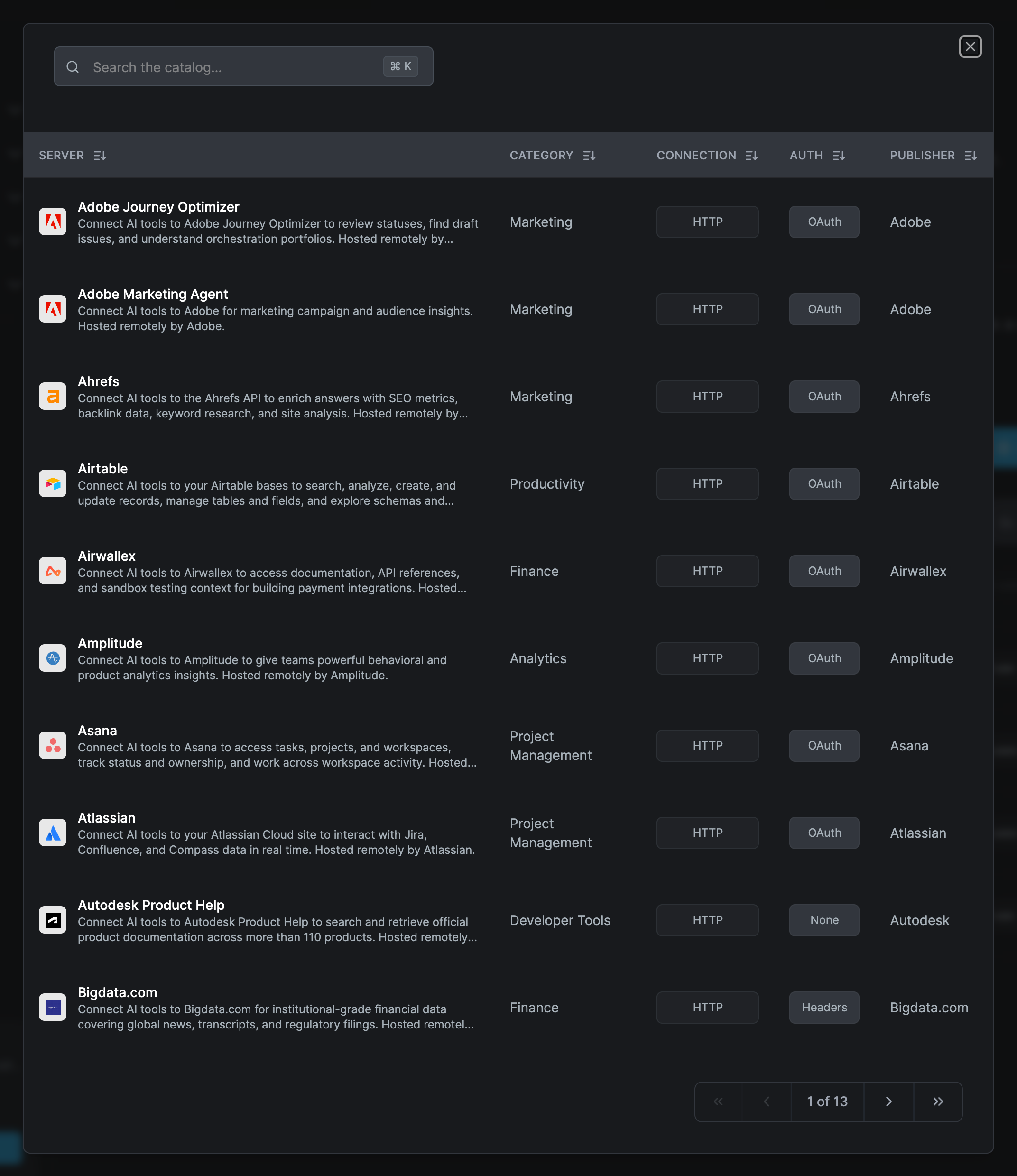
- Browse Catalog to start from a known server. The catalog lists each server with its Server, Category, Connection, Auth and Publisher. Picking one fills in the dialog; you review it and save. The catalog is reference data from Netzilo's library, not a list of what you have configured.
- Custom to define a server yourself.
The dialog has three tabs: Connection, Authentication and Name & Description.
Connection
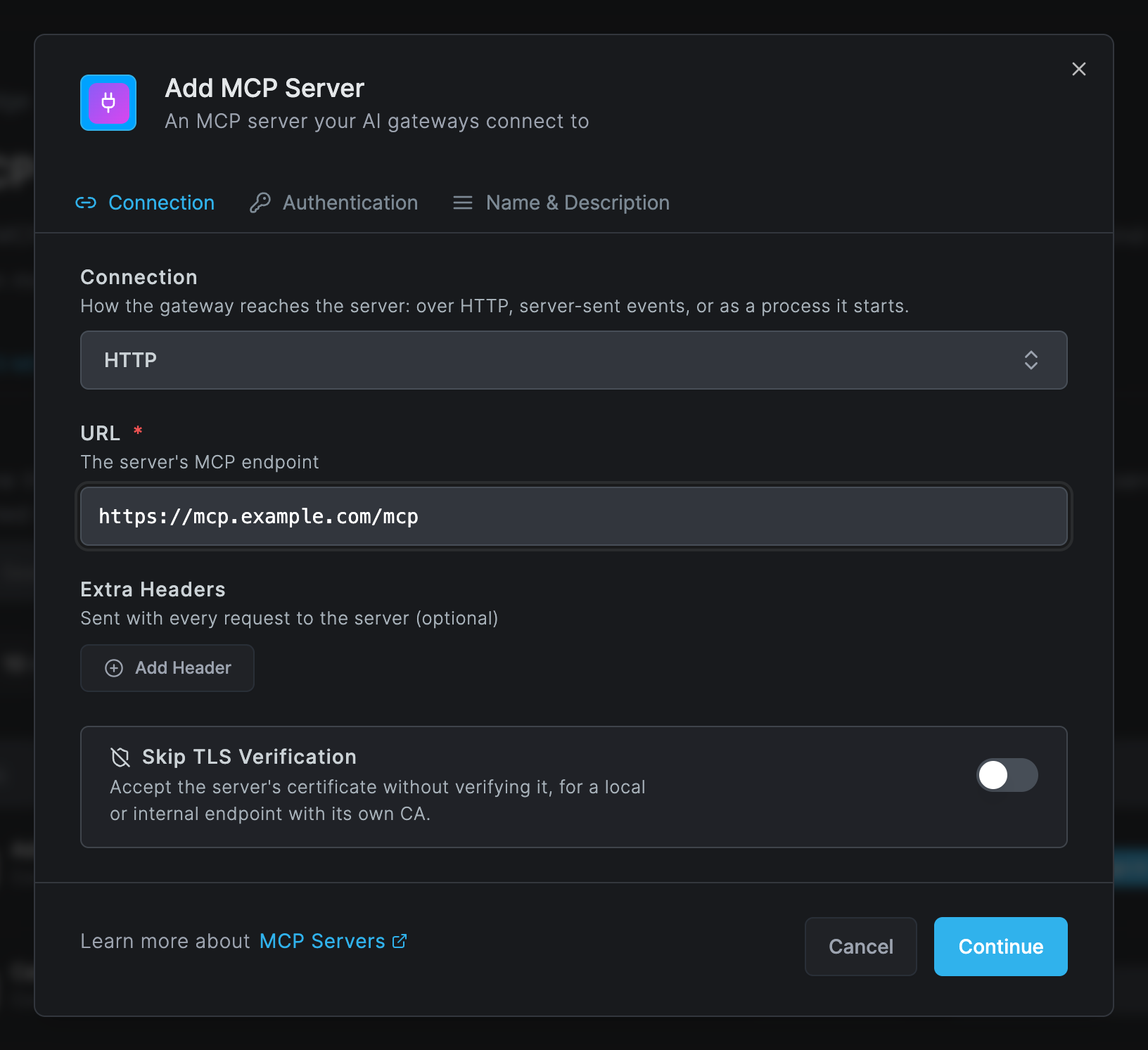
| Field | What to enter |
|---|---|
| Connection | How the gateway reaches the server: HTTP, SSE (server-sent events), or Stdio, a process the gateway starts. |
| URL | For HTTP and SSE: the server's MCP endpoint, http:// or https://. Required. |
| Command | For Stdio: the command and its arguments, for example npx and -y @modelcontextprotocol/server-filesystem /data. The gateway host runs it. Required. |
| Environment Variables | For Stdio: variables set for the process. Optional. Values are write-only. |
| Extra Headers | Headers sent with every request to the server. Optional. Values are write-only. |
| Skip TLS Verification | Accept the server's certificate without verifying it, for a local or internal endpoint with its own CA. |
Authentication
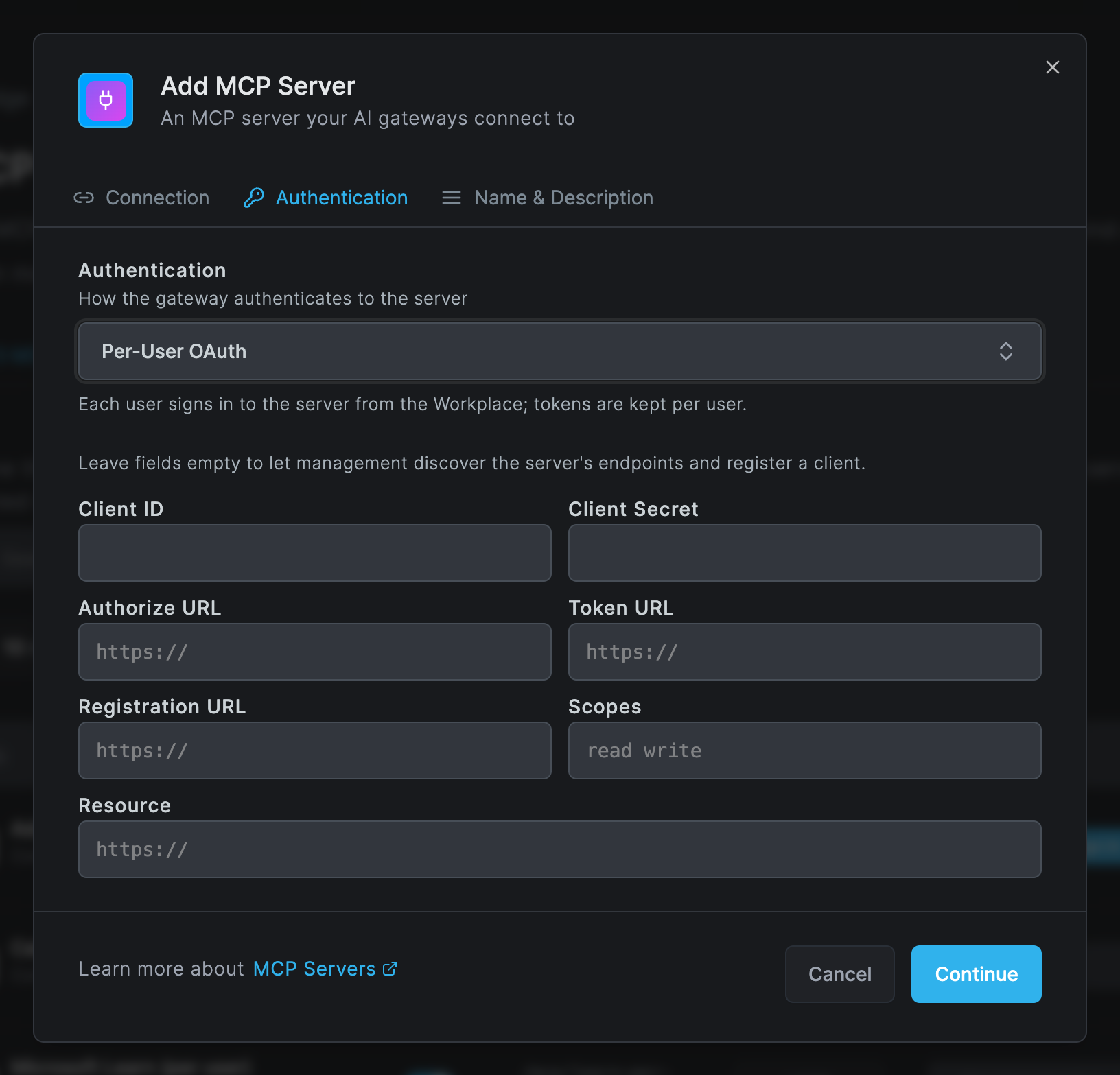
Choose how the gateway authenticates to the server. A Stdio server allows only None and Headers.
| Authentication | Who holds the credential | What users do |
|---|---|---|
| None | Nobody. The server takes no credential. | Nothing. |
| Headers | You. One set of Credential Headers, sent with every request. | Nothing. |
| Per-User Headers | Each user, for the names you list in Header Names Users Supply, comma separated, for example X-API-Key, X-Tenant-ID. You can add Static Headers that are the same for everyone. | Enter their values once in the Workplace. |
| OAuth | You. You sign in once, and every user shares that token. | Nothing. Until you sign in, their Workplace says that an admin has not connected the server yet. |
| Per-User OAuth | Each user. Tokens are kept per user. | Sign in once in the Workplace, in a popup at the provider. |
For both OAuth types the dialog shows Client ID, Client Secret, Authorize URL, Token URL, Registration URL, Scopes (space separated) and Resource. Leave them empty to let management discover the server's endpoints and register a client on the first sign-in. Management then fills in what it discovered.
Some providers refuse automatic client registration or Netzilo's callback address. The sign-in
then fails with Sign-in failed and a message such as client registration refused. Register
an OAuth client at the provider by hand with the redirect URI
https://<management-host>/api/mcp/oauth/callback, where <management-host> is the address your
dashboard uses for the management API. Enter its Client ID and, if it has one, its
Client Secret on the server.
OAuth tokens are refreshed by management shortly before they expire. When a refresh fails, the credential needs a new sign-in: the user's Workplace shows Needs Attention with Reconnect, and for a shared sign-in the Sign-In Expired state appears in the server's dialog.
Name & Description
| Field | What to enter |
|---|---|
| Name | A name unique in the account, for example GitHub. |
| Endpoint | The slug the gateways serve the server at, /mcp/<slug>. It is filled in from the name; lowercase letters, digits and hyphens. It is unique across servers and bundles and cannot be changed once the server is created. |
| Description | Optional. |
| Enable MCP Server | A disabled server is removed from every gateway. Filters that grant it grant nothing from it. |
Click Add MCP Server. Adding, updating and deleting a server are recorded in Activity > Events.
Sign in for a shared OAuth server
A server with OAuth authentication needs one sign-in by an administrator. Save the server first, then open it again: the Authentication tab shows the Shared Sign-In panel. You can also click Sign In in the server's Auth column.
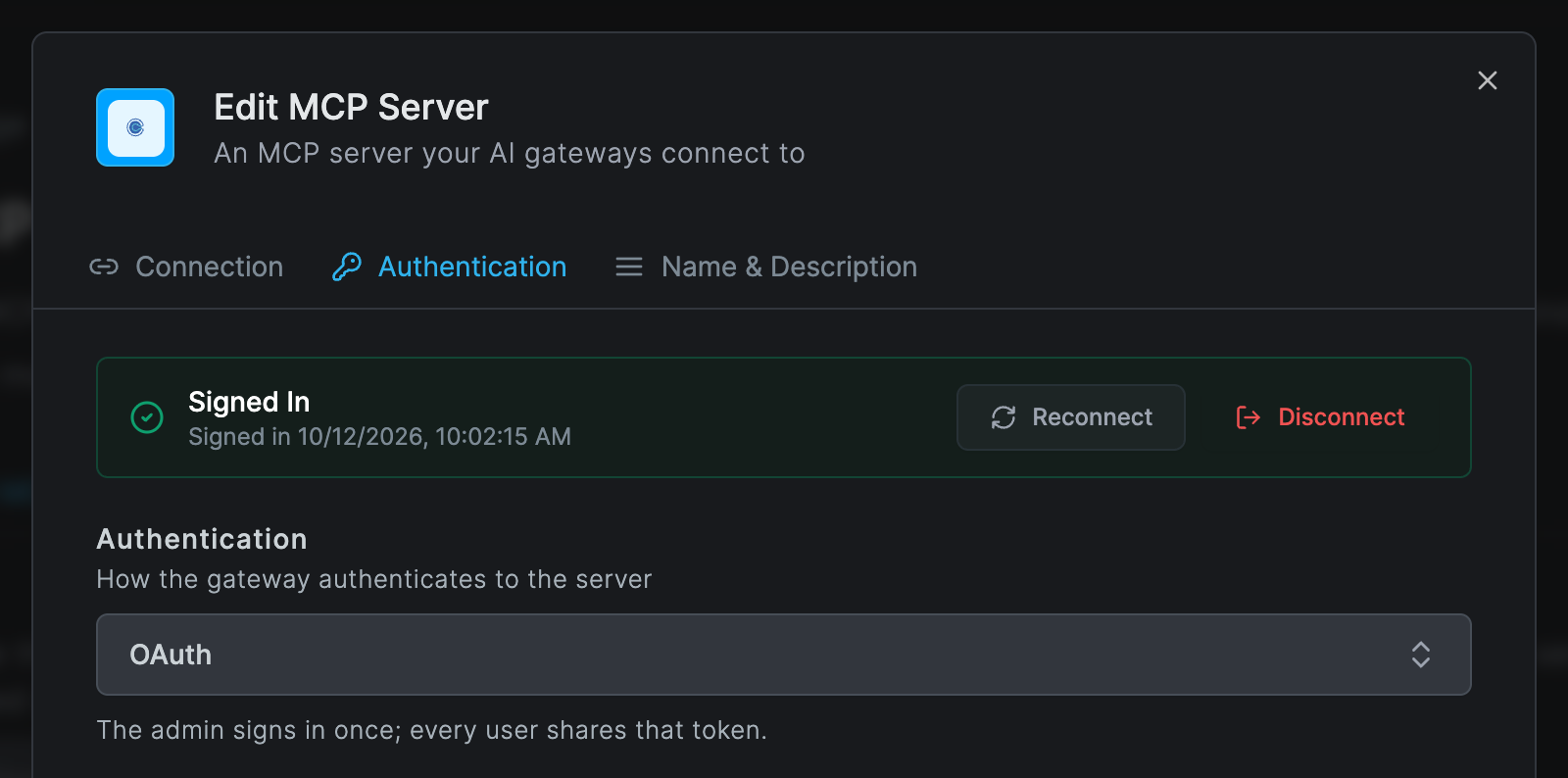
- Click Sign In. The provider's sign-in opens in a popup and the panel says Complete the sign-in in the window that opened.
- Sign in at the provider with the account all users should share.
- The panel turns to Signed In and shows when. Reconnect signs in again; Disconnect removes the shared credential.
The popup must finish within 10 minutes. If the browser blocks it, allow pop-ups for the dashboard and try again.
A shared sign-in means one identity at the provider for everyone. The provider's own audit log shows that account, not the individual user. Use Per-User OAuth when you need each user's own identity at the provider.
MCP bundles
A bundle serves chosen tools from several MCP servers behind one endpoint, so a client connects to one address instead of several. Open the MCP Bundles tab.
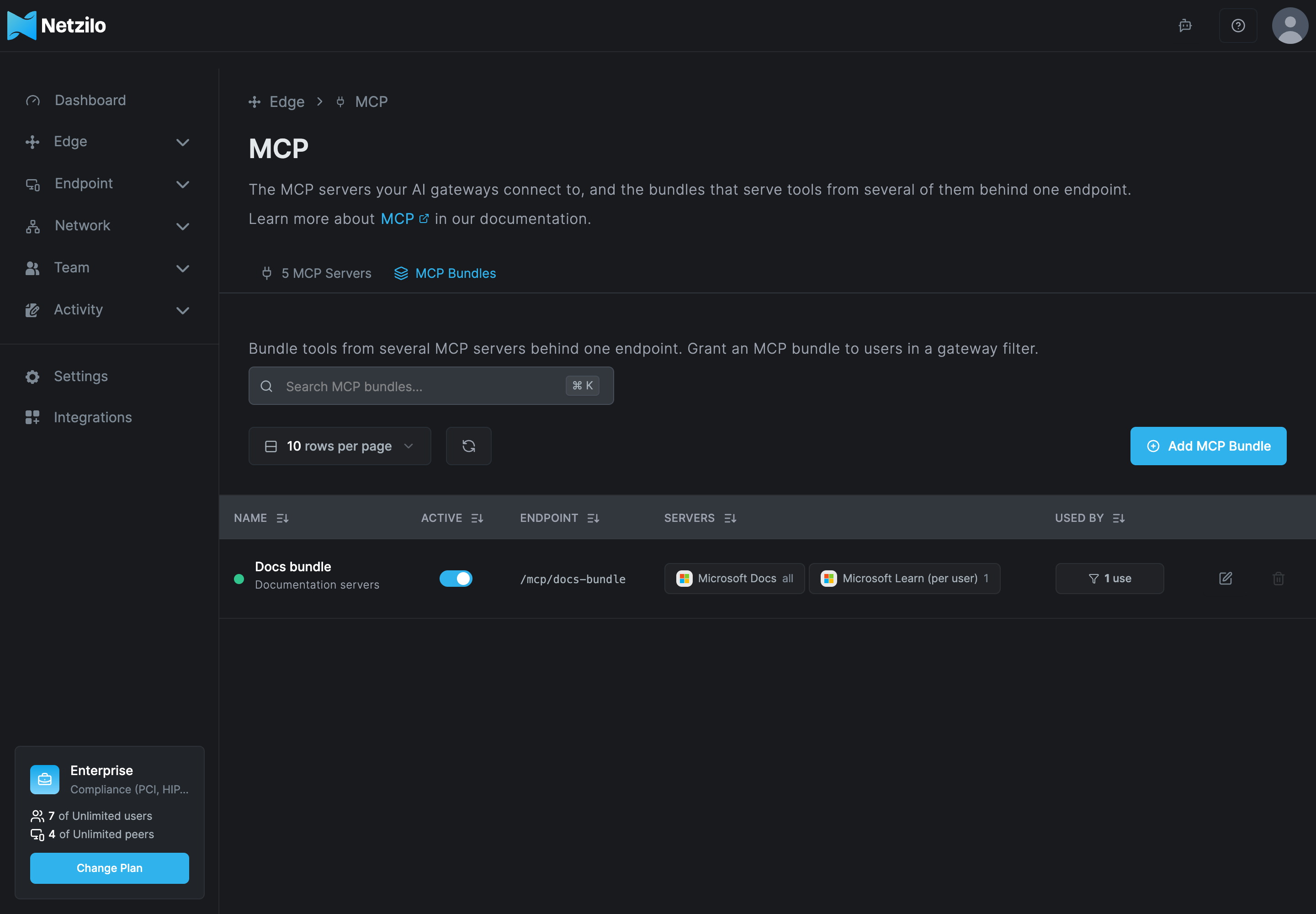
Click Add MCP Bundle.
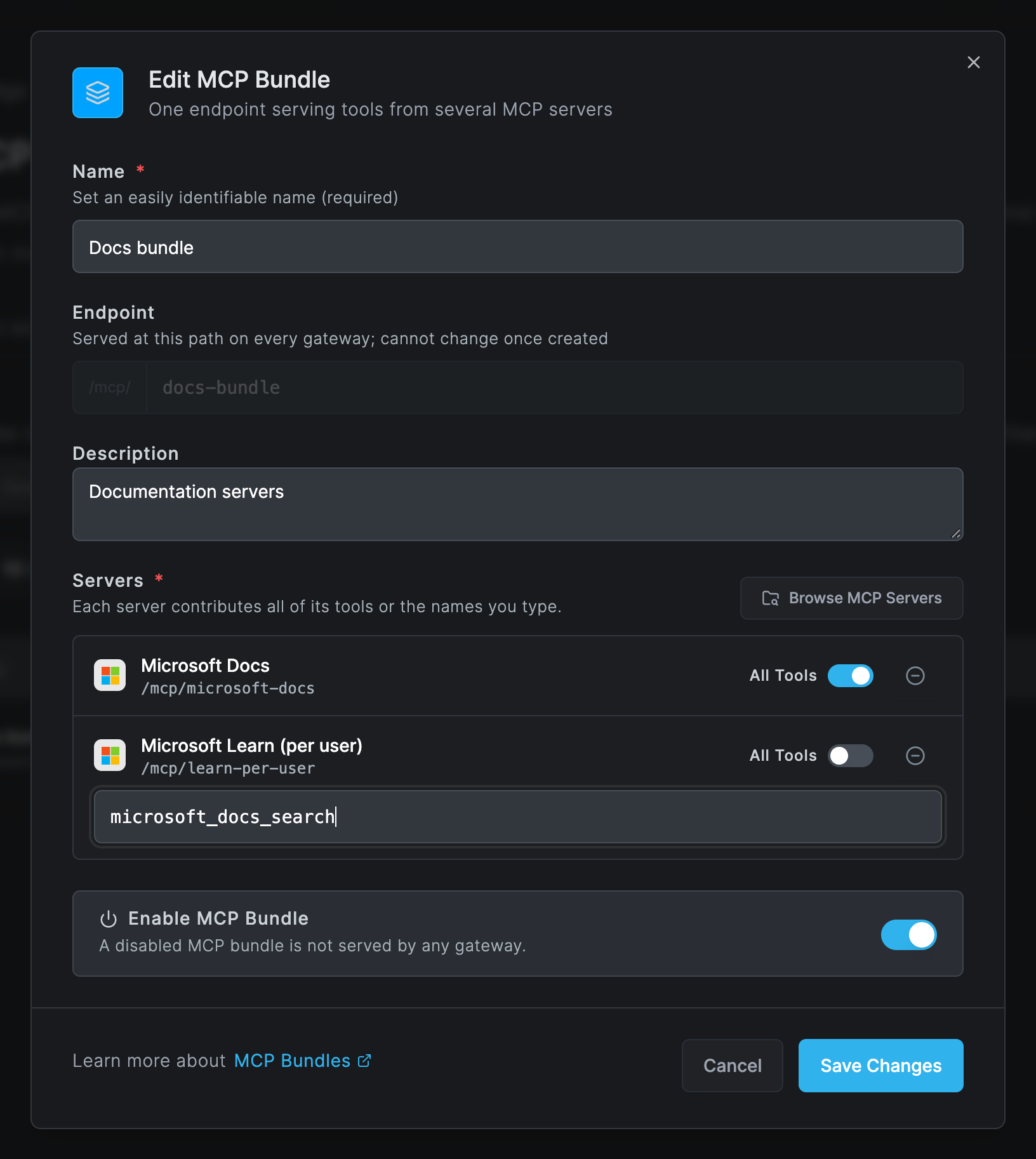
| Field | What to enter |
|---|---|
| Name | A name for the bundle, for example Support toolkit. |
| Endpoint | The slug the gateways serve the bundle at. It shares the namespace of server slugs and cannot be changed once created. |
| Description | Optional. |
| Servers | Click Browse MCP Servers and pick at least one server. Each server contributes All Tools, or, with the switch off, only the tool names you type, comma separated. |
| Enable MCP Bundle | A disabled bundle is not served by any gateway. |
Members keep their own authentication. If a member needs a per-user sign-in, users still have to connect that server; until they do, the bundle's Workplace card shows Needs Attention and names the servers to finish.
Grant servers and bundles to users
Go to Edge > Filters, open a gateway filter, and use its MCP tab: Browse MCP Servers grants servers, each with All Tools or the tool names you type; Browse MCP Bundles grants bundles. See Filters.
Tool names are not checked against the server: management does not know a server's tools, only the gateway does at runtime. A misspelled tool name grants nothing, and nothing warns you.
What users see
- In the Workplace, under Agentic Access, each granted server and bundle has a card with its endpoint and its state. Per-user servers show Connect, then Disconnect once connected; a sign-in that could not be renewed shows Reconnect. See Agentic Access.
- An agent that calls a tool before the user has connected the server gets this text as the tool
result:
Connect <server> in your Workplace before using its tools: ..., with a link to the Workplace. The user connects and retries. - A tool call or result blocked by a guardrail fails with
Tool execution failed: Blocked by rule: <name>. A redacting guardrail rewrites the arguments or the result instead. - Tools are listed to clients with the server's slug in front, for example
microsoft_docs-microsoft_docs_search; grants and events use the bare tool name. - Desktop apps and connectors that sign in themselves at the gateway, such as Claude Desktop or a claude.ai connector, are covered in Agentic Access.
Change or delete a server
- Changing the authentication type deletes every stored credential for that server. Every user has to connect again.
- A server cannot be deleted while a filter or a bundle uses it; the delete button is disabled. Remove it from those filters and bundles first. Deleting a server deletes every stored sign-in and header value for it.
- A bundle cannot be deleted while a filter grants it.
Troubleshooting
A user's card shows Needs Attention. A per-user sign-in or header value is missing, the shared OAuth sign-in has not been done, a token refresh failed, or a bundle member is not set up. The card says which. The user clicks Connect or Reconnect; for a shared sign-in an administrator signs in from the server's dialog.
Sign-in failed with client registration refused. The provider refuses Netzilo's callback or
automatic registration. Register a client at the provider with the callback URI shown under
Authentication and enter its Client ID.
Sign-in failed because the server's authorization endpoints could not be discovered. The server publishes no OAuth metadata. Fill in Authorize URL, Token URL and Client ID by hand.
The sign-in expired or was not started here. The popup took more than 10 minutes, or, on a self-hosted server with several management replicas, the callback reached another replica. Retry; on a self-hosted server, run one replica or use session affinity.
the server refused these values (HTTP 401) when a user saves header values. The values are
wrong. The values are tested against the server before they are stored.
The Workplace Tools tab says The gateway did not list tools for this server. The server is not reachable from the gateway host, rejected the credential, or the Stdio command failed to start. Check the gateway's log, see AI Gateway.
A Stdio server never starts. The command must exist on the gateway host, and environment variables are set in the gateway's process. Install the command there.
Everyone was disconnected after an edit. The authentication type was changed, which deletes the stored credentials. Users connect again.
A user can call tools they should not. Another filter grants the server too, or a bundle includes those tools. Grants from all of a user's filters add up. Narrow the grant in the filter or the bundle.
Related Documentation
- Filters - grant MCP servers and bundles to users
- Guardrails - the rules that run on every tool call and result
- Agentic Access - how users connect servers and clients
- AI Gateway - install and run the gateway that serves MCP
- AI Usage - tool calls per user and server