

Guardrails
A guardrail is a detection rule for AI traffic: a YAML rule in the Sigma format with Netzilo extensions. It looks at prompts and answers, tool calls and tool results, HTTP requests and, on devices, process and file activity, and decides what happens: block, redact, report, allow, or a more specialised action. Typical guardrails stop prompt injection, redact secrets and personal data, and detect an agent that reads credentials and then sends them out.
A guardrail does nothing until a filter binds it. The same guardrail runs on devices when an endpoint filter binds it, and at the Netzilo AI Gateway when a gateway filter binds it.
You manage guardrails under Edge > Guardrails. Only administrators and owners see this page. This page covers the screen and the lifecycle of a rule. The full rule language, with every field, modifier, action and the scripting builtins, is on Detection Rules.
Every guardrail belongs to your account. There is no catalogue of global or premium rules and no plan gate on guardrails. Ready-made rules for prompt injection, secrets, personal data, path traversal, SSH-key exfiltration and system enumeration are in the public rule library at github.com/netzilo/aidr-sigma: copy one, adjust it, test it with Replay. Guardrails were called Scanners in earlier releases.
How it works
- You write a guardrail, or paste one from the rule library, and test it with Replay against activity a device has already recorded.
- A filter binds the guardrail to a population:
- an endpoint filter, to the devices in its groups and operating systems, and with the OS Browser to the Netzilo browser extension of its users;
- a gateway filter, to the users of its groups when they go through the AI Gateway.
- Each Netzilo client, browser extension and AI Gateway loads the guardrails of the filters that apply to it and evaluates them on every matching event.
- The most severe matching guardrail decides the outcome and is the one named in the event. Each decision is recorded in Activity > Events.
Where a guardrail runs decides what it can see:
| Bound by | Runs on | Sees |
|---|---|---|
| an endpoint filter | the Netzilo client on each device, and the browser extension for the OS Browser | prompts and answers of intercepted apps, agent hooks and the browser extension; MCP over HTTP from intercepted apps; HTTP requests; semantic events; process and file activity where the client has those probes |
| a gateway filter | the AI Gateway, per user | prompts and answers, the tool calls a model asks for, every MCP tool call and result through /mcp/<slug>. No process, file or network-connect activity: rules that need it are not loaded at the gateway |
Which of the gateway's API surfaces are scanned is described on the AI Gateway page.
The Guardrails list
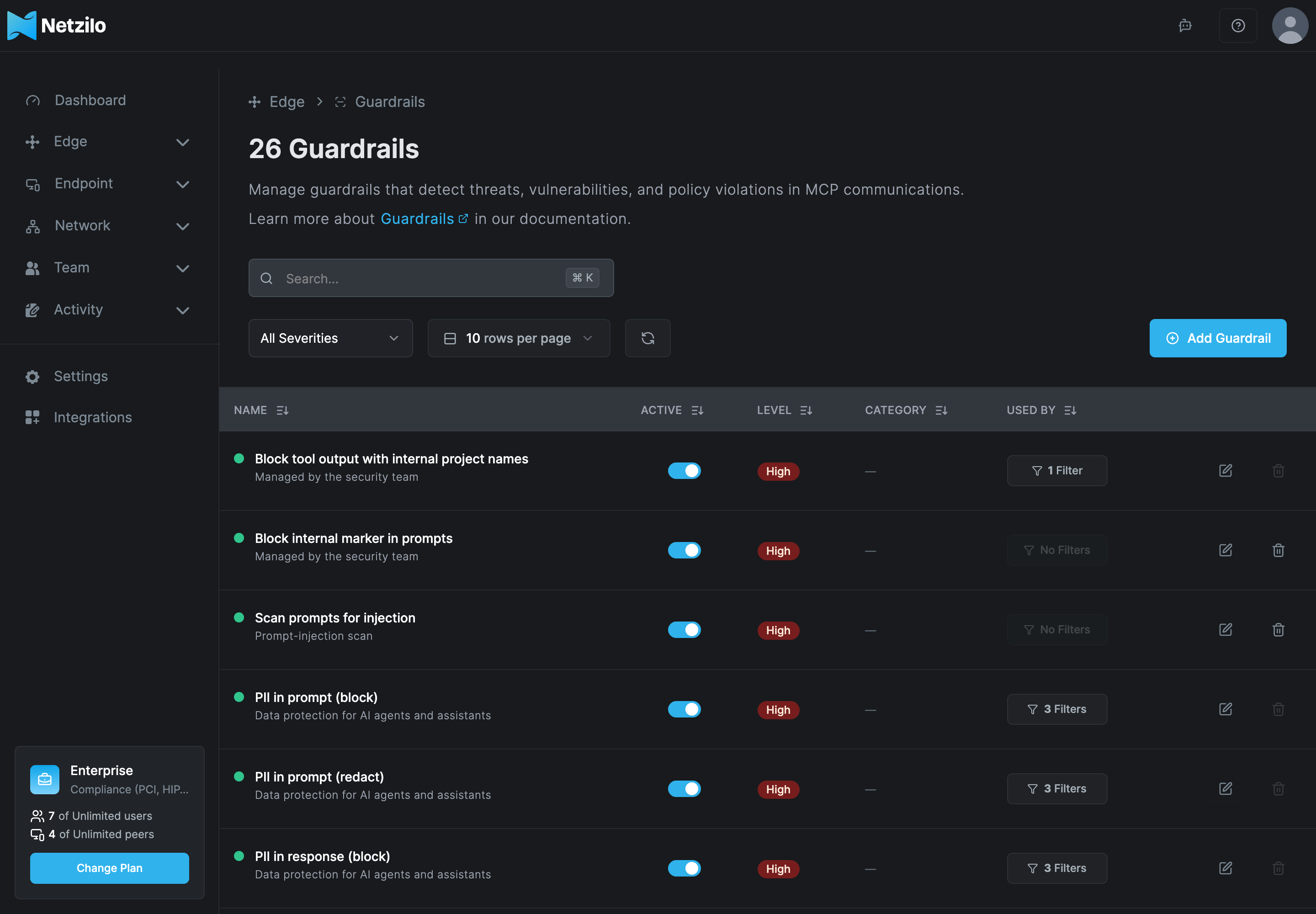
| Column | What it shows |
|---|---|
| Name | The guardrail's name and description. |
| Active | Whether the guardrail is enabled. A disabled guardrail is dropped from every filter at the next sync. |
| Level | Critical, High, Medium or Low, from the rule's level. |
| Category | The attack tactics from the rule's tags, for example attack.initial-access shows as Initial Access. A dash means the rule has no such tag. |
| Used by | The filters that bind the guardrail. No Filters means it runs nowhere. |
Filter by level with All Severities. Click a row to edit the guardrail.
The dashboard does not let you delete a guardrail while a filter uses it: the delete button is disabled with Used by n filters and cannot be deleted. Remove it from those filters first.
Add or edit a guardrail
Click Add Guardrail, or click a row to edit one.
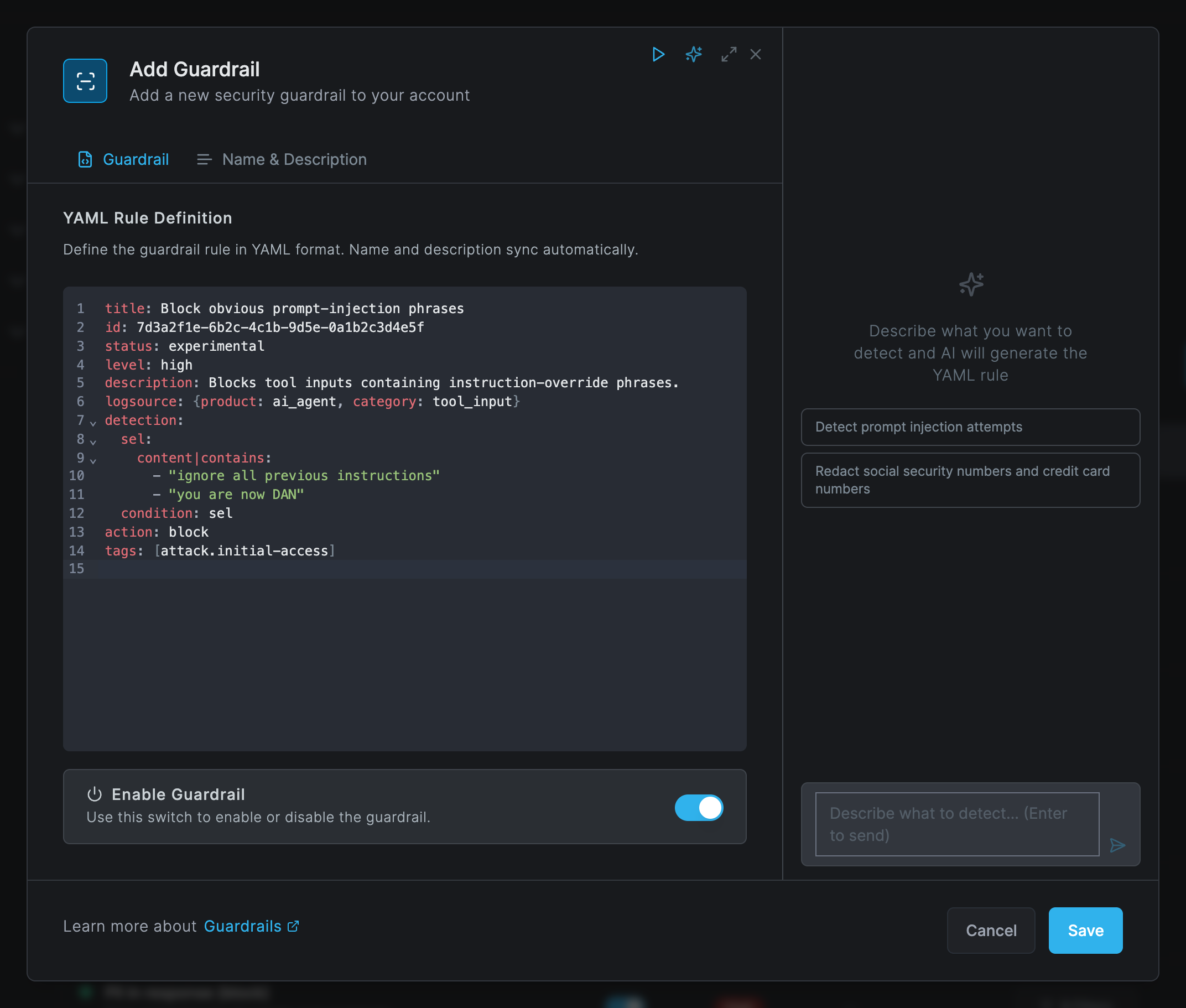
The dialog has two tabs:
| Tab | Field | What to enter |
|---|---|---|
| Guardrail | YAML Rule Definition | The rule. The rule's title and description sync with the name and description on the other tab. A rule that does not parse shows YAML Parse Warning with the reason. |
| Guardrail | Enable Guardrail | Turn the guardrail on or off without unbinding it. |
| Name & Description | Guardrail Name, Description | Both required. They sync with title and description in the YAML. |
The header icons are Replay (play), Generate with AI (sparkle) and maximize. Click Save, or Save Changes when you edit. Creating, updating and deleting a guardrail are recorded in Activity > Events.
There is no version history and no rollback. Saving replaces the rule, and the previous YAML is kept nowhere. Keep a copy of every rule in your own version control before you edit it.
A minimal rule
title: Block obvious prompt-injection phrases
id: 7d3a2f1e-6b2c-4c1b-9d5e-0a1b2c3d4e5f
status: experimental
level: high
description: Blocks tool inputs containing instruction-override phrases.
logsource: {product: ai_agent, category: tool_input}
detection:
  sel:
    content|contains:
      - "ignore all previous instructions"
      - "you are now DAN"
  condition: sel
action: block
tags: [attack.initial-access]
idis a UUID that identifies the rule. Use a new one for every rule.levelsets the severity and the default action: critical and high block, medium and low report, whenactionis left out.logsource.categorychooses which traffic the rule looks at, here the input of a tool call. Other categories cover prompts and answers (llm_request,llm_response), tool results, HTTP requests, semantic events and, on devices, processes, files and network connections.detectionholds named selections and acondition. Exclude known-good traffic with a second selection:condition: sel and not excl.actionis one ofblock,report,redact,allow,scanand the other actions listed on Detection Rules.
Two things make a rule fail silently, so check for them:
|reuses RE2. Lookarounds, backreferences and\uescapes do not compile. The rule is saved, but the device or gateway reports it as failed and it never fires.- The wrong category. A rule bound in a gateway filter that needs process, file or connect activity is not loaded at the gateway at all.
The server does not validate the YAML. Read the host's rule load after every save, see Troubleshooting.
Generate with AI
Click the sparkle icon to open the AI panel, describe what to detect and press Enter. The rule streams into the editor. Review it, then test it with Replay before you bind it.
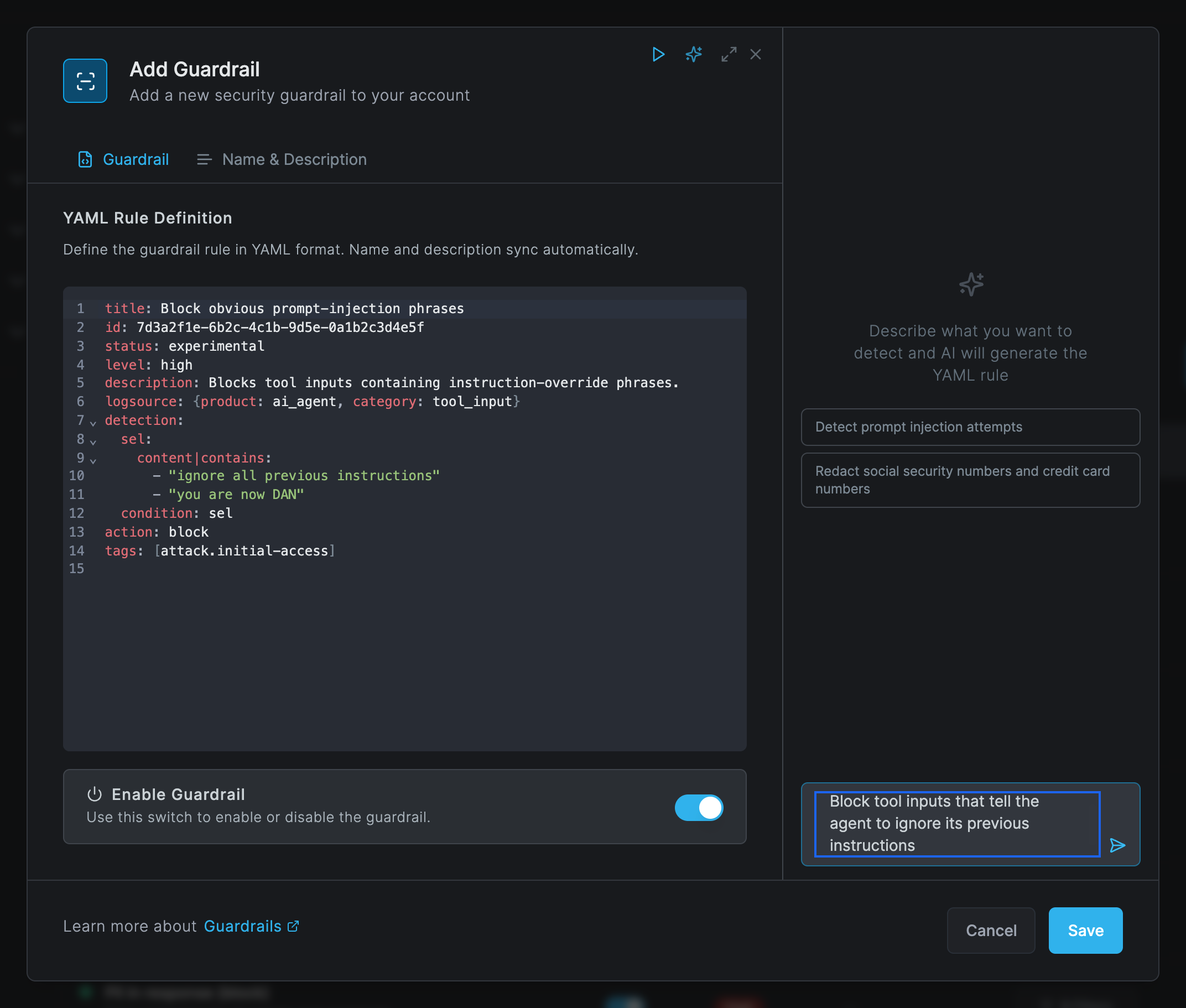
The panel needs a model approved for Threat Analysis under Integrations > Artificial Intelligence. Without one the panel says No AI model is approved for Threat Analysis and tells you where to add it. See Artificial Intelligence.
Replay
Replay runs the rule in the editor against a device's recorded behavior graph, without deploying it. Use it to see which observations the rule matches, and that it matches nothing else.
- In the guardrail dialog, click Replay (the play icon). The dialog Replay Guardrail opens: Test rule "name" against a peer's behavior graph.
- Choose a peer under Select a peer…. Only peers with recorded AI activity are listed; if none has any, the list says No peers with AIDR data. The peer's behavior graph loads. You can narrow the time range and search observations with Search observations….
- Click Play.
- Read the tabs Search Results, Replay Results and Output. The summary counts how many observations were blocked, redacted, detected, allowed or unchanged, and any errors.
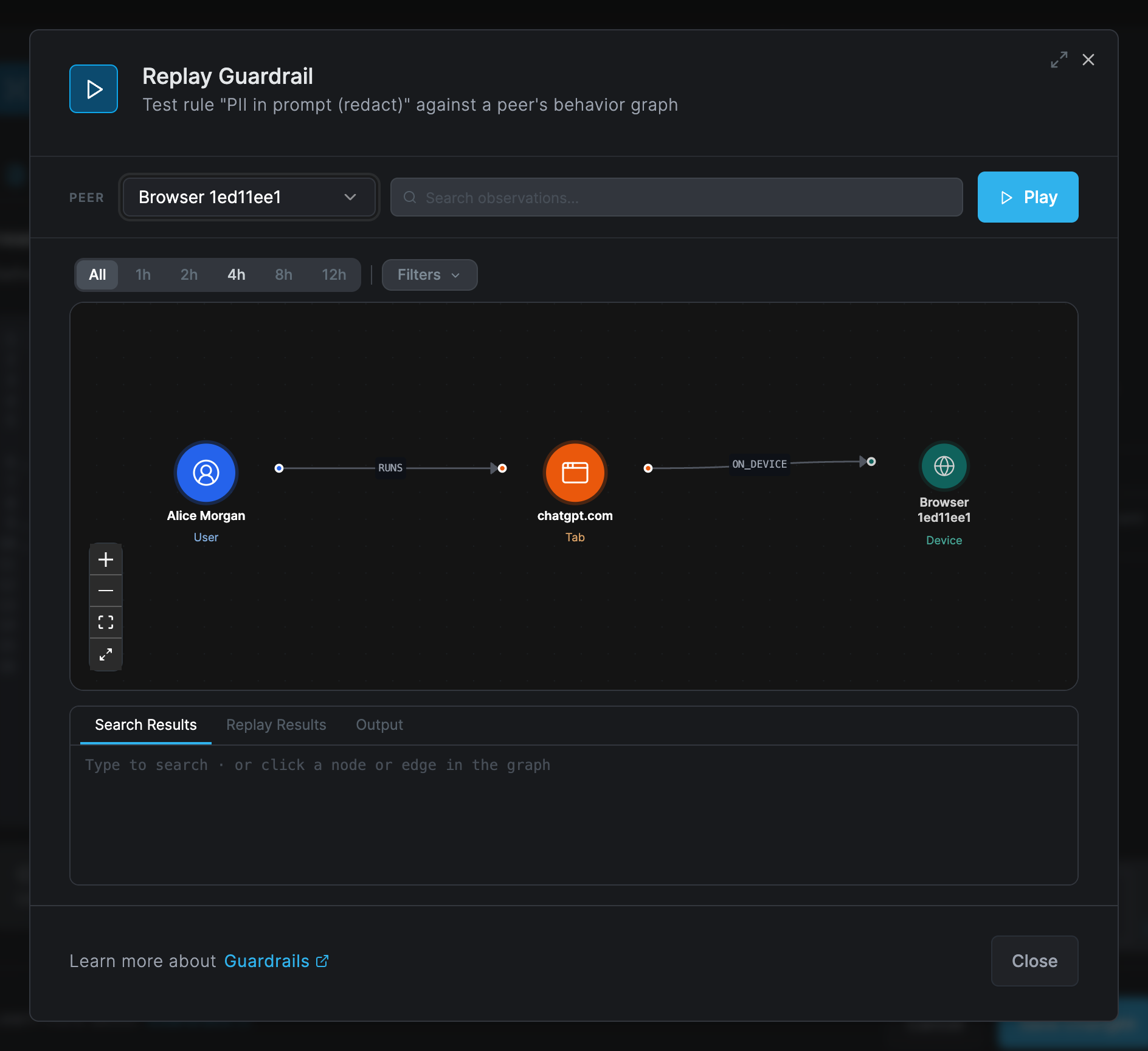
Edit the YAML and replay until the intended observations, and only those, fire.
Replay uses what devices have recorded, so it does not exercise the AI Gateway. Test a rule bound in a gateway filter with a real request through the gateway and read the AI blocked or AI detected event.
The behavior graph itself, and running guardrails from a session snapshot, are described on Behavior Graph & Kill Chains.
Bind a guardrail with a filter
Go to Edge > Filters, open a filter, and on its Guardrails tab click Browse Guardrails or New Guardrail. See Filters.
When several filters apply to the same device or user, all their guardrails are evaluated together:
- The most severe matching rule decides, then the rule
idbreaks ties. Its position in a list has no effect. - A block from any rule wins. After a block only
redactandexecuterules still run. - An
allowrule records a match and never lifts another rule's block. To exempt a group, give it a filter that does not bind the rule, and make sure no other filter that matches it binds the rule either.
What users see
How a decision shows depends on where it was made:
- At the AI Gateway, a blocked request gets HTTP 403 with the rule's reason. A blocked MCP
tool result answers
Tool execution failed: Blocked by rule: <name>. A streamed answer is checked when it ends: a block ends the stream, and a redaction cannot be applied to a stream. - Agent hooks return a block decision to the agent, which shows the reason.
- The browser extension refuses the prompt in the chat page or redacts it there.
- A redact rule rewrites only the matched content, for example to
[REDACTED].
Every decision is an event in Activity > Events, category AI Edge: AI allowed, AI blocked, AI redacted, AI redirected or AI detected (a match in report mode). Each names the rule, the filter, the surface, the agent, model or tool, and the source: the client, a hook, the extension or the gateway. See Event reference.
Roll out a guardrail
- Draft in report mode (
action: report), or generate it with AI and review it. - Replay it against several peers with different agents and users.
- Pilot: bind it in a filter for a small group, an endpoint filter for devices or a gateway filter for gateway users. Run it for one or two weeks and review the AI detected events and the AI Agent Activity report.
- Tighten: add exclusions and anchors, then switch to
blockorredact. - Widen the filter's groups.
- Review monthly: AI blocked volumes per rule, on the Dashboard's agentic activity cards and in Activity filtered by AI blocked. Retire noisy rules.
Troubleshooting
The rule is saved but never fires. It is not bound (Used by shows No Filters), the
filter does not match the device or user, the logsource.category does not match where the
content is, it is bound in a gateway filter but needs process, file or connect activity, or a
more severe rule already blocks the same events. Replay shows the real category and content of
the observations.
The host reports the rule as failed. The Netzilo client logs Failed rules: [<id>], the
browser extension lists failed rules by name in its popup, and the gateway logs the number of
failed rules in its policy line. The YAML does not parse, or a |re pattern does not compile as
RE2. Fix the rule and save; check the next rule load.
It fires far too often. The contains values are too broad. Add an exclusion selection and
run it in report mode until it is quiet.
The redaction is not visible. Redaction replaces matched content only. A streamed answer at the gateway can only be blocked. An old client or extension may still render the original text: compare the event's content and update the host.
The event names a different rule than the one you expected. The event names the most severe
match across all filters. Correct the level values or narrow the other rule; reordering has no
effect.
scan rules slow the agent down. Classifier or AI-judge calls take time, with a 15-second
timeout on devices and gateways. Narrow the detection first and use on_timeout: report.
The Generate with AI icon is missing. No model is approved for Threat Analysis under Integrations > Artificial Intelligence.
Replay says No peers with AIDR data. No device has recorded AI activity yet. Generate some traffic on a device that an endpoint filter covers.
A filter fails to save with guardrail <id> does not exist. The guardrail was deleted through
the API while the filter still named it. Remove it from the filter.
Things to know
- No version history. Keep your rules in your own version control.
- No per-group exemption inside a rule. A rule has no group field. Exempt people with filters.
- Gateway coverage. The gateway scans only some of its API surfaces, see AI Gateway. Streams are block-only.
- No per-rule timing. No overhead figure or per-rule timing is shown. When AI tools feel slow, narrow the rules and move expensive ones to report mode.
- API. Guardrails are managed at
/api/edge/guardrails; the older path/api/edge/scannersanswers the same. See the API reference.
Related Documentation
- Detection Rules - the full rule language, actions and scripting
- Filters - bind guardrails to devices, browsers and gateway users
- Behavior Graph & Kill Chains - what Replay runs against
- AI Gateway - where gateway-bound guardrails run
- Browser Extension - where Browser-OS guardrails run
- Artificial Intelligence - approve a model for Threat Analysis
- AI Agent Activity - review detections and blocks