

AI Agent Activity Report
The AI Agent Activity Report provides comprehensive monitoring and analytics for AI agent usage across your Netzilo network, tracking tool calls, policy violations, and usage patterns for different AI models and servers.
Overview
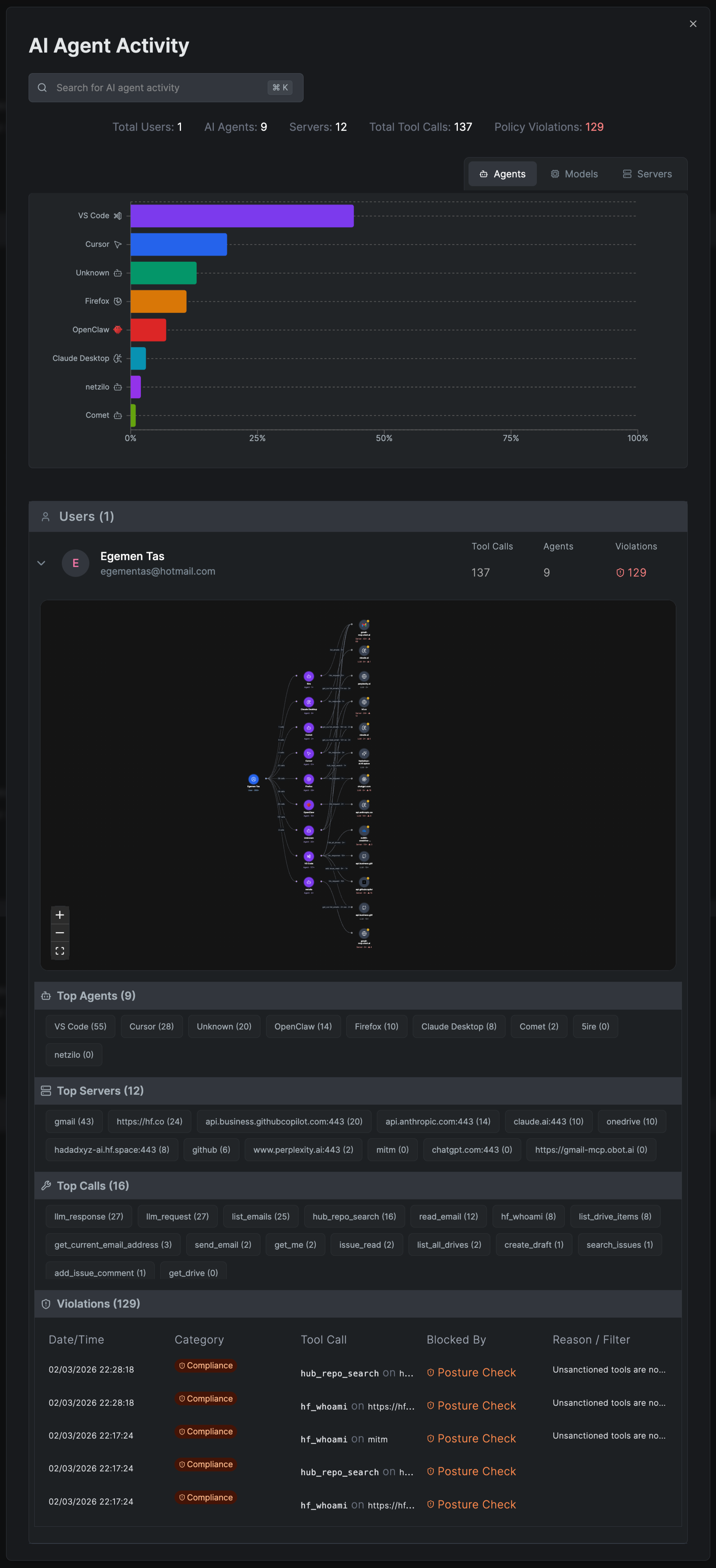
The AI Agent Activity dashboard displays key metrics at the top:
- Total Users: Number of users utilizing AI agents
- AI Agents: Count of different AI models being accessed
- Servers: Number of MCP servers handling AI requests
- Total Tool Calls: Aggregate number of AI tool invocations
- Policy Violations: Count of detected policy breaches
View Modes
The report offers three different visualization modes:
Agents View
Displays AI model usage distribution showing which models are most frequently used:
- VS Code integration usage
- Cursor IDE connections
- Unknown/unidentified agents
- Firefox browser extensions
- OpenCore integrations
- Claude Desktop applications
- Various other AI agent connections
Models View
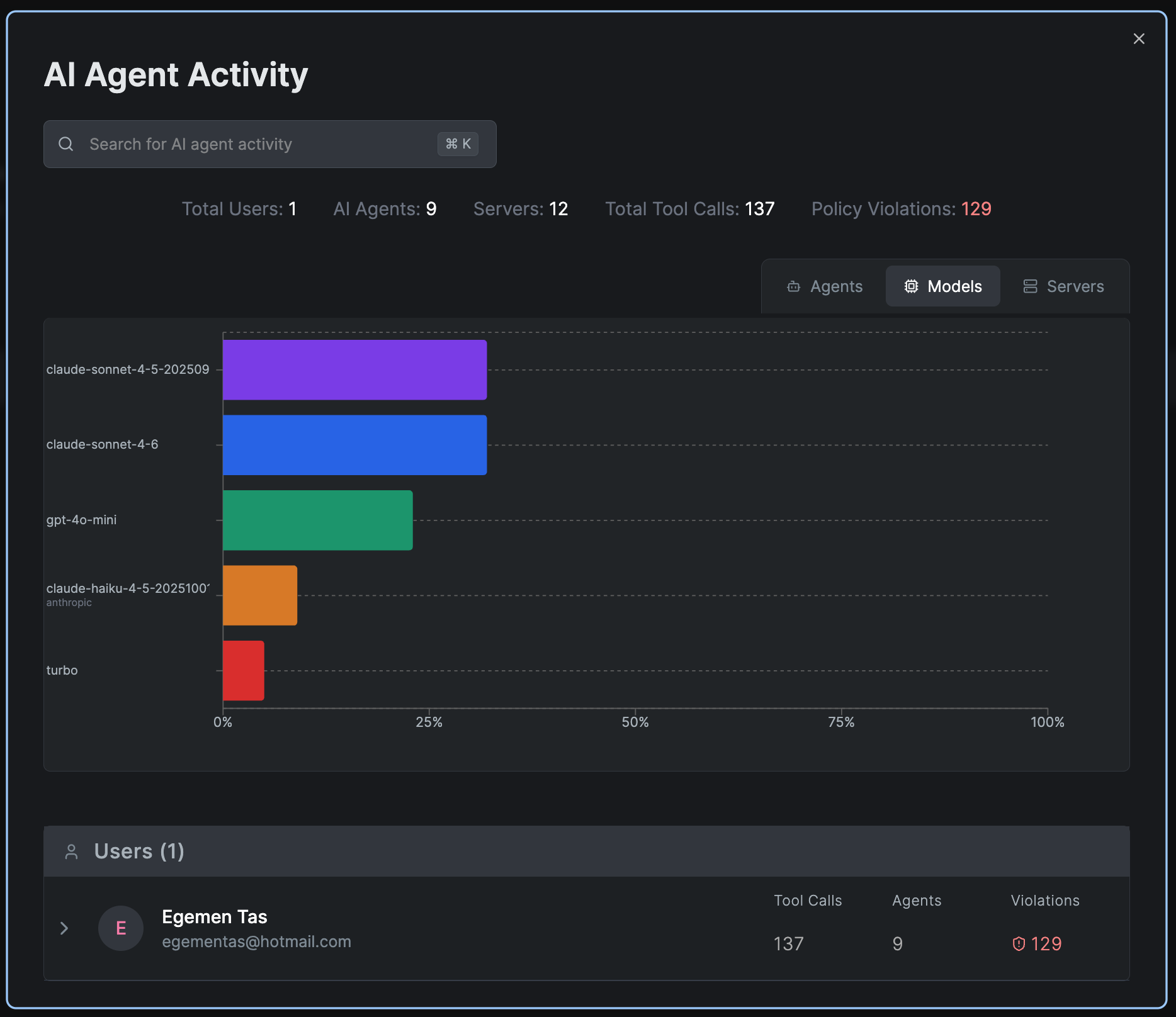
Shows the distribution of AI model usage across different versions:
- claude-sonnet-4-5-202509
- claude-sonnet-4-6
- gpt-4o-mini
- claude-haiku-4-5-2025100
- turbo
- Other model variants
Servers View
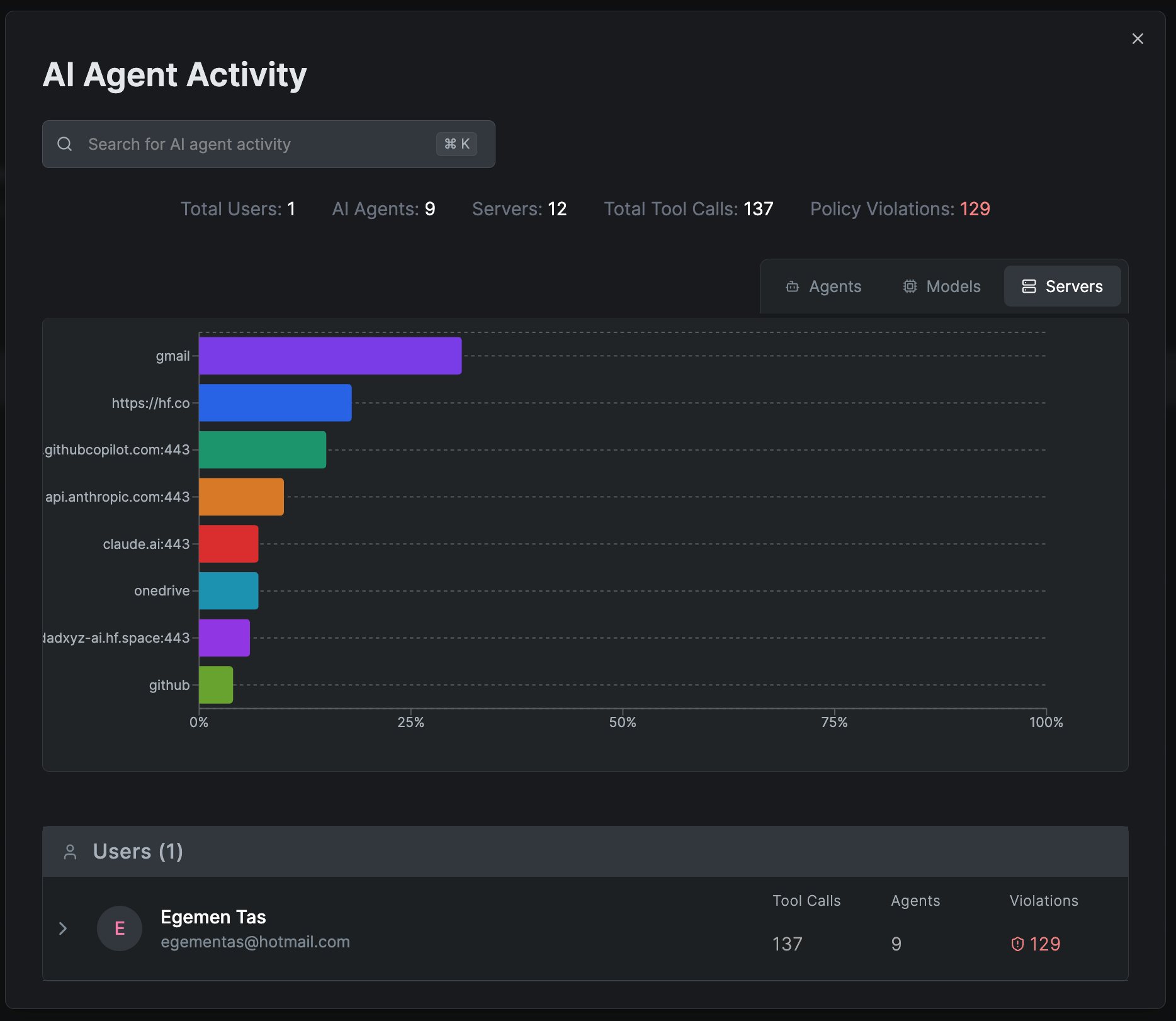
Visualizes MCP server endpoint usage:
- gmail connections
- https://hf.co endpoints
- github.copilot.com:443
- api.anthropic.com:443
- claude.ai:443
- onedrive integrations
- jadxyz-ai.hf.space:443
- github API endpoints
Detailed Analytics Sections
Top Agents
Lists the most active AI agents with usage statistics:
- VS Code (58 calls)
- Cursor (28 calls)
- Unknown (20 calls)
- OpenClaw (14 calls)
- Firefox (10 calls)
- Claude Desktop (8 calls)
- netzilo (0 calls)
- Comet (0 calls)
Top Servers
Shows the most accessed MCP server endpoints with call counts:
- gmail (43 calls)
- https://hf.co (24 calls)
- api.business.githubcopilot.com:443 (20 calls)
- api.anthropic.com:443 (14 calls)
- claude.ai:443 (10 calls)
- onedrive (10 calls)
- Additional servers with varying usage levels
Top Calls
Tracks the most frequently invoked AI tool functions:
- llm_response (27 calls)
- llm_request (27 calls)
- list_emails (25 calls)
- hub_repo_search (16 calls)
- read_email (12 calls)
- hf_whoami (8 calls)
- list_drive_items (8 calls)
- get_current_email_address (3 calls)
- send_email (2 calls)
- get_me (2 calls)
- issue_read (2 calls)
- list_all_drives (2 calls)
- create_draft (1 call)
- search_issues (1 call)
- add_issue_comment (1 call)
- get_drive (0 calls)
Policy Violations
Displays a detailed table of policy violations with:
- Date/Time: When the violation occurred
- Category: Type of violation (Compliance)
- Tool Call: Which specific tool or function was involved
- Blocked By: The security mechanism that prevented the action (Posture Check)
- Reason/Filter: Specific reason for blocking (e.g., "Unsanctioned tools are not allowed")
Example violations shown:
- hub_repo_search blocked on https://hf.co
- hf_whoami blocked on https://hf.co
- mlim operations blocked
- Various tool calls blocked due to unsanctioned tool policies
User Details
For each user, the report shows:
- Email: User identification (e.g., jdoe@example.com)
- Tool Calls: Total number of AI tool invocations (137)
- Agents: Number of different AI agents used (9)
- Violations: Count of policy violations (129)
The user section includes an expandable network visualization showing the connections between users, AI agents, and MCP servers, providing a visual representation of the AI tool usage flow.
Creating an AI Agent Activity Report
To generate a new AI Agent Activity report:
- Navigate to Activity > Reports
- Click Create Report
- Select AI Activity as the Report Type
- Choose a Date Range for the report
- Select the Groups to include or choose "All Groups"
- Click Save to generate the report
Practical Use Cases
Monitoring AI Usage
- Track which AI models and tools are being used most frequently
- Identify unauthorized AI tool usage attempts
- Monitor policy compliance across the organization
- Analyze usage patterns to optimize AI resource allocation
Security and Compliance
- Detect and prevent unsanctioned AI tool usage
- Track policy violations and their frequency
- Identify users with excessive violations
- Ensure compliance with AI governance policies
Resource Optimization
- Identify most and least used AI services
- Optimize MCP server configurations based on usage
- Plan capacity based on usage trends
- Reduce costs by identifying underutilized resources
The AI Agent Activity Report is essential for maintaining governance over AI tool usage in your organization. Regular review helps ensure security compliance and optimal resource utilization.
Related Features
- User Activity Report - General user behavior tracking
- Authentication Activity Report - Login and authentication analysis
- Edge Tools - Configure AI/MCP tools
- Edge Filters - Control AI tool access policies