

User Activity Report
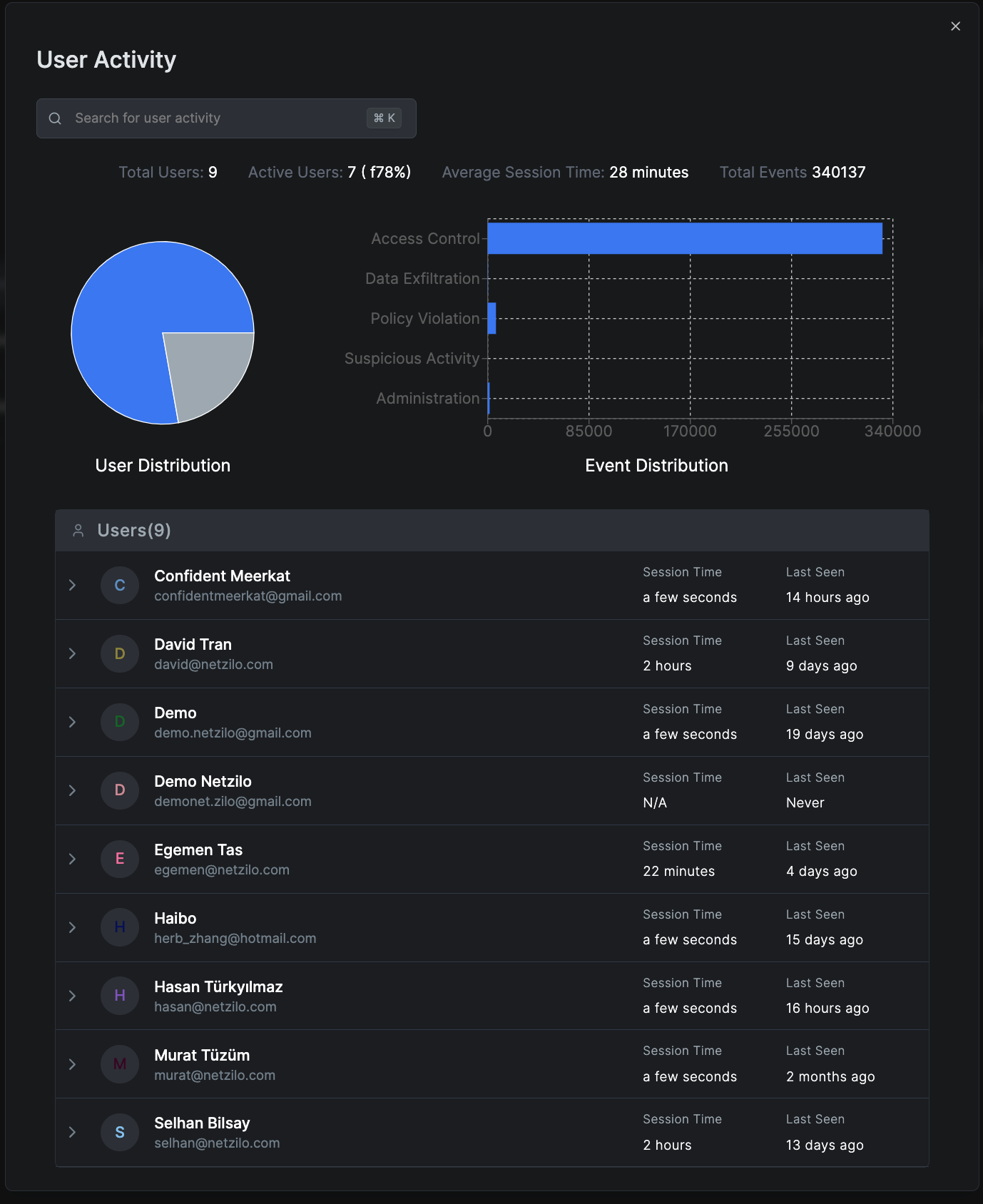
The User Activity Report provides in-depth insights into user interactions within Netzilo, helping administrators monitor and analyze user behaviors across the network.
Overview
User Activity Reports track and analyze:
- User Distribution: Shows active versus inactive users
- Event Distribution: Highlights the types of events, such as Access Control, Data Exfiltration, Policy Violations, Suspicious Activity, and Administration actions
- Average Session Time: Indicates how long users typically stay active
- Total Events: Counts all user-generated events
Creating a User Activity Report
To generate a new User Activity report:
- Navigate to Activity > Reports
- Click Create Report
- Select User Activity as the Report Type
- Choose a Date Range for the report
- Select the Groups to include or choose "All Groups"
- Click Save to generate the report
Detailed User Analysis
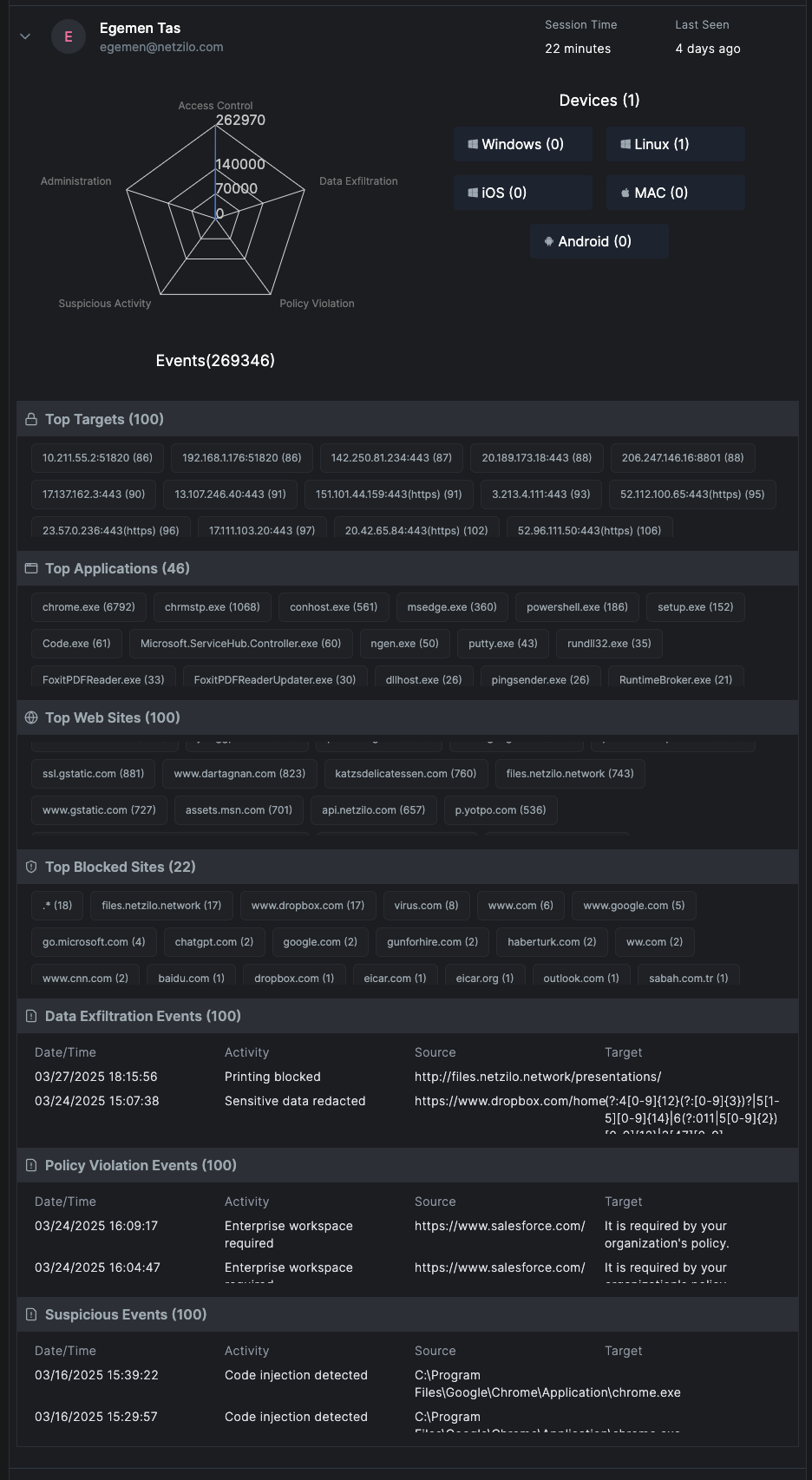
By clicking on a specific user in the report, you'll see comprehensive details about their activities:
Event Radar
Visualizes event types and frequencies, providing a quick overview of the user's activity patterns.
Device Information
- Device Types: Lists operating systems used by the user
- Connection Methods: Shows how the user connects to the network
Network Activity
- Top Targets: Most accessed network targets
- Top Applications: Most frequently used applications
- Top Websites: Frequently visited websites
- Top Blocked Sites: Websites that have been blocked
Security Events
- Data Exfiltration Events: Details of prevented data leaks
- Policy Violation Events: Instances where policy compliance was enforced
- Suspicious Events: Alerts for potentially harmful activities
Key Metrics and Insights
Event Distribution Analysis
The report categorizes events into:
- Access Control Events: Login attempts, permission changes, access grants/denials
- Data Exfiltration: Attempts to transfer sensitive data outside the organization
- Policy Violations: Breaches of organizational security policies
- Suspicious Activity: Anomalous behavior patterns that may indicate security threats
- Administration Actions: Administrative changes and system configurations
User Behavior Patterns
- Peak activity hours
- Resource utilization trends
- Collaboration patterns
- Application usage frequency
Practical Use Cases
Security Monitoring
- Identify unusual user behavior patterns
- Detect potential insider threats
- Track data access and movement
- Monitor policy compliance
Performance Analysis
- Measure user productivity
- Identify resource bottlenecks
- Optimize application deployment
- Plan capacity requirements
Compliance and Audit
- Generate compliance reports for regulatory requirements
- Maintain audit trails for user activities
- Document access patterns for security reviews
- Track privileged user actions
Report Management
Viewing Reports
- Access existing reports from the Reports dashboard
- Filter reports by date, type, or user groups
- Search for specific users or events
Downloading Reports
- Export reports in various formats (PDF, CSV, Excel)
- Schedule automated report generation
- Share reports with stakeholders
Report Retention
- Configure report retention policies
- Archive historical reports
- Delete outdated or unnecessary reports
Best Practices
- Regular Review: Schedule weekly or monthly reviews of user activity reports
- Baseline Establishment: Create baseline activity patterns for normal user behavior
- Alert Configuration: Set up alerts for suspicious or high-risk activities
- Data Privacy: Ensure user activity monitoring complies with privacy regulations
- Documentation: Maintain records of significant findings and actions taken
User Activity Reports contain sensitive information about user behaviors. Access to these reports should be restricted to authorized administrators and security personnel only.
Related Reports
- Authentication Activity Report - Detailed login and authentication analysis
- Events Monitoring - Real-time event tracking
- Security Dashboard - Overview of security metrics
Next Steps
- Configure alert thresholds for suspicious activities
- Set up automated report generation schedules
- Integrate with SIEM systems for enhanced monitoring
- Review and update monitoring policies