

DNS
Netzilo gives every peer a name, so users reach machines by name instead of by address, for
example my-server.netzilo.network. It also pushes DNS servers to peers: a resolver for all
queries, and resolvers for internal domains only (split DNS).
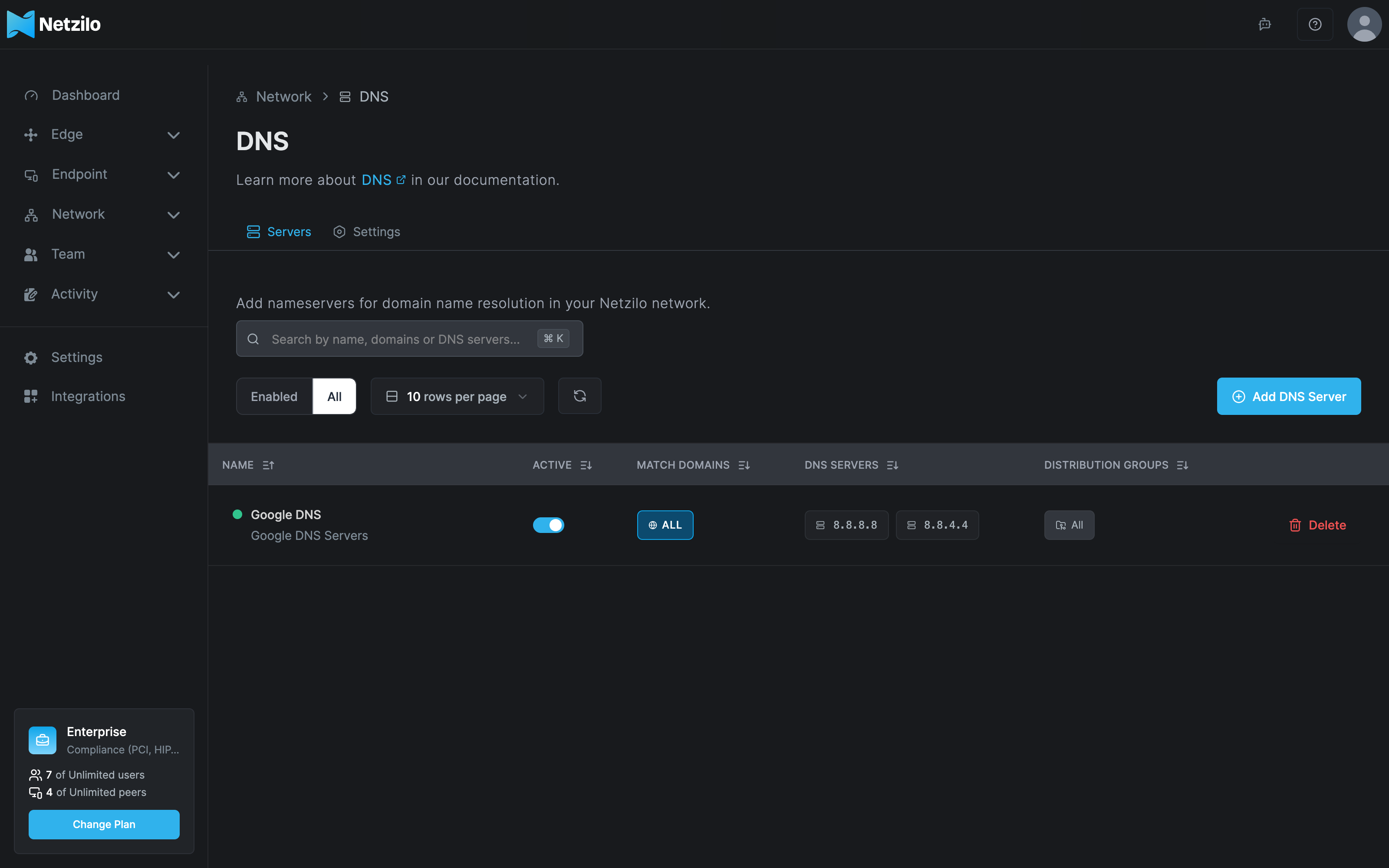
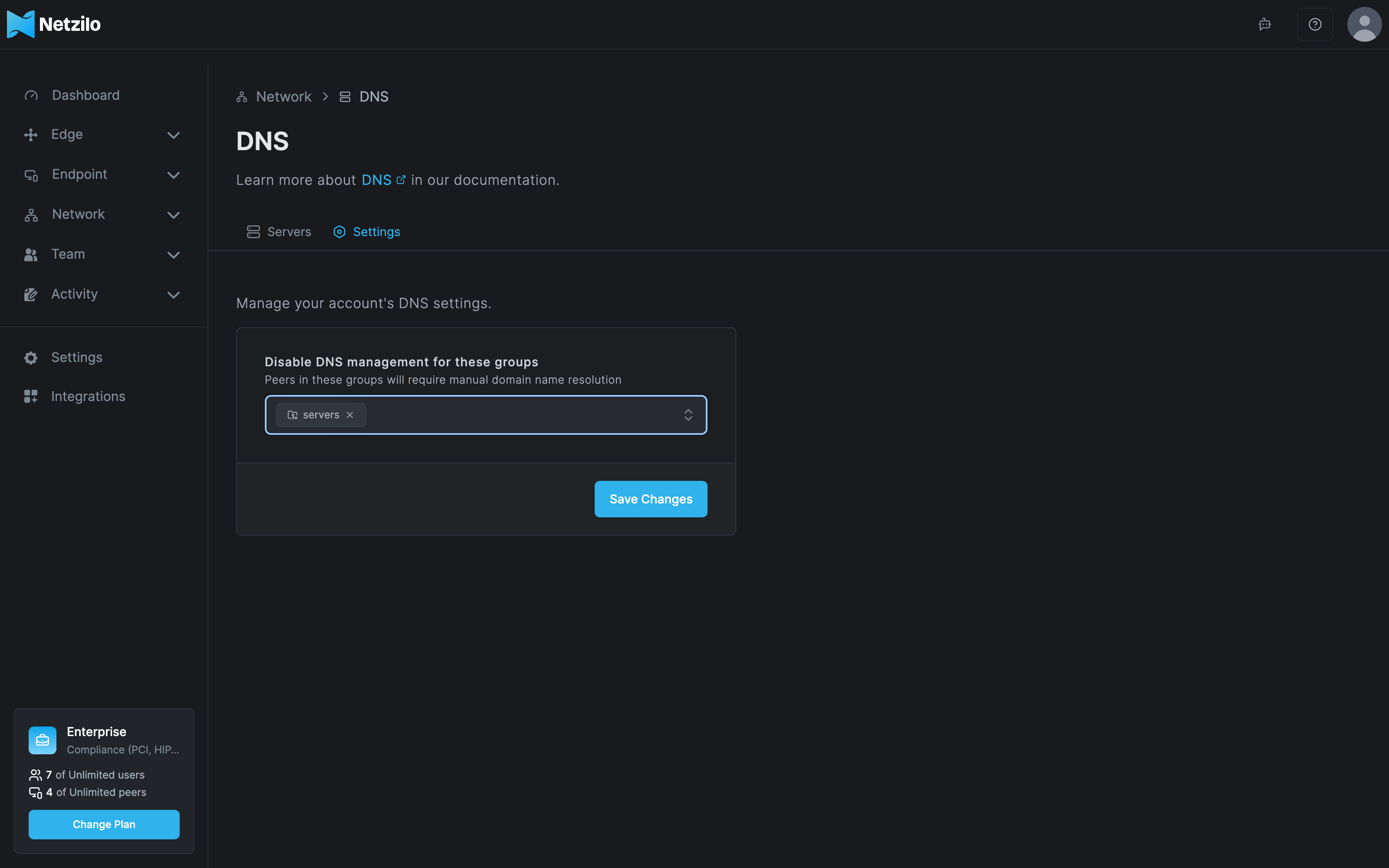
You manage DNS under Network > DNS. The page has two tabs: Servers, the DNS servers you push to peers, and Settings, the groups whose DNS Netzilo leaves alone.
How it works
- Peer names. Every peer has a DNS label under the network domain:
netzilo.networkon Netzilo Cloud, or the domain chosen when a self-hosted server was installed. Peer addresses are in the range100.64.0.0/10, for example100.111.25.203. - Local resolver. The Netzilo client runs a small resolver on each device. It answers peer names itself and forwards other queries to the DNS servers you configure.
- DNS server. A DNS server entry holds up to three upstream servers (IP address and port),
the Distribution Groups that receive it, and optionally Match Domains.
- Without match domains the entry is the peers' primary resolver for every name that is not a Netzilo name. The table shows ALL under Match Domains.
- With match domains only those domains go to these servers: split DNS.
- Where split DNS works. macOS, Windows 10 and later, and Linux with systemd-resolved or
NetworkManager. Linux hosts where the client edits
/etc/resolv.confdirectly, or uses resolvconf, cannot route single domains, and without a primary DNS server they get no Netzilo DNS at all, not even peer names. - Failing upstreams. Each upstream server gets 15 seconds to answer. After 5 failed queries in a row the entry is switched off temporarily: its domains are removed from the device and the device's other resolvers answer, until the upstreams respond again.
- Private DNS servers in a routed network need a route to them and a policy that allows DNS traffic to the routing peer.
Add one DNS server without match domains for the group All, for example Cloudflare or your
company resolver. Without it, some devices have no working resolver for Netzilo names.
Add a DNS server
Go to Network > DNS, stay on the Servers tab and click Add DNS Server.
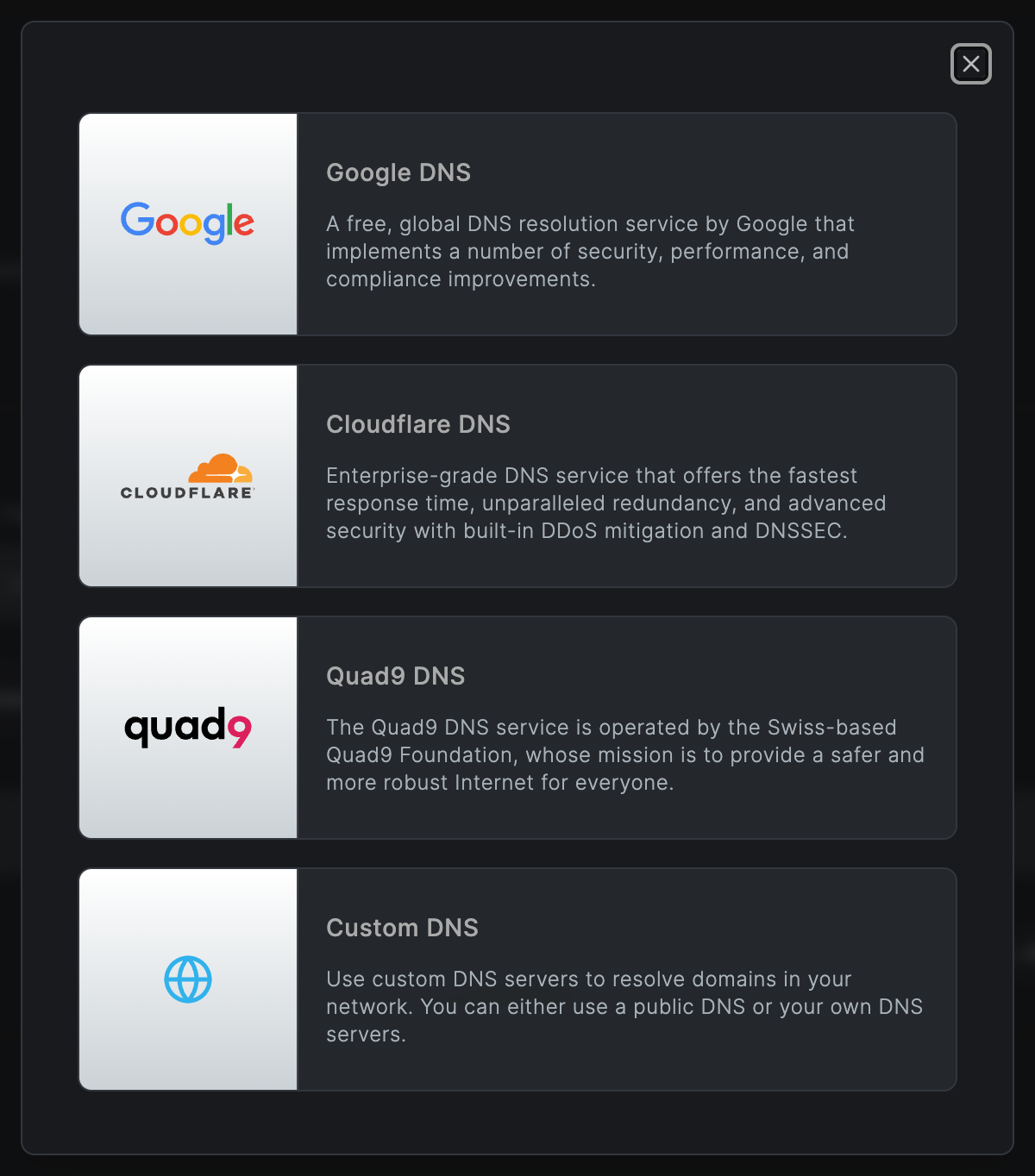
Choose a template: Google DNS, Cloudflare DNS and Quad9 DNS fill in the public servers; Custom DNS starts empty for your own servers.
The Add DNS Server dialog has three tabs: DNS Server, Domains and Name & Description.
DNS Server tab
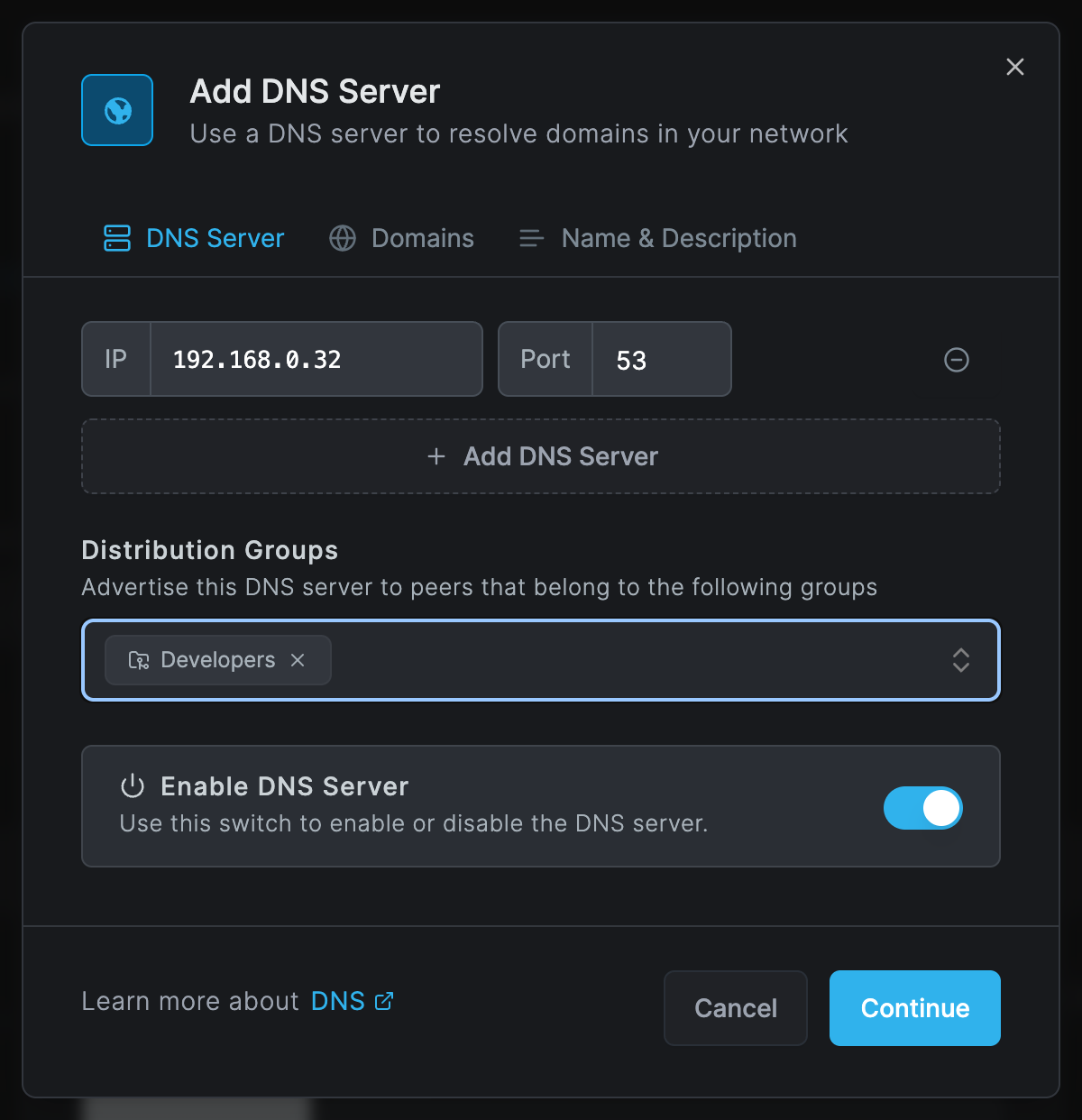
| Field | What to enter |
|---|---|
| IP and Port | The upstream server's IP address and port, 53 by default. Click Add DNS Server for another upstream, up to three. |
| Distribution Groups | The peers that receive this DNS server. At least one group. |
| Enable DNS Server | Off keeps the entry but pushes it to nobody. |
Domains tab
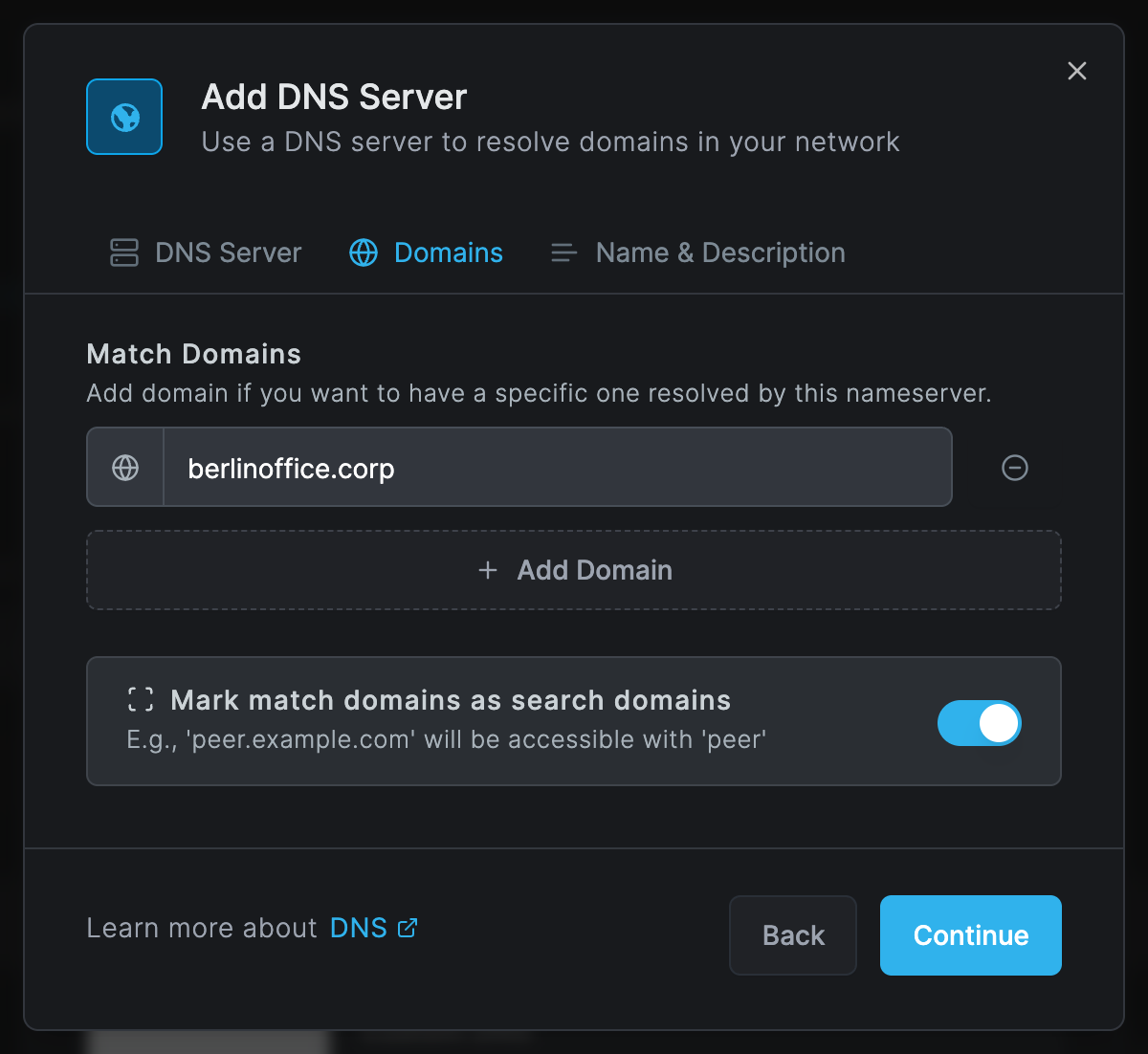
| Field | What to enter |
|---|---|
| Match Domains | Leave empty for a primary DNS server. Click Add Domain for each domain this server should answer, for example berlinoffice.corp. |
| Mark match domains as search domains | On: users can type short names. With berlinoffice.corp as search domain, ping host-a looks up host-a.berlinoffice.corp. Available only with match domains. |
Name & Description tab
Enter a DNS Name of up to 40 characters, for example Office resolver, and an optional
description. Click Add Nameserver to save.
Use a DNS server in a private network
To push a resolver that lives behind a routing peer, for example 192.168.0.32 in the Berlin
office:
- Make sure a route covers the resolver's address, for example the office network
192.168.0.0/24, and is distributed to the users' group. See Routes. - Add a policy from the users' group to the routing peer's group that allows UDP and TCP port 53. See Policies.
- Add a Custom DNS server with
192.168.0.32, the users' group as distribution group, andberlinoffice.corpas match domain.
Exclude groups from DNS management
On the Settings tab, Disable DNS management for these groups lists groups whose peers keep their own DNS configuration: Netzilo pushes no DNS servers to them and they cannot resolve peer names. Use it for servers whose resolver configuration you manage yourself. Click Save Changes.
Exit-node users
Peers that send their internet traffic through an exit node need a DNS server without match domains for the same group. Otherwise their queries go to the local resolver, which may be unreachable and reveals their location. See Exit nodes.
Peer names
A peer's DNS label comes from its name: lowercase, with characters that are not valid in a name
converted. When two peers would get the same label, the second gets a number, for example
laptop-1. To change a label, rename the peer under Endpoint > Peers: click the pencil next
to the name; the dialog shows the resulting label.
Check DNS on a device
netzilo status shows Nameservers: n/m Available: how many of the pushed DNS servers answer.
Tools like nslookup and dig do not always use the same resolvers as the operating system. Use
the system's own tools:
| System | Command |
|---|---|
| macOS | dscacheutil -q host -a name peer-a.netzilo.network |
| Windows (PowerShell) | Resolve-DnsName peer-a.netzilo.network; split-DNS rules: Get-DnsClientNrptPolicy |
| Linux with systemd-resolved | resolvectl query peer-a.netzilo.network |
| Other Linux | dig peer-a.netzilo.network |
Troubleshooting
Nameservers: 0/1 Available on a peer. The upstream server cannot be reached through the
tunnel or is down. For a private resolver, check the route and the policy for port 53.
Peer names do not resolve. The peer is in a group under Settings, the operating system's DNS integration failed, or the peer is a Linux host without systemd-resolved or NetworkManager and has no primary DNS server. Add a DNS server without match domains for its groups.
The client log says unable to configure DNS for this peer using file manager without a nameserver group with all domains configured. The Linux host cannot do split DNS and only
received DNS servers with match domains. Add a primary DNS server for its groups, or switch the
host to systemd-resolved or NetworkManager.
Internal names resolve to public addresses. The DNS server is missing the domain, the device cannot do split DNS, or the entry was switched off temporarily after its upstreams timed out.
Lookups take 15 to 45 seconds or fail now and then. The upstreams time out. Make them reachable through the tunnel, or replace them.
Only some peers resolve internal names. Their groups are not in the DNS server's distribution groups.
A search domain is ignored. Mark match domains as search domains is off, or the entry has no match domains.
Save fails with Name should be less than 40 characters or Please enter a valid IP. Shorten the DNS name, or correct the address.
Related Documentation
- Routes - Reach private DNS servers
- Policies - Allow DNS traffic to routing peers
- Exit nodes - DNS for exit-node users
- Peers - Rename peers
- Groups - Where each group is used