

Routing Rules
A routing rule sends matching requests through the Netzilo AI Gateway to a provider or model other than the one the caller asked for. A rule matches requests by model, provider, header, query parameter or request type, spreads them over one or more targets by weight, and tries fallbacks in order when the targets fail.
Use routing rules to:
- Cut cost. Send simple chat traffic to a cheaper model, or part of it to a model you host yourself.
- Keep data where it belongs. Send requests marked as EU data to a deployment in the EU.
- Stay up. Fall back to another provider when one fails, is overloaded, or is slow to start answering.
- Move coding agents. Run a coding agent such as Claude Code on another model without touching any developer's machine.
You manage routing rules under Edge > Governance > Routing Rules. Only administrators and owners see this page.
Routing rules apply only to gateway filters. A rule does nothing until a gateway filter carries it, and then it applies only to the users that filter targets. Endpoint filters and Browser filters have no routing rules.
How it works
- You define a rule: the requests it matches (Conditions), where they go (Targets), what to try when the targets fail (Fallbacks), and its Priority.
- You add the rule to one or more gateway filters on their Routing tab.
- For each request, the AI Gateway takes the enabled rules that the user's gateway filters carry and evaluates them from the lowest Priority number up. The first rule that matches routes the request.
- The request goes to one of the rule's targets, chosen by weight. When that target fails, for example with an error such as 500, 503 or 429, or when a streamed answer does not start within the target's First token timeout, the gateway tries the fallbacks in order.
- The gateway records the call with the rule that routed it.
The rules to keep in mind:
- Gateway filters only. A rule nobody carries is never evaluated. A disabled rule, or a rule carried only by disabled filters, is not applied.
- Several filters. A user in several gateway filters gets every rule those filters carry, evaluated together by priority. A rule matches only users of the filters that carry it. A caller cannot claim another filter's rules: the gateway decides which filters apply.
- First match wins. Equal priorities are evaluated oldest rule first. Only a rule with Chain Rule on lets the rules be evaluated again, see Targets.
- Filters must grant the targets. Every filter that carries a rule must grant every target and fallback of that rule, see The grants a rule needs.
- Guardrails win. When a guardrail sends a request to another model, routing rules and their fallbacks do not apply to that request.
- About a minute. Changes to rules and filters reach the AI Gateways within about a minute. A gateway that restarts keeps applying the rules.
- No conditions, every request. A rule without conditions applies to every request of the filter's users.
The Routing Rules list
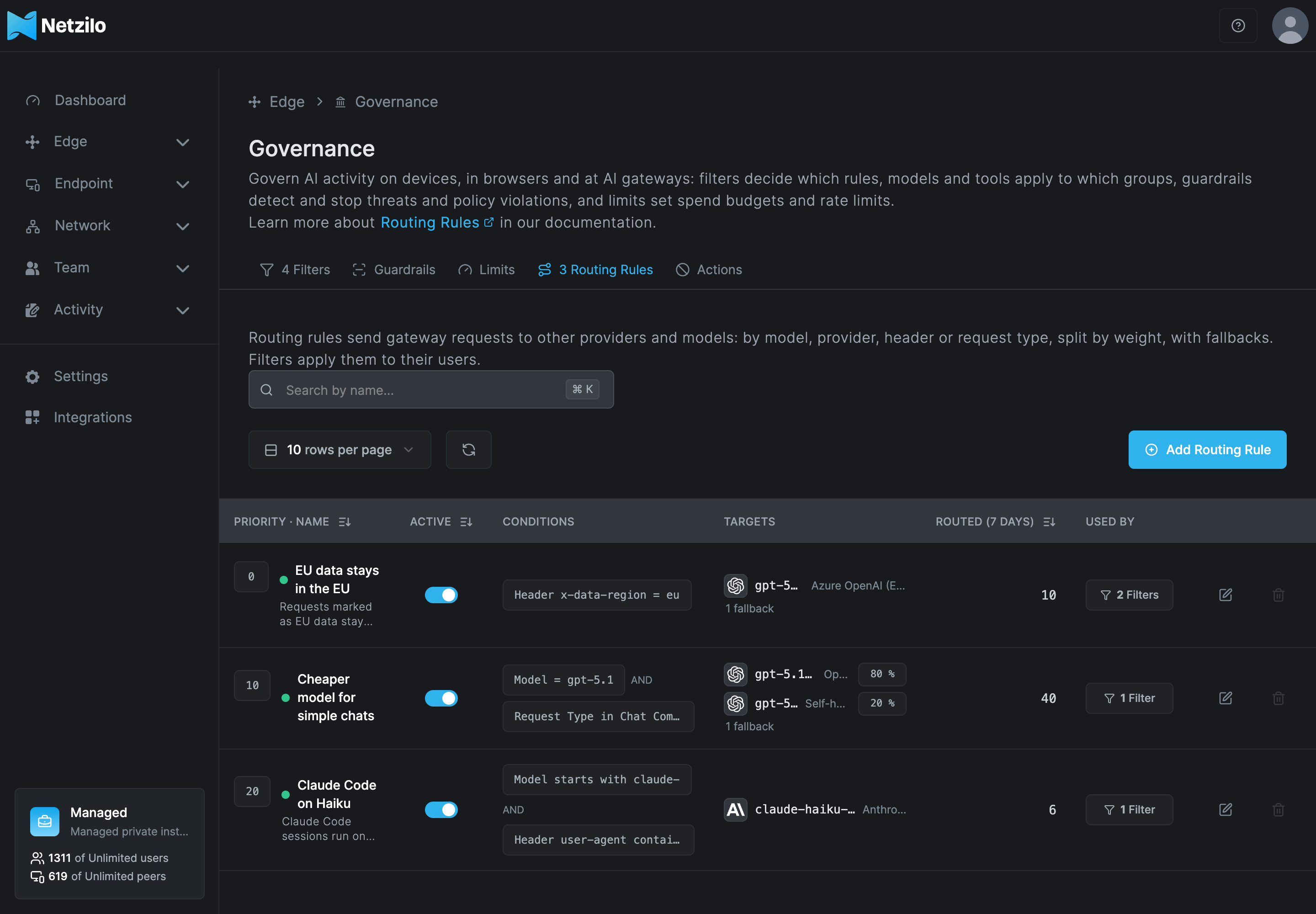
| Column | What it shows |
|---|---|
| Priority · Name | The rule's priority, name and description. Lower numbers are evaluated first. |
| Active | Whether the rule is enabled. Turn the switch off to stop a rule without deleting it. |
| Conditions | The conditions in short form, for example Header x-data-region = eu, or All requests for a rule without conditions. |
| Targets | The target models with their providers and weights, and the number of fallbacks. |
| Routed (7 days) | How many requests the rule routed in the last seven days. |
| Used By | The filters that carry the rule, or No filters. |
Search with Search by name.... The edit button on a row opens the rule; the delete button deletes it, see Delete a routing rule.
Add a routing rule
Click Add Routing Rule. The dialog Create Routing Rule opens with the tabs Conditions, Targets, Fallbacks and Name. Continue walks through them in that order; on the Name tab, click Add Routing Rule to save. When you edit a rule, the button is Save Changes.
Conditions
Conditions decide which requests the rule applies to. Choose Builder to put them together from fields, or CEL to write the expression yourself. The Enable Rule switch at the bottom turns the rule on or off; matching requests are routed only while it is on.
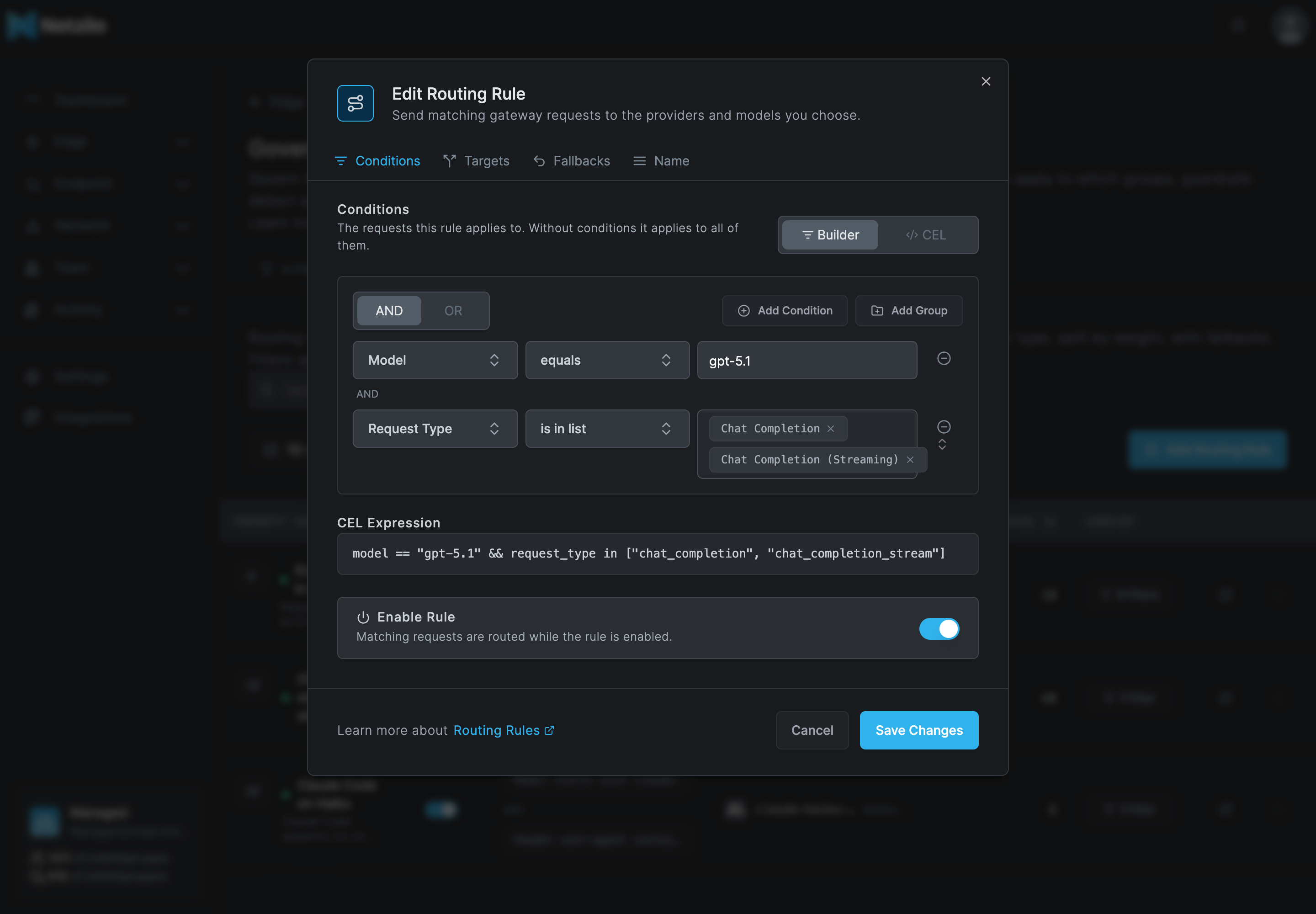
In the builder, a group joins its conditions with AND (all must match) or OR (any may match). Add Condition adds a condition to the group, Add Group adds a nested group. Groups nest at most 3 levels deep, and a rule has at most 50 conditions. The CEL the builder produces is shown under CEL Expression.
| Field | Operators | Value |
|---|---|---|
| Model | equals, does not equal, is in list, is not in list, contains, begins with, ends with, matches (regex) | A model name, typed or picked from your providers' catalogues, for example gpt-5.1. |
| Provider | equals, does not equal, is in list, is not in list, matches (regex), does not exist, exists | One or more of your providers, picked by name. |
| Request Type | equals, does not equal, is in list, is not in list, matches (regex) | The kind of call, for example Chat Completion, Responses, Text Completion, Embeddings, Image Generation, Speech, Transcription, Count Tokens, Rerank or Video Generation. A streamed call is its own value, for example Chat Completion (Streaming). |
| Header | equals, does not equal, contains, begins with, ends with, matches (regex), does not exist, exists | A header name and a value, for example x-data-region and eu. |
| Query Parameter | the same as Header | A query parameter name and a value. |
- Header and parameter names use lowercase letters, digits, dots, dashes and underscores.
Names starting with
x-netzilo-orx-bf-are reserved. - Values are case-sensitive:
eudoes not matchEU. - Regular expressions do not support lookarounds or backreferences.
- A list holds at most 100 values.
The dialog marks an incomplete or invalid condition where it is and does not save, or switch to CEL, until you fix it.
CEL
In CEL mode you write the condition as a CEL expression, for example to match Claude Code by its user agent:
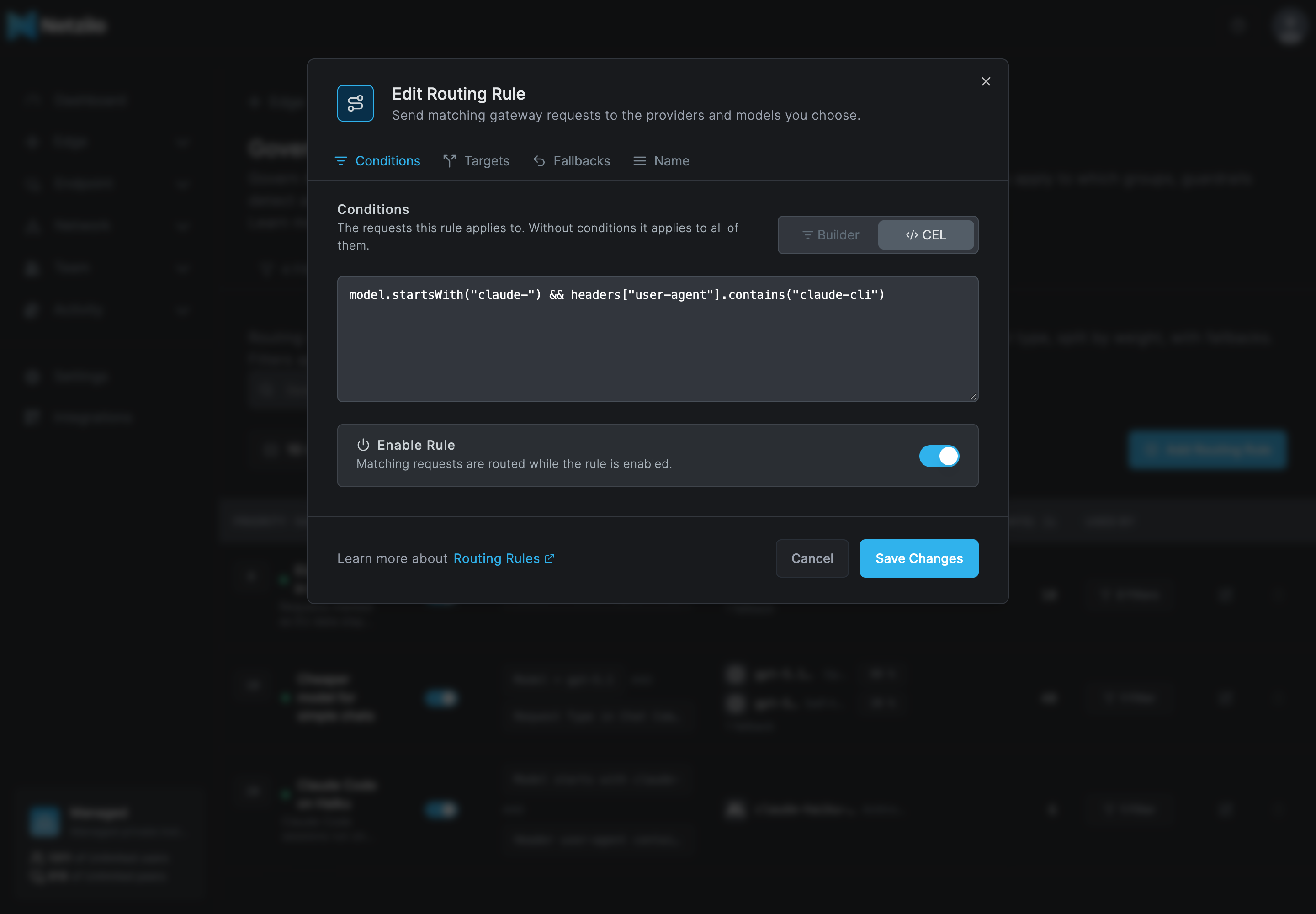
The expression can use these variables:
| Variable | What it holds |
|---|---|
model | The model the request asks for. |
provider | The provider the request asks for. |
request_type | The kind of call, for example chat_completion or chat_completion_stream. |
headers | The request headers, by lowercase name. |
params | The query parameters. |
Read a header by a fixed name, such as headers["x-team"] == "data" or "x-team" in headers.
An expression is at most 4096 characters. The server refuses:
- headers whose names start with
x-netzilo-orx-bf-; complexity_tier: complexity-based routing is not available yet;- identity variables such as
user_idand those starting withteam_,virtual_key_orcustomer_: the filters that carry a rule decide whom it applies to; - usage percentages such as
budget_used,tokens_usedandrequest.
Switching from CEL back to Builder replaces the expression with the builder's conditions; the dialog asks first.
Targets
Targets are where matching requests go. A rule has 1 to 10 targets, and requests are spread over them by weight.
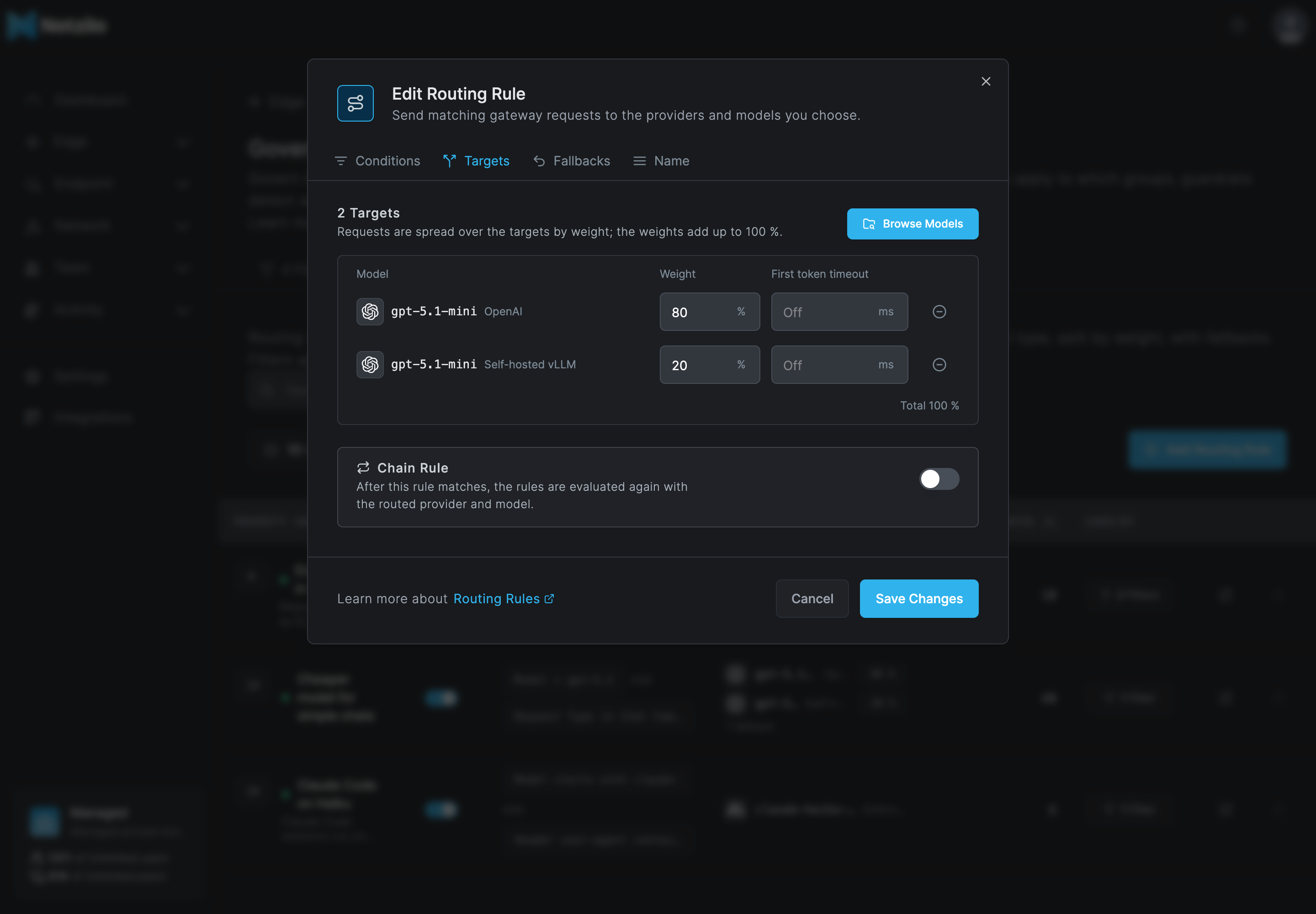
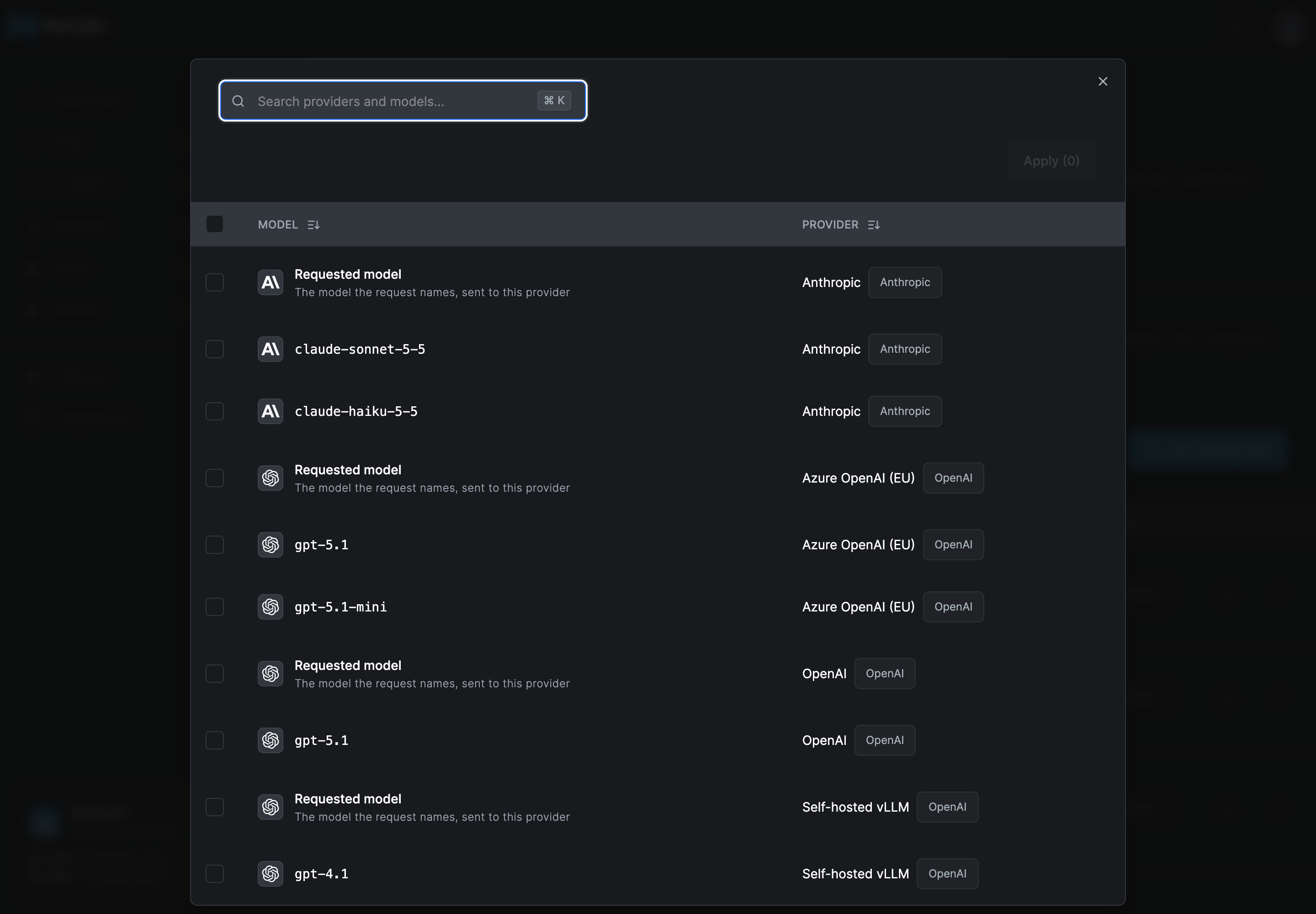
Click Browse Models and pick one or more models. The picker lists the enabled models of your enabled providers, and a Requested model row for each provider: the model the request names, sent to that provider. Use Requested model to move traffic to another provider without changing the model, for example to an EU deployment that serves the same models.
| Column | What to enter |
|---|---|
| Model | The target model and its provider. |
| Weight | The share of the traffic, as a whole percent. The weights of all targets add up to 100 %. Targets you add are split evenly; adjust them as you need. |
| First token timeout | For streamed requests, in milliseconds, at most 300000. When no first token arrives in this time, the request moves on to the fallbacks. Empty or 0 is Off. |
Chain Rule: when it is on and this rule matches, the rules are evaluated again with the routed provider and model, so a second rule can refine the result. When it is off, this rule's routing is final. A rule with Chain Rule on is marked in the list.
Fallbacks
Fallbacks are tried in order when the targets fail, for example with an error such as 500, 503 or 429, or a first token timeout. A rule has 0 to 10 fallbacks.
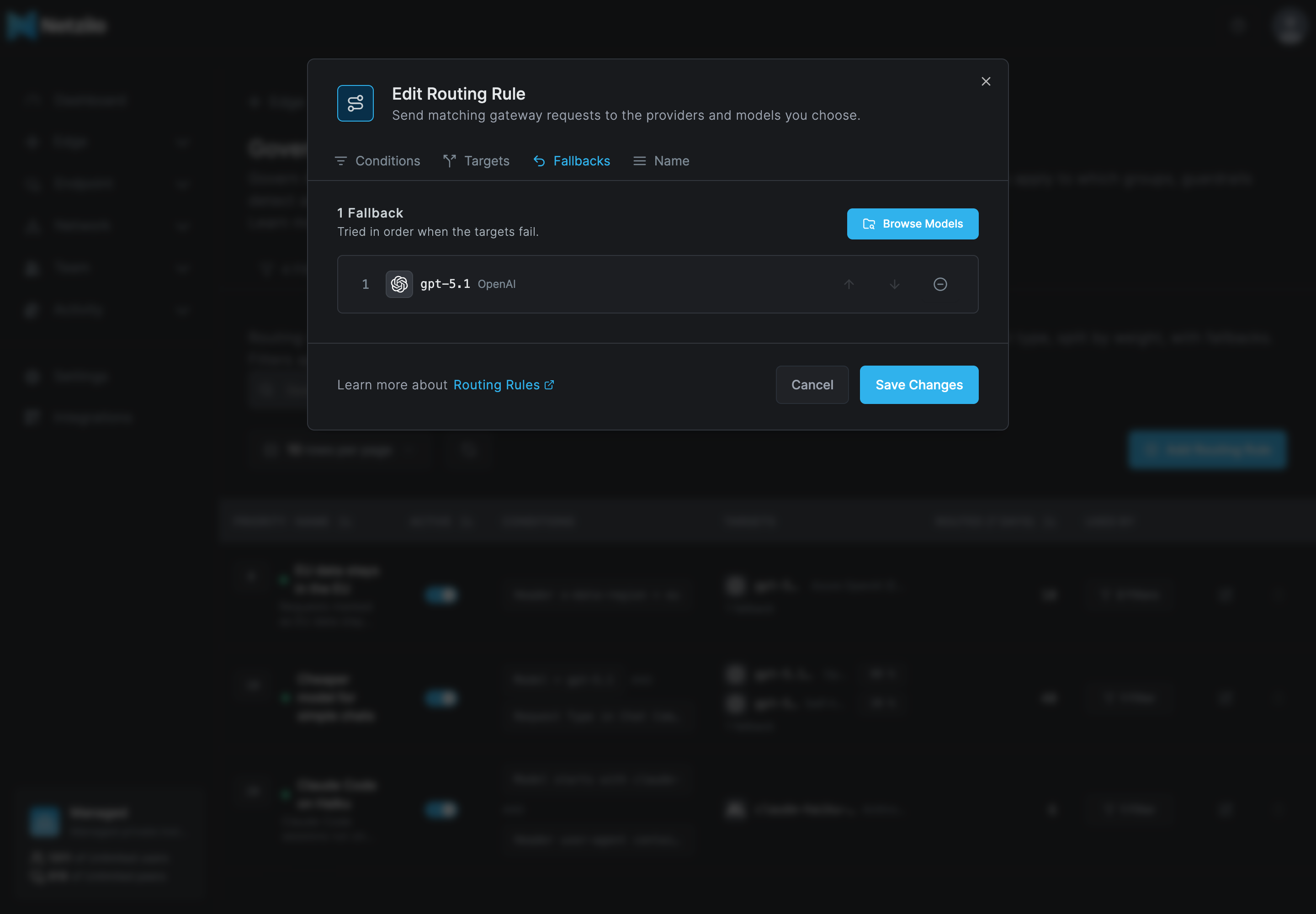
Click Browse Models to add fallbacks, and use the arrows to put them in order. A fallback names a model: Requested model cannot be a fallback.
Name
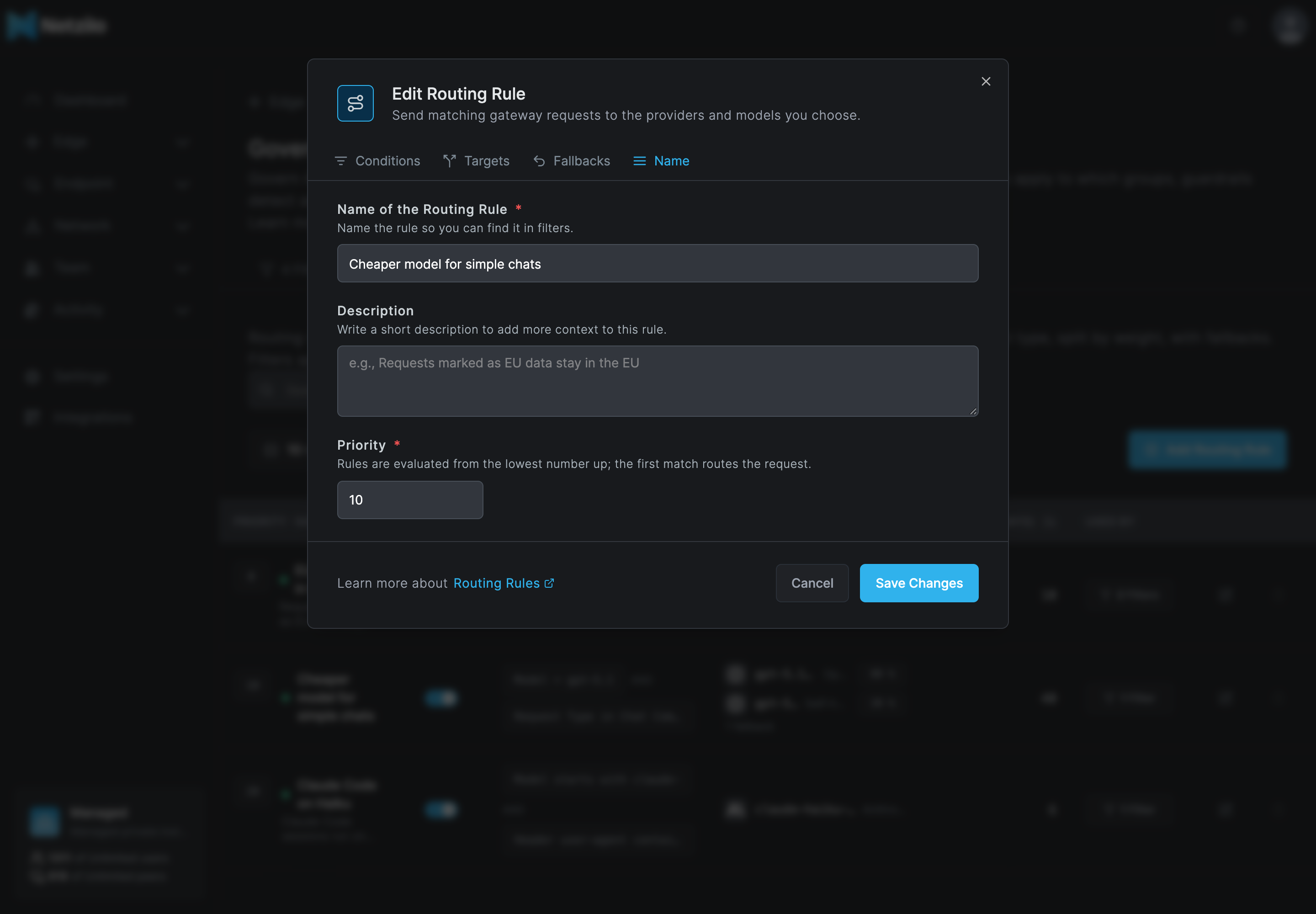
| Field | What to enter |
|---|---|
| Name of the Routing Rule | Required. Name the rule so you can find it in filters, for example Keep EU requests in Azure EU. |
| Description | Optional. |
| Priority | Required, from 0 to 9999. Rules are evaluated from the lowest number up; the first match routes the request. Leave gaps, such as 0, 10, 20, so that you can add rules in between later. |
Click Add Routing Rule. Creating, updating and deleting a rule are recorded in Activity > Events.
Apply the rule to a filter
- Go to Edge > Governance > Filters and open the gateway filter for the users whose requests you want to route.
- On the Routing tab, click Browse Routing Rules and pick the rules, or Add Routing Rule to create one from there.
- Save the filter.
See Filters.
The grants a rule needs
A filter's users may only be routed to models the filter grants them. So the server checks, when you save a rule or a filter, that every filter carrying the rule grants every target and every fallback of the rule on its Models tab:
- A target or fallback with a model needs that model granted from that provider, or All models of the provider.
- A Requested model target needs All models of its provider, since the caller can ask for any model.
If a grant is missing, the save is refused with a message naming the filter, the model and the rule. The same check stops you from removing a grant from a filter while one of its rules needs it. Targets and fallbacks must also be enabled models of enabled providers.
What a rule in use protects
While a rule uses a model or a provider, the server refuses changes that would break it:
- removing the model from its provider's catalogue, or disabling the model;
- deleting the provider;
- deleting the rule while a filter carries it (the delete button is disabled; remove the rule from those filters first).
Disabling a whole provider is allowed, as an off-switch in an incident. The rules that use it then stop applying within about a minute: matching requests go to the model the caller asked for, and nothing fails. Enable the provider again and the rules apply again.
See what a rule routed
- Routed (7 days) on the list counts the requests each rule routed in the last seven days.
- In an AI session, a model call's Source tab shows Model (the model that answered), Asked for (the model the caller named) and Routed by (the rule's name, or A deleted routing rule), next to Provider. See AI Sessions.
- Activity > Events records Routing rule created, Routing rule updated and Routing rule deleted, with the administrator who made the change.
Examples
The three rules in the screenshots above, carried by the same gateway filter:
EU data stays in the EU (priority 0). Requests whose callers mark them with the header
x-data-region: eu go to gpt-5.1 on the Azure OpenAI provider deployed in the EU, with one
fallback. The filter grants gpt-5.1 of that provider and the fallback model.
| Tab | Setting |
|---|---|
| Conditions | Header x-data-region equals eu |
| Targets | gpt-5.1, Azure OpenAI (EU), weight 100 % |
| Fallbacks | one model, granted by the filter |
Cheaper model for simple chats (priority 10). Chat calls that ask for gpt-5.1 go to
gpt-5.1-mini: 80 % to OpenAI and 20 % to a self-hosted vLLM server, with gpt-5.1 on OpenAI
as the fallback when both fail.
| Tab | Setting |
|---|---|
| Conditions | Model equals gpt-5.1 AND Request Type is in list Chat Completion, Chat Completion (Streaming) |
| Targets | gpt-5.1-mini, OpenAI, 80 %; gpt-5.1-mini, Self-hosted vLLM, 20 % |
| Fallbacks | gpt-5.1, OpenAI |
Claude Code on Haiku (priority 20). Claude Code sessions run on claude-haiku-5-5
whatever Claude model they ask for. Claude Code names itself claude-cli in its user agent.
| Tab | Setting |
|---|---|
| Conditions | Model begins with claude- AND Header user-agent contains claude-cli, or in CEL: model.startsWith("claude-") && headers["user-agent"].contains("claude-cli") |
| Targets | claude-haiku-5-5, Anthropic, 100 % |
A request for gpt-5.1 with x-data-region: eu matches the first rule and goes to the EU
deployment; the second rule is never reached for it.
To send traffic to a model in your own network, add a provider for your vLLM, Ollama or SGLang server under Providers and pick its models as targets.
Use the API
Routing rules are part of the public API. Use an administrator's personal access token.
| Method and path | What it does |
|---|---|
GET /api/edge/routing-rules | Lists the rules. |
POST /api/edge/routing-rules | Creates a rule. |
GET /api/edge/routing-rules/{ruleId} | Reads a rule. |
PUT /api/edge/routing-rules/{ruleId} | Replaces a rule. |
DELETE /api/edge/routing-rules/{ruleId} | Deletes a rule that no filter carries. |
GET /api/edge/routing-rules/stats?days=7 | Requests routed per rule over the last 1 to 90 days, as [{"rule_id": "…", "requests": 10}]. |
A provider has two identifiers in GET /api/edge/providers, and each field takes one of them:
| Identifier | Looks like | Used in |
|---|---|---|
slug (the ID in the provider dialog) | anthropic-production | a Provider condition's value, provider == "…" in CEL, and the model name clients send (<slug>/<model>) |
id | db4scbta5gic73bpm1p0 | targets[].provider_id, fallbacks (<id>/<model>) and the filter's model grants |
A Provider condition written with the id is refused with no provider is named "…"; a target or
fallback written with the slug is refused with provider … does not exist.
Create a rule. provider_id is the provider's id from GET /api/edge/providers; a fallback
is <provider id>/<model>. A model of "" in a target is Requested model. Omitting
enabled creates the rule disabled.
curl -X POST -H "Authorization: Token $NZ_TOKEN" -H 'Content-Type: application/json' \
  https://<api-host>/api/edge/routing-rules -d '{
    "name": "EU data stays in the EU",
    "enabled": true,
    "priority": 0,
    "chain_rule": false,
    "condition_mode": "builder",
    "condition": {"id": "root", "combinator": "and", "rules": [
      {"id": "c1", "field": "headers", "operator": "=", "key": "x-data-region", "value": "eu"}]},
    "targets": [{"provider_id": "<azure-eu-provider-id>", "model": "gpt-5.1", "weight": 100, "ttft_timeout_ms": 4000}],
    "fallbacks": ["<openai-provider-id>/gpt-5.1"]
  }'
For a CEL rule, send "condition_mode": "cel" and the expression in cel_expression
instead of condition.
Attach rules to a gateway filter with its routing_rules field, a list of rule ids, in
PUT /api/edge/filters/{filterId}. Leaving the field out keeps the filter's rules.
{ "routing_rules": ["<rule-id>"] }
Send the filter's other fields as you read them from GET /api/edge/filters/{filterId}.
| Status | Meaning |
|---|---|
| 422 | The rule is invalid: a missing or disabled target, weights that do not add up to 100, a refused CEL variable, or a filter that does not grant a target or fallback. The message says which. |
| 412 | The change would break a rule in use: deleting a rule a filter carries (the message names the filters), or removing or disabling a model, or deleting a provider, that a rule uses (the message names the rule). Also returned when the account already has 200 rules. |
Delete a routing rule
A rule cannot be deleted while a filter carries it: the delete button is disabled and its tooltip says how many filters use it. Remove the rule from those filters first. Once deleted, the requests it routed go to the model they ask for. This cannot be undone.
Troubleshooting
To check a rule, send a test request as a user of the filter, matching the rule's conditions, then open the session under AI Sessions and look at the model call's Source tab: Routed by names the rule, Asked for the model the request named, and Model and Provider where it went. No Routed by means no rule routed the call.
| Symptom | Cause and fix |
|---|---|
| The rule never routes anything; Used By says No filters | No gateway filter carries it. Add it on the filter's Routing tab. |
| The rule never routes for some users | Those users are in none of the groups of the filters that carry the rule. Check the filters' Targets. |
| The rule stopped routing | The rule or its filter was disabled (the Active switch), or a provider it uses was disabled. Matching requests then go to the model the caller asked for. Turn them on again. |
| Another rule routed the request | A rule with a lower Priority number matched first. Give the rule a lower number, or narrow the other rule's conditions. |
| The rule matches nothing | A condition does not fit the requests: header values are case-sensitive, the request type of a streamed call is the (Streaming) value, and the model name is the one the caller sends. Compare with Asked for in the session. |
| The change has no effect yet | Changes reach the gateways within about a minute. Send the request again after a minute. |
| The rule or filter does not save, naming a filter and a model | That filter does not grant a target or fallback of the rule. Grant the model, or All models of the provider for a Requested model target, on the filter's Models tab. |
| A model cannot be removed or disabled, or a provider cannot be deleted | A routing rule uses it. Change or delete the rule first. |
| Requests fail instead of falling back | The rule has no fallbacks, or the fallbacks failed too. Add fallbacks on another provider. A request a guardrail or a missing grant refuses is never retried on a fallback. |
Not available yet
- Complexity-based routing, which sends a request to a model by how hard the request is.
- Adaptive routing, which shifts traffic by the providers' observed performance.
Related Documentation
- Filters - carry routing rules to the users of a group
- Providers - the providers and models rules route to
- Limits - cap spend, tokens and requests per user
- Guardrails - guardrail routes take precedence over routing rules
- AI Gateway - the gateway that applies the rules
- AI Sessions - see which rule routed a call
- Events - routing rule changes in the activity log